
Mazda 3 Service Manual: Clock Switch Inspection
NOTE:
-
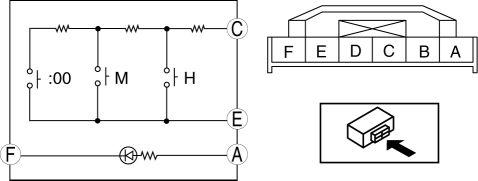
Clock switch built with the hazard warning switch.
1. Disconnect the negative battery cable..
2. Remove the clock switch..
3. Verify resistance between the clock switch terminals.
-
If the resistance is not as specified, replace the clock switch.
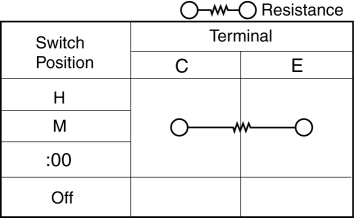
Between the terminal C—E resistance
|
Switch position |
Resistance (ohm) |
|
H |
48.45—53.55 |
|
M |
86.45—95.55 |
|
:00 |
142.5—157.5 |
4. Connect the positive battery to the clock switch terminal A, the negative battery to the clock switch terminal F.
5. Verify the LED illuminates.
-
If there is any malfunction, replace the clock switch.
 Clock Spring Removal/Installation
1. Disconnect the negative battery cable..
2. Remove the driver-side air bag module..
3. Remove the steering wheel..
4. Remove the column cover.
5. Remove the connectors.
6. Remove the t ...
 Information Display Input/Output Check Mode
NOTE:
In this mode, it is possible to verify the items in the following chart.
Check Code Table
Check code
Check item
Related items
...
Other materials:
Oil Pump Removal/Installation [Skyactiv G 2.0]
WARNING:
Hot engines and engine oil can cause severe burns. Turn off the engine and
wait until it and the engine oil have cooled.
A vehicle that is lifted but not securely supported on safety stands is dangerous.
It can slip or fall, causing death or serious injury. Never work ...
Body And Accessories SST
49 L067 001
Reflector
49 L067 002
Tripod
49 L067 003
Plum-bob
49 L067 006
Plum-bob
—
—
...
Airflow Mode Main Link Removal/Installation
1. Set the air intake mode to FRESH.
2. Set the air mix mode to MAX COLD.
3. Disconnect the negative battery cable..
4. Remove the following parts:
a. Front doors.
b. Front scuff plate.
c. Front side trim.
d. Dashboard under cover.
e. Glove compartment.
f. Upper panel.
g. Shift l ...
