
Mazda 3 Service Manual: Control System Personalization Features Setting Procedure
1. Connect the M-MDS to the DLC-2.
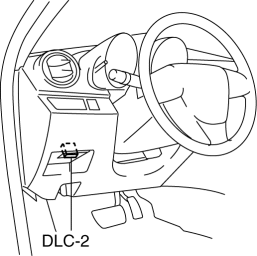
2. After the vehicle is identified, select the following items from the initial screen of the M-MDS.
-
When using the IDS (laptop PC)
-
Select the “Module Programming”.
-
Select the “Programmable Parameters”.
3. Select menu in the “Personality” , “Interior lighting”, “Washer/Wiper”, “Security” or “Power Door Locks”.
4. Select an item name, and then select option. Items of "Personality"
|
M-MDS display |
Function |
Initial setting |
Setting content |
Control unit |
|
2 stage door unlocking (without AKE) |
2-step unlocking system can be set. |
Enabled |
Disabled / Enabled |
BCM |
|
Answer feed back (hazard) |
Answer back hazard can be set to inoperable. |
Enabled |
Enabled / Disabled |
BCM |
|
Answer feed back (horn) |
Answer back horn can be set to inoperable. |
Enabled |
Enabled / Disabled |
BCM |
|
Auto relock timer (without AKE) |
Auto re-lock operation timing can be changed. |
30sec |
30sec / 60sec / 90sec |
BCM |
|
Rear defroster off timer |
Rear defroster off timer operation timing can be changed. |
15min |
15min / 20min / 25min / 30min |
BCM |
|
Room lamp control time (when no transmitter is in the room) |
The elapsed time between the doors closing and the interior light turning off can be adjusted. |
15s |
7.5s / 15s / 30s / 60s |
BCM |
|
Room lamp control time (when the transmitter is in the room) |
The elapsed time between the doors unlocking and the interior light turning off can be adjusted. |
30s |
7.5s / 15s / 30s / 60s |
BCM |
|
Smart turn |
The turn light system function can be set. |
Disabled |
Disabled / Enabled |
BCM |
Items of "Interior lighting"
|
M-MDS display |
Function |
Initial setting |
Setting content |
Control unit |
|
Auto room lamp (when doors unlocked) |
The automatic illumination function of the interior light when the doors are unlocked can be canceled. |
Enabled |
Enabled / Disabled |
BCM |
|
Auto room lamp (when IG-OFF) |
The automatic illumination function of the interior light after the ignition is switched off can be canceled. |
Enabled |
Enabled / Disabled |
BCM |
|
Interactive illumination |
The welcome mode can be set to operable or inoperable. |
Enabled |
Enabled / Disabled |
BCM |
|
Room Lamp Battery Saver Timer |
The elapsed time for the interior light to automatically turn off when a door is ajar can be adjusted. |
30min |
30min / 60min / 10min |
BCM |
|
Room Lamp Battery Saver |
The automatic illumination function of the interior light to automatically turn off can be canceled. |
Enabled |
Enabled / Disabled |
BCM |
Items of "Washer/Wiper"
|
M-MDS display |
Function |
Initial setting |
Setting content |
Control unit |
|
Front wiper interlocked to window washer switch |
The wiper action in conjunction with the windshield washer operation can be canceled. |
Enabled |
Enabled / Disabled |
BCM |
|
Rear wiper interlocked to window washer switch |
The wiper action in conjunction with the rear washer operation can be canceled. |
Enabled |
Enabled / Disabled |
BCM |
|
Auto Wiper Request |
Auto wiper system can be set to operable or inoperable. |
Enabled |
Enabled / Disabled* |
BCM |
* To change to the disable mode, replace the wiper and washer switch (with auto wiper system (AUTO)) with the switch on the vehicle (without auto wiper system (INT).
Items of "Security"
|
M-MDS display |
Function |
Initial setting |
Setting content |
Control unit |
|
Burglar alarm start up method |
Theft-deterrent system start up method can be changed. |
Transmitter and key |
Transmitter and key / Transmitter |
BCM |
Items of "Power Door Locks"
|
M-MDS display |
Function |
Initial setting |
Setting content |
Control unit |
|
Auto door lock control |
Auto lock/unlock function can be changed. |
Type 3 |
Type 1*1 / Type 2*2 / Type 3*3 / Type 4 (for AT only)*4 / Type 5 (for AT only)*5 / Type 6 (for AT only)*6 / Type 7 (for AT only)*7 / Type 8 (for AT only)*8 / Type 9*9 |
BCM |
*1 Disabled.
*2 Locking all doors when vehicle starts.
*3 Locking all doors when vehicle starts. Unlocking all doors when ignition off.
*4 Locking all doors when gear selector is changed (except to P range).
*5 Locking all doors when gear selector is changed (except to P range). Unlocking all doors when gear selector is changed to P range.
*6 Locking all doors when gear selector is changed (except to P range). Unlocking driver-side door when gear selector is changed to P range.
*7 Locking all doors when gear selector is changed (except to P range). Unlocking all doors when ignition off.
*8 Locking all doors when gear selector is changed (except to P range). Unlocking driver-side door when ignition off.
*9 Locking all doors when vehicle start. Unlocking driver-side door when ignition off.
 Clock Spring Inspection [Two Step Deployment Control System]
1. Disconnect the negative battery cable..
2. Remove the driver–side air bag module..
3. Remove the steering wheel..
4. Remove the column cover.
5. Remove the clock spring..
6. Verify that ...
 Driver Side Air Bag Module Removal/Installation [Standard Deployment Control
System]
Driver Side Air Bag Module Removal/Installation [Standard Deployment Control
System]
WARNING:
Handling the air bag module improperly can accidentally deploy the air bag
module, which may seriously injure you. Read the air bag system service warnings
and cautions before h ...
Other materials:
PID/Data Monitor Inspection [Standard Deployment Control System]
1. Connect the M-MDS (IDS) to the DLC-2.
2. After the vehicle is identified, select the following items from the initialization
screen of the IDS.
a. Select “DataLogger”.
b. Select “Modules”.
c. Select “RCM”.
3. Select the applicable PID from the PID table.
4. Verify th ...
Forced Ignition On [With Advanced Keyless Entry And Push Button Start System]
NOTE:
In order to perform a forced ignition ON, the M-MDS (IDS) is necessary. If
the servicing is being done outside of an Authorized Mazda dealership, contact
an Authorized Mazda dealership for instructions.
The forced ignition ON procedure forces a power supply to each part w ...
Sunroof Switch Inspection
NOTE:
The sunroof switch is together with the front map light.
1. Disconnect the negative battery cable..
2. Remove the map light from the headliner..
3. Inspect for continuity between the sunroof switch terminals using an ohmmeter.
If not as specified, replace the sun ...
