
Mazda 3 Service Manual: Cowl Panel Removal/Installation
1. Disconnect th negative battery cable..
2. Remove the windshield wiper arm and blade..
3. Remove the front fender molding..
4. Remove the cowl grille..
5. Remove the washer hose grommet from the cowl panel and disconnect the front washer hose.
6. Remove the windshield wiper motor..
7. Remove the bolts A and bolt B.
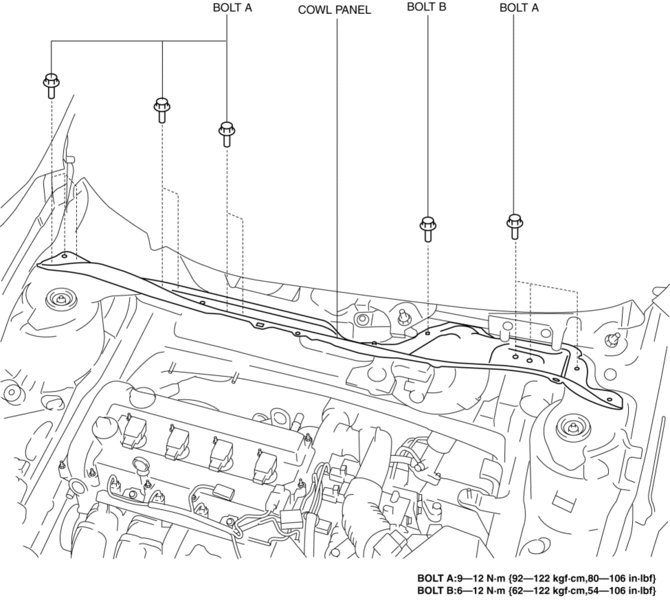
8. Remove the cowl panel in the direction of the arrow shown in the figure.
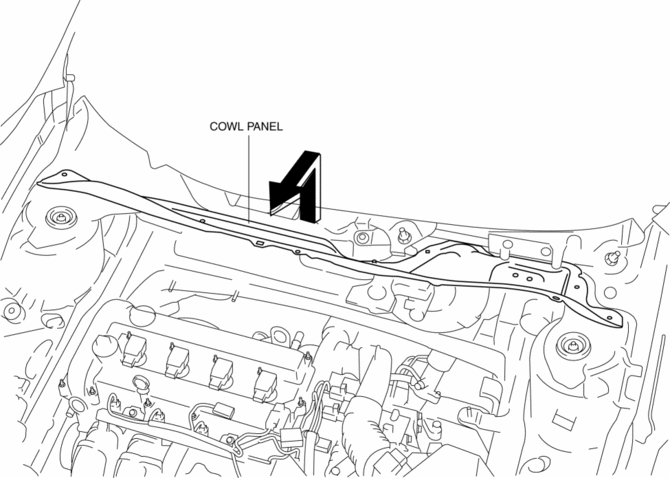
9. Install in the reverse order of removal.
 Cowl Grille Removal/Installation
1. Remove the windshield wiper arm and blade..
2. Remove the fastener A.
3. Pull the front fender molding in the direction of the arrow shown in the figure
and remove it while remove the tab B a ...
 Energy Absorbing Form Removal/Installation
1. Disconnect the negative battery cable..
2. Remove the rear combination light..
3. Remove the rear bumper..
4. Remove the fasteners.
5. Remove the rear energy-absorbing form.
6. Instal ...
Other materials:
Ignition Coil Inspection [Mzr 2.0, Mzr 2.5]
Ignition Coil Inspection
1. Perform the spark test and identify the malfunctioning cylinder..
2. Replace the ignition coil of the malfunctioning cylinder with that of a normal
cylinder, and perform the spark test again..
If the spark is not normal due to a malfunctioning ignition coil, ...
Starting the Engine
WARNING
Radio waves from the key may aff ect
medical devices such as pacemakers:
Before using the key near people who
use medical devices, ask the medical
device manufacturer or your physician
if radio waves from the key will aff ect
the device.
NOTE
The key mus ...
Front ABS Wheel Speed Sensor Removal/Installation
1. Remove in the order indicated in the table.
2. Install in the reverse order of removal.
3. After installation, verify that there is no twisting in the front ABS wheel-speed
sensor.
1
Connector
2
Front ABS wheel-speed sensor
...
