
Mazda 3 Service Manual: Tweeter Inspection
1. Disconnect the negative battery cable..
2. Remove the inner garnish..
3. Remove the tweeter..
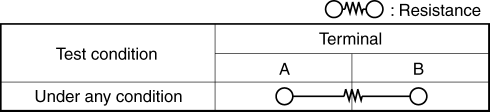
4. Verify the resistance between tweeter terminals.
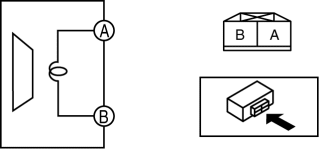
-
If not within the specification, replace the tweeter.
-
Resistance
-
Without Bose®: 3.4—4.6 ohms
-
With Bose®: 3.06—3.74 ohms
 Supplier Identification Procedure [Audio]
Identification Using the Label or Inscribed Lettering
1. Disconnect the negative battery cable..
2. Remove the center panel..
3. Remove the audio unit..
4. Verify the supplier by referring to t ...
 Tweeter Removal/Installation
1. Disconnect the negative battery cable..
2. Remove the inner garnish..
3. Remove the tweeter in the direction of the arrow shown in the figure.
4. Install in the reverse order of removal. ...
Other materials:
Airflow Mode Main Link Removal/Installation
1. Set the air intake mode to FRESH.
2. Set the air mix mode to MAX COLD.
3. Disconnect the negative battery cable..
4. Remove the following parts:
a. Front doors.
b. Front scuff plate.
c. Front side trim.
d. Dashboard under cover.
e. Glove compartment.
f. Upper panel.
g. Shift l ...
Transaxle Oil Inspection [G35 M R]
1. Park the vehicle on level ground.
2. Remove the aerodynamic under cover No.2..
3. Remove the oil level plug and washer.
4. Verify that the oil is near the brim of the plug port.
If the oil level is lower than the low level, add the specified amount and
type of oil through the ...
Turn signal lever
Operating instructions
The turn signal lever in the Subaru Solterra is designed for precise, intuitive
operation, allowing the driver to clearly communicate intended maneuvers to other
road users. Proper use of this control enhances safety and ensures predictable driving
behavior in all ...
