
Mazda 3 Service Manual: Tweeter Removal/Installation
1. Disconnect the negative battery cable..
2. Remove the inner garnish..
3. Remove the tweeter in the direction of the arrow shown in the figure.
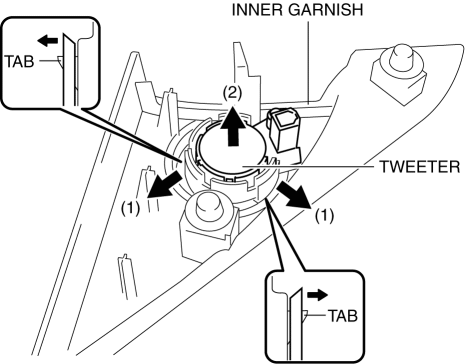
4. Install in the reverse order of removal.
 Tweeter Inspection
1. Disconnect the negative battery cable..
2. Remove the inner garnish..
3. Remove the tweeter..
4. Verify the resistance between tweeter terminals.
If not within the specification, ...
 Navigation
...
Other materials:
Sunroof Unit Disassembly/Assembly
NOTE:
If the guide or sunroof motor is removed, the glass panel will not be positioned
properly after the re-installation. To ensure proper positioning of the glass
panel, place alignment marks on the guide pin and frame before removing the
guide or sunroof motor.
1. Disassemb ...
Removing a Flat Tire
If your vehicle is equipped with a
wheel cover, pry off the wheel cover
with the beveled end of the jack lever.
NOTE
Force the end of the jack lever firmly
between wheel and cover, or removal will
be difficult.
CAUTION
Align the notch on the wheel cover
with the valve ...
Variable Intake Air Shutter Valve Actuator Inspection [Mzr 2.0, Mzr 2.5]
Operation Inspection
1. Remove the air hose..
2. Disconnect the vacuum hose from the variable intake air shutter valve actuator.
3. Connect a vacuum pump to the variable intake air shutter valve actuator.
NOTE:
Covered with a hood, the rod of the variable intake air shutter valv ...
