
Mazda 3 Service Manual: Disc Pad (Front) Replacement [Mzr 2.3 Disi Turbo]
1. Remove in the order indicated in the table.
2. Install in the reverse order of removal.
3. After installation, pump the brake pedal a few times and verify that the brakes do not drag.
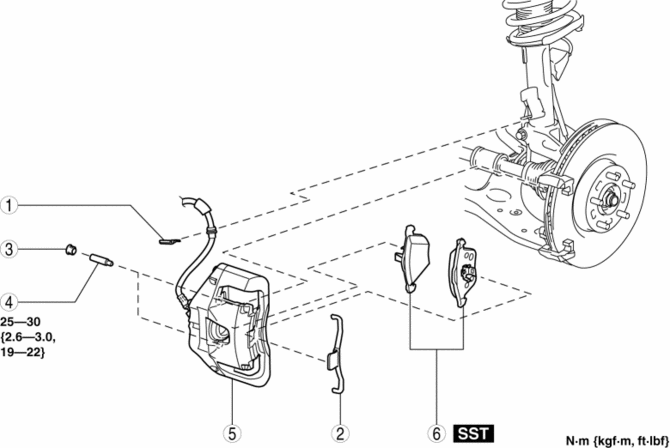
|
1 |
Clip |
|
2 |
Retaining clip (See FRONT BRAKE (DISC) REMOVAL/INSTALLATION [MZR 2.3 DISI Turbo].) |
|
3 |
Cap |
|
4 |
Bolt |
|
5 |
Caliper |
|
6 |
Disc pad (See FRONT BRAKE (DISC) REMOVAL/INSTALLATION [MZR 2.3 DISI Turbo].) |
 Disc Pad (Front) Replacement [Mzr 2.0, Skyactiv G 2.0, Mzr 2.5]
1. Remove in the order indicated in the table.
2. Install in the reverse order of removal.
3. After installation, pump the brake pedal a few times and verify that the brakes
do not drag.
...
 Disc Pad (Rear) Replacement
1. Remove in the order indicated in the table.
2. Install in the reverse order of removal.
3. After installation, pump the brake pedal a few times and inspect the following:
Parking brake ...
Other materials:
Maintenance Monitor (Type A audio)
“Oil Change” with a flexible setting *1 is available. Consult your
Authorized Mazda Dealer
when you want to change the setting *2 . Once the system turns on, the wrench
indicator light
in the instrument cluster will be illuminated when remaining oil life becomes
less than 500
km (300 mi ...
Drive Belt Removal/Installation [Mzr 2.0, Mzr 2.5]
MZR 2.0
A/C drive belt removal
1. Remove the aerodynamic under cover No.2 and splash shield as a single unit..
2. Remove the nut shown in the figure and set the power steering pipe component
out of the way.
3. Set the SST as shown in the figure.
NOTE:
Hold the SST by hand unti ...
Drive Belt Removal/Installation [Mzr 2.3 Disi Turbo]
1. Remove the aerodynamic under cover No.2 and splash shield as a single unit..
2. Rotate the drive belt auto tensioner in the direction shown in the figure
and remove the drive belt.
3. Install the drive belt.
4. Verify that the drive belt auto tensioner indicator mark does not exceed ...
