
Mazda 3 Service Manual: Extractor Chamber Removal/Installation
1. Disconnect the negative battery cable..
2. Remove the rear combination light..
3. Remove the rear bumper..
4. Remove the clips.
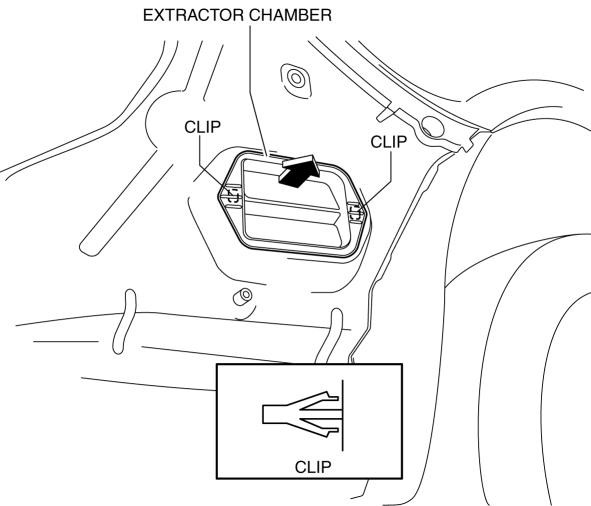
5. Install in the reverse order of removal.
 Energy Absorbing Form Removal/Installation
1. Disconnect the negative battery cable..
2. Remove the rear combination light..
3. Remove the rear bumper..
4. Remove the fasteners.
5. Remove the rear energy-absorbing form.
6. Instal ...
 Floor Under Cover Removal/Installation
1. Lift up the vehicle.
2. Remove the cap nuts.
3. Remove the nus.
4. Pull the floor under covers in the direction of arrow (1), (2), (3) shown
in the figure, and then remove it.
5. ...
Other materials:
Boost Air Temperature Sensor Inspection [Mzr 2.3 Disi Turbo]
Resistance Inspection
NOTE:
Because the boost air temperature sensor is integrated in the MAP sensor,
replacing the boost air temperature sensor includes replacement of the MAP sensor/boost
air temperature sensor.
1. Remove the battery cover..
2. Disconnect the negative batter ...
ALL AUTO (ECO) control
In the Subaru Solterra, the ALL AUTO (ECO) control intelligently
manages interior comfort by automatically adjusting seat heaters/radiant heaters*,
seat ventilators*, and the heated steering wheel* based on the selected climate
settings, as well as real-time cabin and outside temperature condi ...
Hazardous Driving
WARNING
Be extremely careful if it is necessary to
downshift on slippery surfaces:
Downshifting into lower gear
while driving on slippery surfaces is
dangerous. The sudden change in tire
speed could cause the tires to skid. This
could lead to loss of vehicle control
an ...
