
Mazda 3 Owners Manual: Replacing Interior Light Bulbs
Overhead lights (Front)/Map lights * , Overhead lights (Front) * , Overhead lights (Rear) * , Vanity mirror lights *
- Wrap a small flathead screwdriver with a soft cloth to prevent damage to the lens, and then remove the lens by carefully prying on the edge of the lens with the flathead screwdriver.
- Disconnect the bulb by pulling it out.
Overhead lights (Front)/Map lights
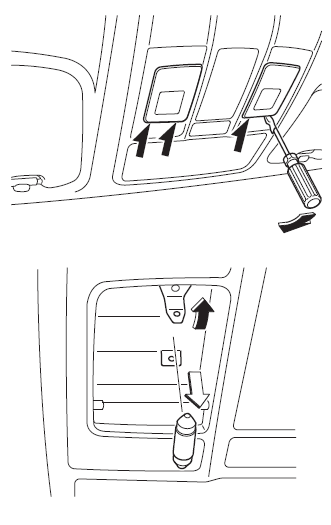
Overhead lights (Front) *
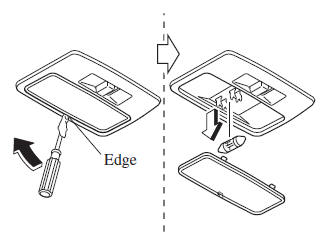
Overhead lights (Rear) *
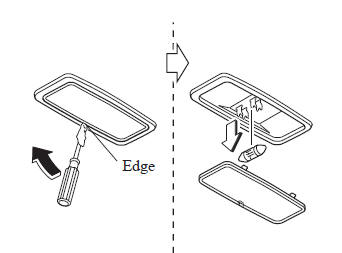
Vanity mirror lights
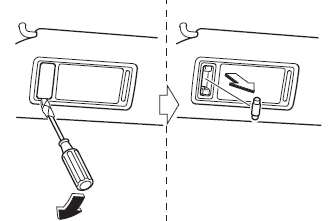
- Install the new bulb in the reverse order of the removal procedure
Trunk light (4–Door)
- Press both sides of the lens cap to remove it.
- Disconnect the bulb by pulling it out.
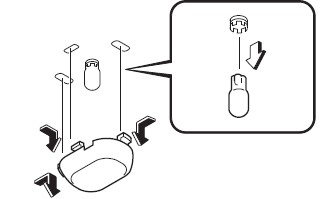
- Install the new bulb in the reverse order of the removal procedure.
Luggage compartment light (5–Door)
- Wrap a small flathead screwdriver with a soft cloth to prevent damage to the lens and remove the lens by carefully prying on the edge of the lens with the flathead screwdriver.
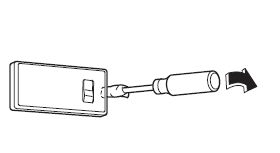
- Disconnect the connector from the unit by pressing the tab on the connector with your finger and pulling the connector.
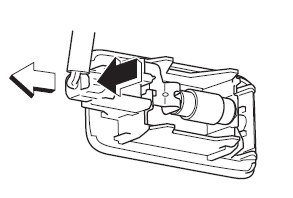
- Disconnect the bulb by pulling it out.
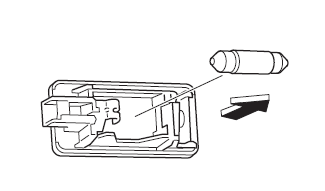
- Install the new bulb in the reverse order of the removal procedure.
 Replacing Exterior Light Bulbs
Headlights (With xenon fusion
headlights)
Low/High beam bulbs
You cannot replace the low/high beam
bulbs by yourself. The bulbs must be
replaced at an Authorized Mazda Dealer.
Headlights (With h ...
 Fuses
Fuses
Your vehicle's electrical system is
protected by fuses.
If any lights, accessories, or controls do
not work, inspect the appropriate circuit
protector. If a fuse has blown, the inside
element w ...
Other materials:
Maintenance Monitor (Type B audio)
Select the icon on the
home screen to display the “Applications” screen.
Select “Maintenance” to display the maintenance list screen.
Switch the tab and select the setting item you want to change.
You can customize settings in the setup display as follows:
...
B Pillar Lower Trim Removal/Installation
1. Remove the front scuff plate..
2. Remove the rear scuff plate..
3. Partially peel back the seaming welt.
4. Pull the B-pillar lower trim in the direction of the arrow (1), (2) shown
in the figure, detach tab A, pin B, pin C, clip D.
5. Remove the B-pillar lower trim in the direction ...
Electric Power Steering Oil Pump Component Disassembly/Assembly
CAUTION:
The internal parts of the EHPAS control module and motor could be damaged
if they receive an impact. Be careful when handling the EHPAS control module
and motor to prevent the component from getting hit. Replace the electric power
steering oil pump component if it has recei ...
