
Mazda 3 Service Manual: Valve Clearance Inspection [Mzr 2.0, Mzr 2.5]
1. Remove the battery cover..
2. Disconnect the negative battery cable..
3. Remove the plug hole plate..
4. Disconnect the wiring harness.
5. Remove the ignition coils..
6. Remove the spark plugs..
7. Remove the ventilation hose.
8. Remove the oil level gauge.
9. Remove the cylinder head cover..
10. Remove the aerodynamic under cover No.2 and splash shield as a single unit..
11. Measure the valve clearance.
NOTE:
-
Make sure to note down the measured values for choosing the suitable replacement tappets.
a. Turn the crankshaft clockwise so that the No.1 piston is at top dead center (TDC) of the compression stroke.
b. Measure the valve clearance at A in the figure.
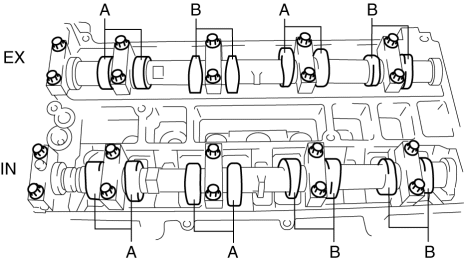
-
Valve clearance for inspection [Engine cold]
-
IN: 0.22—0.30 mm {0.009—0.011 in}
-
EX: 0.27—0.37 mm {0.011—0.014 in}
c. If the valve clearance is out of the standard value, adjust it..
d. Turn the crankshaft 360°
clockwise so that the No.4 piston is at TDC of the compression stroke.
e. Measure the valve clearance at B in the figure.
-
Valve clearance for inspection [Engine cold]
-
IN: 0.22—0.30 mm {0.009—0.011 in}
-
EX: 0.27—0.37 mm {0.011—0.014 in}
f. If the valve clearance is out of the standard value, adjust it..
12. Install in the reverse order of removal.
 Valve Clearance Adjustment [Mzr 2.0, Mzr 2.5]
1. Remove the battery cover..
2. Disconnect the negative battery cable.
3. Remove the plug hole plate..
4. Disconnect the wiring harness.
5. Remove the ignition coils..
6. Remove the spark p ...

Other materials:
Splash Shield Removal/Installation
Front Splash Shield
1. Remove the bolts and fastener then remove the front splash shield.
2. Install in the reverse order of removal.
Rear Splash Shield
1. Remove the fastener, screws and capnut .
2. Pull the rear splash shield in the direction of the arrow shown in the figure,
the ...
Automatic Transaxle Removal/Installation [Fw6 A EL]
CAUTION:
Secure the steering wheel using tape or a cable to prevent the steering shaft
from rotating after disconnecting the steering shaft. If the steering wheel
rotates after the steering shaft and the steering gear and linkage are disconnected,
the internal parts of the clock spr ...
No.7 Bsm Indicator Light Does Not Flash While Under Bsm Indicator Light Flashing
Conditions (With Combination Switch Operation (Turn Signal Switch)) [Blind Spot
Monitoring (Bsm)]
7
BSM indicator light does not flash while under BSM indicator light-flashing
conditions (with combination switch operation (turn signal switch))
Description
The BSM indicator light does not flash or illuminate continuously,
...
