
Mazda 3 Service Manual: Filament Repair
1. Clean the filament using isopropyl alcohol.
2. Attach tape to both sides of the filament.
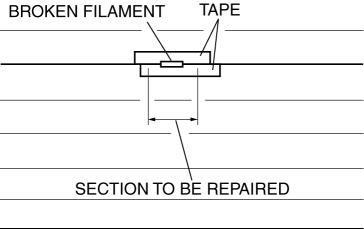
3. Using a small brush or marking pen, apply silver paint.
4. After 2—3 min,
carefully remove the tape without damaging the applied area.
CAUTION:
-
Do not operate the rear window defroster until the paint is completely dry. It may cause other malfunctions if it is used before the paint is dry.
5. Dry the repaired part according to the following procedure.
-
When the room temperature is 25 °C {77 °F},
leave it as it is for 24 h.
-
When a hot air blower is used, dry with the 150 °C {302 °F}
air for 30 min.
 Filament Inspection
1. Turn the ignition switch to the ON position.
2. Turn the rear window defroster switch on.
CAUTION:
Directly touching the rear window defroster filament with the lead of the
teste ...
 Outer Mirror Garnish Removal/Installation
1. Disconnect the negative battery cable..
2. Remove the outer mirror glass from the outer mirror..
3. Pinch the end of the tab which is visible, and release the tab by pressing
it toward the ve ...
Other materials:
Antenna Amplifier Inspection
1. Disconnect the negative battery cable..
2. Remove the rain sensor cover. (Vehicles with auto light/wiper system).
3. Disconnect the rain sensor connector. (Vehicles with auto light/wiper system)
4. Partially peel back the seaming welts.
5. Remove the following parts:
a. Sunroof seaming ...
Air Bag Module And Pre Tensioner Seat Belt Deployment Procedures [Standard Deployment
Control System]
WARNING:
A live (undeployed) air bag module or pre-tensioner seat belt may accidentally
operate (deploy) when it is disposed of and cause serious injury. Do not dispose
of a live (undeployed) air bag module and pre-tensioner seat belt. If the SSTs
(Deployment tool and Adapter harnes ...
No.7 Bsm Indicator Light Does Not Flash While Under Bsm Indicator Light Flashing
Conditions (With Combination Switch Operation (Turn Signal Switch)) [Blind Spot
Monitoring (Bsm)]
7
BSM indicator light does not flash while under BSM indicator light-flashing
conditions (with combination switch operation (turn signal switch))
Description
The BSM indicator light does not flash or illuminate continuously,
...
