
Mazda 3 Service Manual: Fire Extinguisher Installation [Arab Gulf Cooperation Council]
WARNING:
-
Handling a front seat (with built-in side air bag) improperly can accidentally operate (deploy) the air bag, which may seriously injure you. Read the service warnings before handling a front seat (with built-in side air bag)..
CAUTION:
-
After removing a front seat, do not operate the slider lever. If the slider lever is operated, the left and right slide positions will deviate, and the slide adjuster may be damaged after the front seat is installed.
-
Verify that there are no malfunctions in the sliding mechanism after installing a front seat.
-
If any of the following work is performed, perform the seat weight sensor calibration using the M-MDS..
-
Replacement with a new seat weight sensor
-
Replacement with a new seat weight sensor control module
-
Replacement with new passenger-side seat par
-
Disassembly of the passenger-side seat
-
If any of the following work is performed, perform the seat weight sensor inspection using the M-MDS..
-
Removal of the passenger-side seat
-
Loosening and retightening of passenger-side seat fixing bolts
1. Switch the ignition to off.
2. Disconnect the negative battery cable and wait 1 min or more
..
3. Remove the following parts:
a. Front seat.
b. Audio amplifier (Vehicles with Bose®).
c. Front scuff plate.
d. Front side trim.
4. Partially peel back the floor covering..
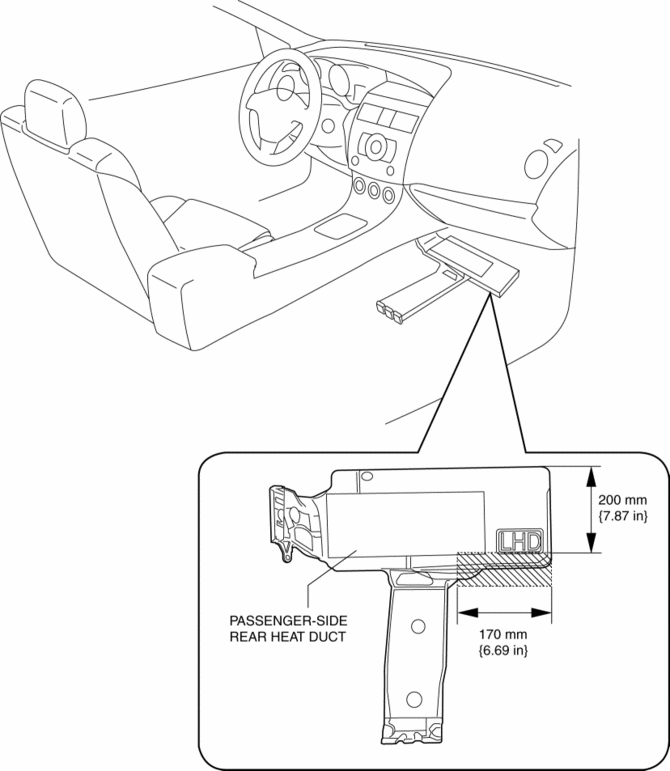
5. Cut the passenger-side rear heater duct cover shown in the figure.
CAUTION:
-
When cutting out the portion of the passenger-side rear heat duct, do not cut it outside of the indicated area shown in the figure. Otherwise, the airflow passage could be damaged and cause the air from the heater to leak.
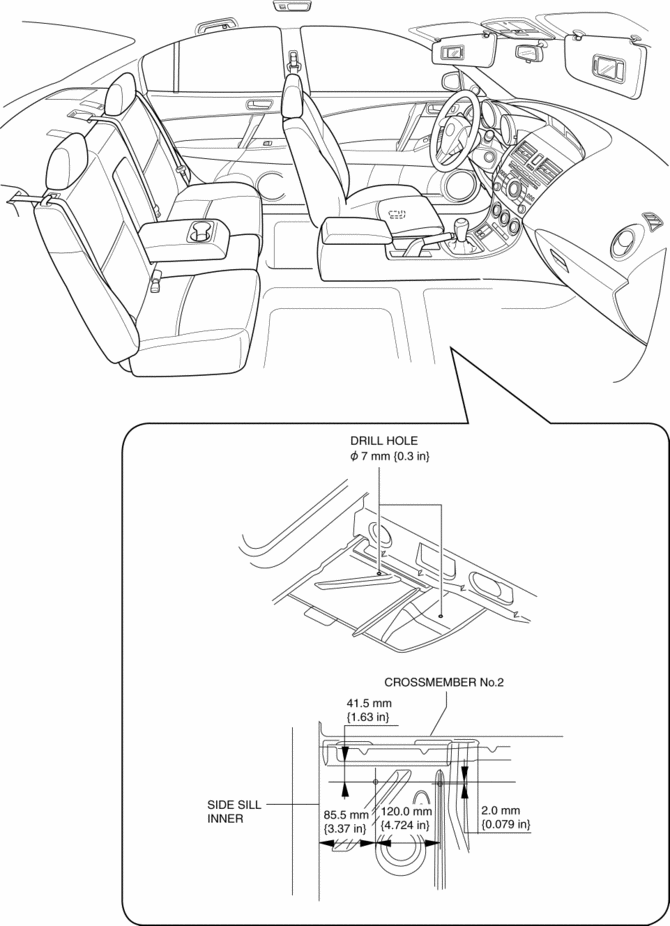
6. Drill a 7 mm {0.3 in}
diameter hole at the point shown in the figure.
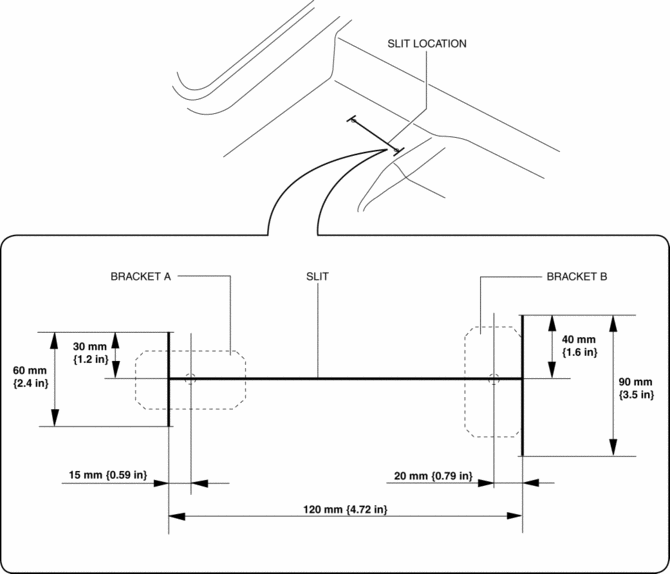
7. Return the floor covering to its original position and open the slit at the position shown in the figure.
8. Install in the order shown in the figure.
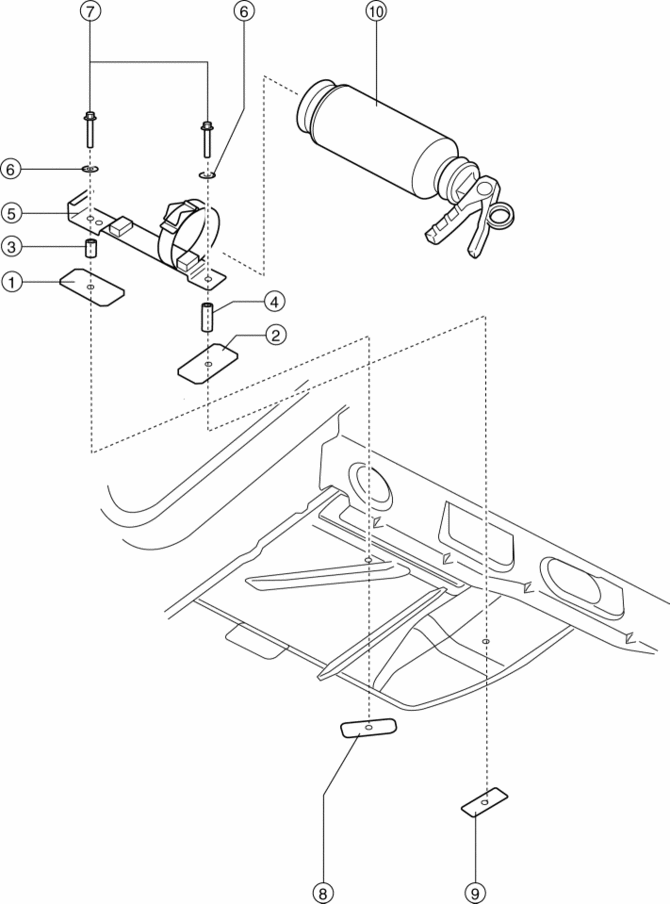
|
1 |
Bracket A |
|
2 |
Bracket B |
|
3 |
Spacer C |
|
4 |
Spacer D |
|
5 |
Bracket assembly |
|
6 |
Spring washer |
|
7 |
Bolt E |
|
8 |
Plate nut F |
|
9 |
Plate nut G |
|
10 |
Fire extinguisher |
9. Apply silicone sealant to the shaded area on the under body as shown in the figure.
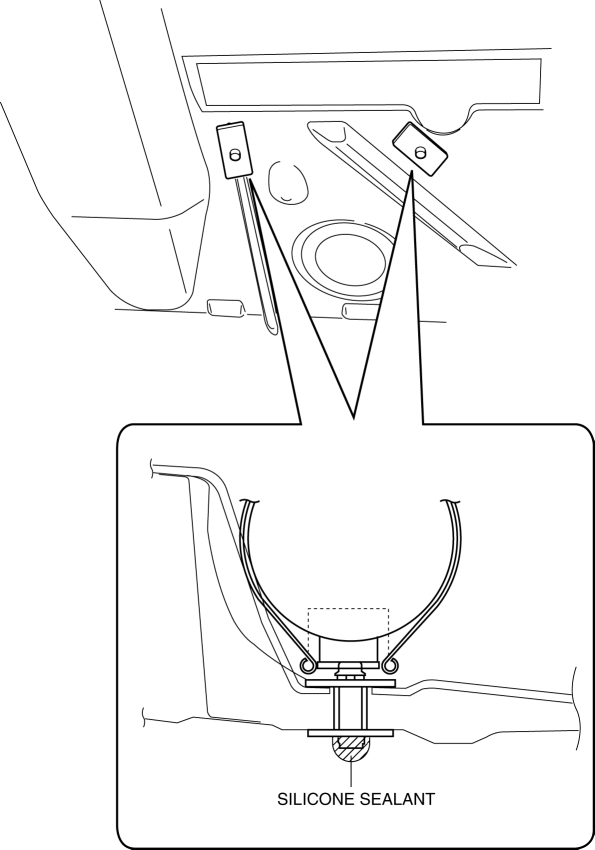
10. Install the following parts:
a. Front side trim.
b. Front scuff plate.
c. Audio amplifier (Vehicles with Bose®).
d. Front seat.
 Decoration Panel Removal/Installation
1. Remove the following parts:
a. Passenger-side front scuff plate.
b. Passenger-side front side trim.
c. Glove compartment.
d. Passenger-side lower panel.
2. Remove the screw.
3. Pull the ...
 Floor Covering Removal/Installation
1. Disconnect the negative battery cable..
2. Remove the following parts:
a. Front seat.
b. Audio amplifier (Vehicles with Bose®).
c. Front scuff plate.
d. Joint cover.
e. Front side trim ...
Other materials:
Steering Gear And Linkage Assembly
CAUTION:
To prevent damage to the steering gear, secure it to the vise using a copper
plate or clean cloth.
1. Assemble in the order indicated in the table.
1
Gear housing
2
Mounting rubber
(See Mounting Rubber Assembly No ...
Windshield Defrosting and
Defogging
Set the mode selector dial to the
position.
Set the temperature control dial to the
desired position.
Set the fan control dial to the desired
speed.
If dehumidified heating is desired, turn
on the air conditioner.
WARNING
Do not defog the windshield using the
pos ...
Starter Interlock Switch Inspection [Mzr 2.0, Mzr 2.5]
CAUTION:
Do not reuse the starter interlock switch if it is removed from the vehicle
even once. Replace with a new starter interlock switch when installing.
1. Remove the battery cover..
2. Disconnect the negative battery cable..
3. Disconnect the starter interlock switch connec ...
