
Mazda 3 Service Manual: Non Return Valve Inspection [Mzr 2.0, Mzr 2.5]
WARNING:
-
Fuel is very flammable liquid. If fuel spills or leaks from the pressurized fuel system, it will cause serious injury or death and facility breakage. Fuel can also irritate skin and eyes. To prevent this, always complete the “Fuel Line Safety Procedure”, while referring to the “BEFORE SERVICE PRECAUTION”.
-
A person charged with static electricity could cause a fire or explosion, resulting in death or serious injury. Before draining fuel, make sure to discharge static electricity by touching the vehicle body.
Except for Mexico
1. Complete the “BEFORE SERVICE PRECAUTION”..
2. Disconnect the negative battery cable..
3. Remove the fuel pump unit..
4. Siphon the fuel from the fuel tank.
NOTE:
-
The non-return valve is integrated in the fuel tank.
-
The non-return valve is normally closed by the spring force.
5. Verify that the non-return valve is closed.
-
If the non-return valve is stuck open and does not open even when pulled up by a finger, replace the fuel tank..
Mexico
1. Complete the “BEFORE SERVICE PRECAUTION”..
2. Remove the non-return valve..
3. Verify that the non-return valve is closed.
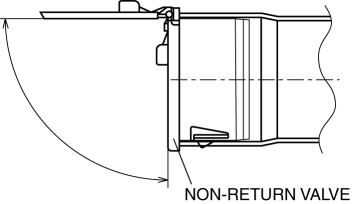
-
If malfunction, replace the non-return valve..
4. Verify that the non-return valve is not stuck open and does not open even when pulled up by a finger.
-
If malfunction, replace the non-return valve..
 Engine Tune Up [Skyactiv G 2.0]
Engine Tune-up Preparation
NOTE:
If the accelerator pedal is depressed continuously for a specified time,
the engine speed may decrease to the idle speed. This is due to the fuel cut
co ...
 Non Return Valve Inspection [Mzr 2.3 Disi Turbo]
WARNING:
Fuel is very flammable liquid. If fuel spills or leaks from the pressurized
fuel system, it will cause serious injury or death and facility breakage. Fuel
can also irritate skin ...
Other materials:
Air Filter Inspection [Mzr 2.0, Mzr 2.5]
Except for Mexico
Airflow inspection
1. Remove the air filter..
2. Blow from port A and verify that there is airflow from port B.
If there is no airflow, replace the air filter..
3. Blow from port B and verify that there is airflow from port A.
If there is no airflow, r ...
Assist Handle Removal/Installation
Assist Handle Removal
1. Insert a flathead screwdriver into the service hole and remove the assist
handle covers.
2. Remove the assist handle in the direction of the arrow (1) and (2), while
detach the clip.
NOTE:
Remove the assist handle by shaking it up and down.
Ass ...
If your vehicle has to be stopped in an emergency
In rare emergency situations where normal stopping is not possible,
follow this procedure to safely bring your Subaru Solterra to a halt.
Stopping the vehicle
1. Firmly press the brake pedal using both feet and maintain steady pressure.
Avoid repeatedly pumping the brake pedal, as this may redu ...
