
Mazda 3 Service Manual: Front Door Checker Removal/Installation
1. Fully close the front door glass.
2. Disconnect the negative battery cable..
3. Remove the inner garnish..
4. Remove the front door trim..
5. Remove the front door speaker..
6. Remove the bolt A.
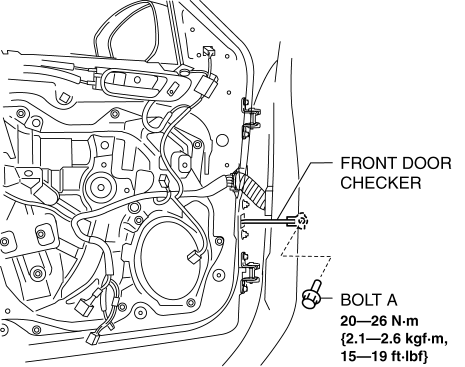
7. Remove the bolts B.
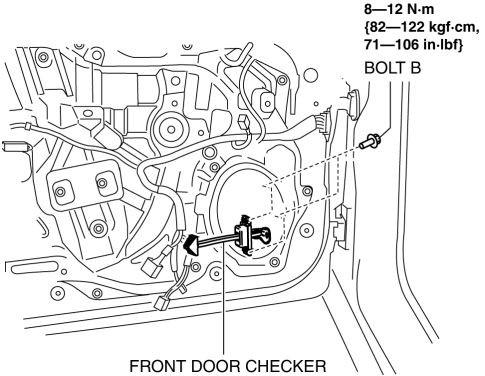
8. Pull out the front door checker from the front speaker installation hole.
9. Install in the reverse order of removal.
 Door Sash Film Removal
1. Disconnect the negative battery cable.
2. Partially peel back the glass run channel.
3. Partially peel back the door weatherstrip.
4. Remove the following parts:
a. Inner garnish.
b. Fron ...
 Front Door Hinge Removal/Installation
1. Disconnect the negative battery cable..
2. Remove the following parts:
a. Front bumper.
b. Front combination light.
c. Front fender molding.
d. Side step molding.
e. Front fender panel. ...
Other materials:
Rear Shock Absorber Removal/Installation
1. Remove in the order indicated in the table.
2. Install in the reverse order of removal.
1
Rear shock absorber upper nut
2
Rear shock absorber under bolt
3
Rear shock absorber
...
Front Fog Light Relay Removal/Installation
1. Disconnect the negative battery cable..
2. Remove the front mudguard.(RH).
3. Remove the front fog light relay case.
4. Remove the cover.
5. Remove the front fog light relay.
6. Install in the reverse order of removal..
Front Fog Light Relay Installation Note
1. Install the front ...
Front passenger occupant classification system
The Subaru Solterra is equipped with an advanced front passenger
occupant classification system that continuously monitors the status of the front
passenger seat. Based on detected conditions, this intelligent system automatically
activates or deactivates specific SRS airbags to optimize safet ...
