
Mazda 3 Service Manual: Fuel Filler Lid Opener Bezel Removal/Installation
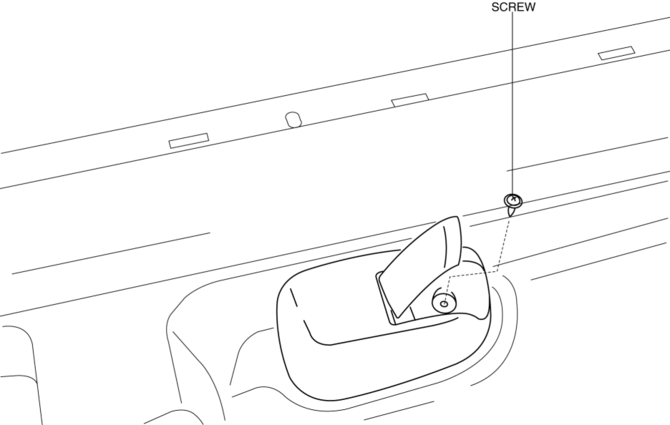
1. Remove the screw.
2. Pull the fuel-filler lid opener bezel in the direction of the arrow (1) then remove the tab.
3. Move the fuel-filler lid opener bezel in the direction of the arrow (2) shown in the figure.
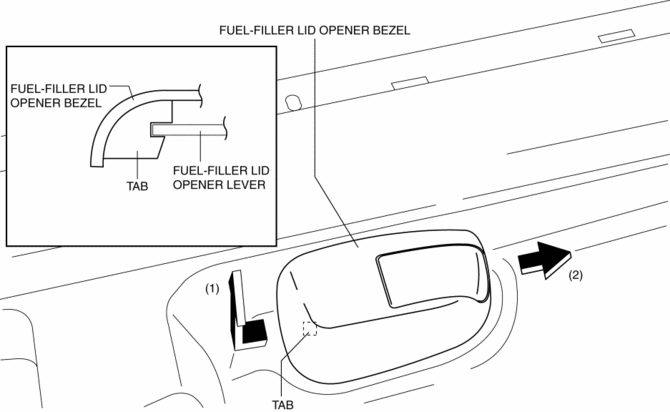
4. Remove the fuel-filler lid opener bezel.
5. Install in the reverse order of removal.
 Fuel Filler Lid Opener And Lever Removal/Installation
Fuel-filler Lid Opener
4SD
1. Open the fuel-filler lid.
2. Remove the following parts:
a. Trunk end trim.
b. Trunk side trim (RH).
3. Remove the nut.
4. Remove the lift spring.
5 ...
 Fuel Filler Lid Opener Cable Removal/Installation
4SD
1. Disconnect the negative battery cable..
2. Remove the following parts:
a. Front seat (LH).
b. Front scuff plate (LH).
c. Rear scuff plate.
d. B-pillar lower trim.
e. Rear seat cush ...
Other materials:
Front Fog Light Removal/Installation
Except Mazdaspeed3
1. Disconnect the negative battery cable..
2. Remove the front bumper..
3. Pull the wiring harness from the hook in the direction of the arrow shown
in the figure and remove it.
4. Disconnect the connector.
5. Pull the wiring harness in the direction of the arrow (2 ...
Front Seat Belt Removal/Installation [Standard Deployment Control System]
WARNING:
Handling the front seat belt (pre-tensioner seat belt) improperly can accidentally
deploy the pre-tensioner seat belt, which may seriously injure you. Read the
air bag system service warnings and cautions before handling the front seat
belt..
WARNING:
Th ...
Transaxle Oil Inspection [A26 M R]
1. Park the vehicle on level ground.
2. Remove the aerodynamic under cover No.2..
3. Remove the oil level plug and gasket.
4. Verify that the oil is near the brim of the plug port.
If the oil level is lower than the low level, add the specified amount and
type of oil through the ...
