
Mazda 3 Service Manual: General Procedures (Steering)
Wheel and Tire Installation
1. When installing the wheels and tires, tighten the wheel nuts in a criss-cross pattern to the following tightening torque.
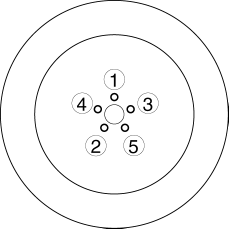
-
Tightening torque
-
88—118 N·m {9.0—12 kgf·m, 65—87 ft·lbf}
Connector Disconnection
1. Disconnect the negative battery cable before performing any work that requires handling of connectors..
Suspension Links Removal/Installation
1. For the joint sections with rubber bushings, raise the vehicle using a lift, and then temporarily tighten the installation bolts and nuts. Lower the vehicle to the ground and tighten them completely with the specified torque.
Power Steering Related Parts Installation
1. If any power steering fluid line has been disconnected, perform the following after installation of the power steering components..
-
Power steering fluid amount inspection
-
Power steering fluid leakage inspection
-
Air bleeding
Electro Hydraulic Power Assist Steering (EHPAS) Related Parts
CAUTION:
-
If the configuration procedure is not completed, the EHPAS will not operate properly and it might cause an unexpected accident. Therefore, when replacing or removing the electric power steering oil pump component, make sure to perform the configuration procedure to ensure the proper EHPAS operation.
1. Make sure that there are no DTCs in the EHPAS memory after working on EHPAS related parts. If there are any codes in the memory, clear them.
2. When replacing or removing the electric power steering oil pump component, perform the configuration procedures..
 Steering
...
 Precaution
Intermittent Concern Troubleshooting
Vibration method
If a malfunction occurs or becomes worse while driving on a rough road or
when the engine is vibrating, perform the following steps.
...
Other materials:
Camshaft Position (CMP) Sensor Removal/Installation [Mzr 2.0, Mzr 2.5]
CAUTION:
When replacing the CMP sensor, make sure there is no foreign material on
it such as metal shavings. If it is installed with foreign material, the sensor
output signal will malfunction resulting from fluctuation in magnetic flux and
cause a deterioration in engine control.
...
Cup Holder
WARNING
Never use a cup holder to hold hot
liquids while the vehicle is moving:
Using a cup holder to hold hot
liquids while the vehicle is moving is
dangerous. If the contents spill, you
could be scalded.
Do not put anything other than cups or
drink cans in cup hold ...
Crankshaft Position (CKP) Sensor Inspection [Mzr 2.0, Mzr 2.5]
Visual Inspection
CAUTION:
When foreign material such as an iron chip is on the CKP sensor, it can cause
abnormal output from the sensor because of flux turbulence and adversely affect
the engine control. Be sure there is no foreign material on the CKP sensor when
replacing.
...
