
Mazda 3 Service Manual: Hood Removal/Installation
WARNING:
-
Removing the hood without supporting it could cause the hood to fall and cause serious injury. Always perform the procedure with at least another person to prevent the hood from falling.
1. Disconnect the negative battery cable..
2. Remove the following parts:
a. Front bumper.
b. Front combination light.
c. Front fender molding.
d. Side step molding.
e. Front fender panel.
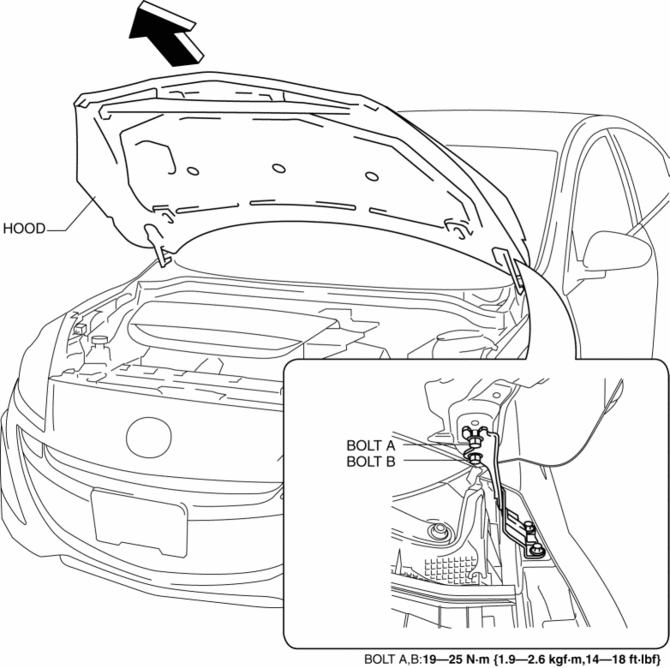
3. After loosening bolt A and removing bolt B, remove the hood in the direction of the arrow shown in the figure.
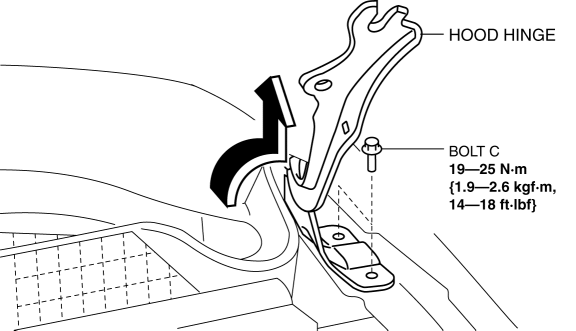
4. Remove bolt C, and remove the hood hinge in the direction of the arrow shown in the figure.
5. Install in the reverse order of removal.
6. When installing the hood, adjust the hood by moving the hood hinge..
 Hood Release Cable Removal/Installation
1. Disconnect the negative battery cable..
2. Remove the battery tray..
3. Remove the Front mudguard (LH)..
4. Remove the hood release cable from clips A.
5. Remove the clips B.
6. Disco ...
 Liftgate Adjustment
1. Measure the gap and height difference between the liftgate and the body.
2. Loosen the liftgate hinge installation bolts and adjust the gap by moving
the liftgate.
Standard clearance
...
Other materials:
Generator Disassembly/Assembly [Mzr 2.0, Mzr 2.5]
CAUTION:
Melt the solder quickly, otherwise the diodes (rectifier) and regulator will
be damaged by excessive heat.
1. Disassemble in the order indicated in the table.
2. Assemble in the reverse order of disassembly.
MZR 2.0
1
Rotor component
...
For your information
Main Owner's Manual
This comprehensive Owner’s Manual for the Subaru Solterra has been carefully
designed to cover the full range of models, trims, and available equipment, including
optional features that may not be installed on your specific vehicle. As a result,
you may encounter descrip ...
Inside rear view mirror
In the Subaru Solterra, the inside rear view mirror is designed to
provide a clear and accurate view of the area behind the vehicle, allowing the driver
to maintain full awareness of surrounding traffic conditions.
Adjusting the height of rear view mirror
The position of the rear view mirror i ...
