
Mazda 3 Service Manual: Horn Removal/Installation
1. Disconnect the negative battery cable..
2. Remove the front bumper..
3. Disconnect the connector.
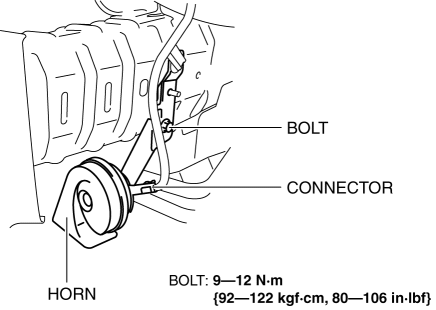
4. Remove the bolt.
5. Remove the horn.
6. Install in the reverse order of removal.
 Horn Inspection
1. Disconnect the negative battery cable..
2. Remove the front bumper..
3. Remove the horn..
4. Apply battery positive voltage and connect the ground as shown in the figure
and verify the horn ...

Other materials:
Brake Fluid Level Sensor Inspection
1. Disconnect the brake fluid level sensor connector from the master cylinder.
2. Inspect for continuity according to fluid level between the brake fluid level
sensor terminals.
If not as indicated in the table, replace the reserve tank.
...
Engine Disassembly/Assembly [Mzr 2.0, Mzr 2.5]
1. Remove the engine from the transaxle..
2. Remove the generator..
3. Remove the exhaust system..
4. Remove the EGR valve..
5. Remove the intake-air system..
6. Remove the fuel injectors..
7. Remove the ignition coils..
8. Remove the crankshaft position (CKP) sensor..
9. Disassemble ...
Oil Seal (Differential) Replacement [G66 M R]
1. On level ground, jack up the vehicle and support it evenly on safety stands.
2. Remove the aerodynamic under cover No.2..
3. Drain the oil from the transaxle..
4. Remove the front splash shield..
5. Separate the drive shaft and joint shaft from the transaxle..
6. Remove the oil seals u ...
