
Subaru Solterra 2023-2026 Owner's Manual: If the electronic key does not operate properly
If communication between the electronic key and the Subaru Solterra is disrupted, or if the key cannot be used due to a depleted battery, the smart key system and wireless remote functions will be unavailable. In such situations, the Subaru Solterra can still be accessed and started by following the alternative procedures outlined below.
■ When the electronic key does not work properly
- Confirm that the smart key system of the Subaru Solterra has not been disabled in the customization settings. If it is turned off, reactivate the function to restore normal operation.
- Check whether battery-saving mode is enabled on the electronic key. If active, disable this mode to allow proper communication with the Subaru Solterra.
NOTICE
■ In case of a smart key system malfunction, or other key related problems
If the issue persists, bring your Subaru Solterra along with all provided electronic keys to an authorized SUBARU dealer for inspection and diagnosis.
Locking and unlocking the doors
When the electronic key is not functioning, use the mechanical key included with your Subaru Solterra to manually operate the door locks.
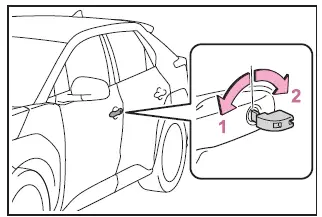
- Locks all the doors
- Unlocks the door
Turning the mechanical key toward the rear unlocks the driver’s door. Turning it again within approximately 5 seconds will unlock all remaining doors of the Subaru Solterra.
■ Key linked functions
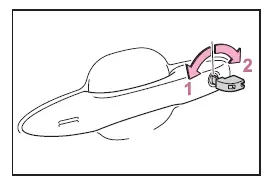
- Closes the windows (turn and hold)*
- Opens the windows (turn and hold)*
*: These functions require prior customization at a SUBARU dealer for the Subaru Solterra.
WARNING
■ When using the mechanical key and operating the power windows
Before operating the windows using the mechanical key in the Subaru Solterra, ensure that no passenger has any part of their body in the window path. Never allow children to operate the key, as this may result in injury due to window entrapment.
Starting the EV system
1. Fully depress the brake pedal in the Subaru Solterra.
2. Hold the electronic key close to the power switch.
Once the Subaru Solterra detects the key, an audible signal will sound and the power switch will transition to the ON mode.
If the smart key system is disabled via customization settings, the power mode will switch to ACC instead.
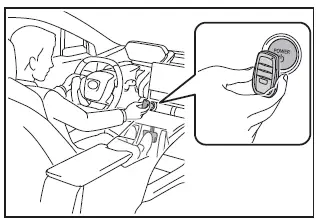
3. Continue pressing the brake pedal firmly and confirm that
 is shown on the multi-information display.
4. Press the power switch briefly and firmly to start the Subaru Solterra EV system.
If the Subaru Solterra still fails to start after completing these steps, contact your SUBARU dealer for further assistance.
■ Stopping the EV system
To turn off the Subaru Solterra, shift the gear selector to P, engage the parking brake, and press the power switch as you would during normal operation.
■ Replacing the key battery
Since the above method is only a temporary workaround, it is strongly recommended to replace the electronic key battery of your Subaru Solterra as soon as possible to restore full functionality.
■ Alarm
If the Subaru Solterra is unlocked manually using the mechanical key while the alarm system is armed, the alarm may activate. This is a normal security response.
■ Changing power switch modes
Release the brake pedal and press the power switch as described in step 3 above.
The Subaru Solterra EV system will remain off, and each press of the switch will cycle through the available power modes.
 If the EV system will not start
If your Subaru Solterra does not power on as expected, the underlying
cause can vary depending on environmental conditions, system status, or component
functionality. Carefully review the followin ...
 If the 12-volt battery is discharged
If the 12-volt battery in your Subaru Solterra becomes discharged,
specific procedures can be followed to restore power and restart the EV system safely.
These steps are designed to help you regai ...
Other materials:
Windshield wipers and washer
The Subaru Solterra windshield wiper system offers both automatic
rain-sensing operation and manual control, allowing precise adjustment for various
weather conditions. The washer system can also be activated for effective cleaning
of the windshield.
NOTICE
■ When the windshield is dry
Do ...
PCM Configuration [Mzr 2.0, Mzr 2.5]
CAUTION:
If the wheel and tire sizes are changed, a discrepancy with the speedometer
needle whereby it exceeds the allowable range could result in a malfunction.
If the wheel and tire sizes are changed, perform the following procedure to
change the tire size parameter setting..
...
Crankshaft Position (CKP) Sensor Removal/Installation [Mzr 2.0, Mzr 2.5]
Removal
CAUTION:
When foreign material such as an iron chip is on the CKP sensor, it can cause
abnormal output from the sensor because of flux turbulence and adversely affect
the engine control. Be sure there is no foreign material on the CKP sensor when
replacing.
Do not a ...
