
Subaru Solterra 2023-2026 Owner's Manual: If your vehicle has to be stopped in an emergency
In rare emergency situations where normal stopping is not possible, follow this procedure to safely bring your Subaru Solterra to a halt.
Stopping the vehicle
1. Firmly press the brake pedal using both feet and maintain steady pressure.
Avoid repeatedly pumping the brake pedal, as this may reduce braking efficiency and increase stopping distance.
2. Move the shift position to N (Neutral).
If the shift position is shifted to N
3. Gradually slow down the Subaru Solterra and steer it to a safe location at the side of the road.
4. Turn off the EV system.
If the shift position cannot be shifted to N
3. Continue applying firm pressure to the brake pedal with both feet to reduce speed as much as possible.
4. To shut down the Subaru Solterra EV system, press and hold the power switch for at least 2 seconds, or press it rapidly three times or more in succession.
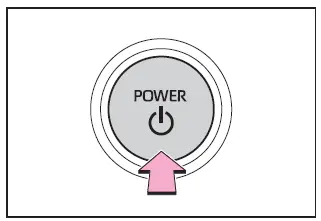
5. Bring the vehicle to a complete stop in a safe location away from traffic.
■ If emergency stopped
When the Subaru Solterra is stopped under emergency conditions, certain systems such as air conditioning may operate with reduced functionality to conserve the 12-volt battery.
WARNING
■ If the EV system has to be turned off while driving
Switching off the Subaru Solterra EV system while driving will not eliminate braking or steering capability entirely. However, power steering assistance may be reduced, making steering more difficult depending on battery condition and system load.
Always reduce vehicle speed as much as possible before turning off the EV system.
 Emergency flashers
The emergency flashers in the Subaru Solterra are designed to alert
surrounding drivers when the vehicle must be stopped unexpectedly due to a breakdown,
hazard, or other urgent situation.
Operat ...
 If the vehicle is submerged or water on the road is rising
The Subaru Solterra is not intended for operation in deep or rising
water conditions. Avoid driving through flooded roads, as this can lead to loss
of control, electrical damage, or the vehicle be ...
Other materials:
Clock Spring Inspection [Two Step Deployment Control System]
1. Disconnect the negative battery cable..
2. Remove the driver–side air bag module..
3. Remove the steering wheel..
4. Remove the column cover.
5. Remove the clock spring..
6. Verify that the continuity is as indicated in the table.
If not as indicated in the table, replace the ...
Glass Panel Removal/Installation
1. Fully close the glass panel.
2. Fully open the sunshade.
3. Remove the screws, and then remove the glass panel.
4. Peel the weatherstrip off the glass panel.
5. Install in the reverse order of removal.
6. Adjust the glass panel.. ...
Antenna Feeder No.7 Removal/Installation
1. Disconnect the negative battery cable..
2. Remove the liftgate upper trim..
3. Disconnect the connector A.
4. Disconnect the connector B..
5. Remove the bolt.
6. Remove the antenna feeder No.7.
7. Install in the reverse order of removal.
Connector B Removal Note
1. Remove the c ...
