
Mazda 3 Owners Manual: Manual Climate Control
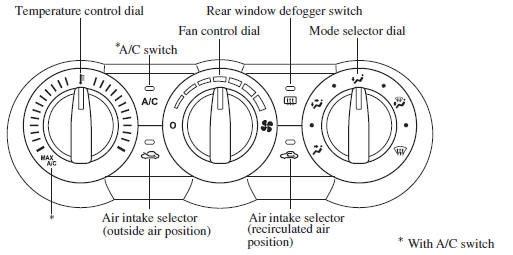
- Control Switches
- Heating
- Cooling (With air conditioner)
- Windshield Defrosting and Defogging
- Dehumidifying (With air conditioner)
 Selecting the Airflow Mode
Dashboard Vents
Defroster and Floor Vents
Dashboard and Floor Vents
Defroster Vents
Floor Vents
...
 Control Switches
Temperature control dial
This dial controls temperature. Turn it
clockwise for hot and counterclockwise
for cold.
NOTE
When the mode is set to or
with the
fan control dial in a position oth ...
Other materials:
Active Adaptive Shift (AAS)
Active Adaptive Shift (AAS)
automatically controls the transaxle shift
points to best suit the road conditions
and driver input. This improves driving
feel. The transaxle may switch to AAS
mode when driving up and down slopes,
cornering, driving at high elevations,
or depressing the accelerat ...
Clutch Unit Removal/Installation [C66 M R]
1. Remove the battery cover..
2. Disconnect the negative battery cable..
3. Remove the aerodynamic under cover No.2 and the splash shield as a single
unit..
4. Drain the manual transaxle oil..
5. Disconnect and/or remove the following parts in the engine compartment.
a. Remove the batte ...
Battery Runs Out
Jump-starting is dangerous if done incorrectly. So follow the procedure
carefully. If you
feel unsure about jump-starting, we strongly recommend that you have a competent
service
technician do the work.
WARNING
Follow These Precautions Carefully:
To ensure safe and correct handl ...
