
Mazda 3 Service Manual: Positive Crankcase Ventilation (PCV) Valve Inspection [Mzr 2.0, Mzr 2.5]
Airflow Inspection
1. Disconnect the section (A) of the ventilation hose shown in the figure.
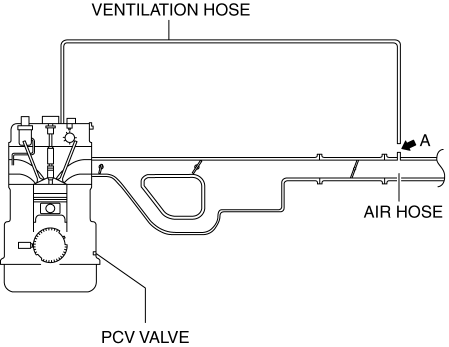
2. Start the engine and verify that vacuum is applied to the end of the disconnected ventilation hose while the engine is idling.
NOTE:
-
Because it is difficult to directly inspect the PCV valve, determine the integrity of the PCV valve by performing a simple inspection of the ventilation hose airflow condition.If the PCV valve is operating normally, vacuum occurs in the ventilation hose, however, if there is a malfunction in the PCV valve, positive pressure occurs in the ventilation hose because the blow-by gas is circulated to the air hose from the ventilation hose.
-
Verify the ventilation hose vacuum using the following methods:
-
When the tip of your finger touches the end of the ventilation hose, it is suctioned by the hose.
-
When a thin scrap of paper contacts the end of the ventilation hose, it is suctioned by the hose.
3. If it can be verified that vacuum occurs in the ventilation hose, the positive crankcase ventilation (PCV valve) system is determined to be normal.
-
If positive pressure occurs in the ventilation hose, perform the procedure from Step 4 to examine the PCV valve.
4. Remove the battery cover..
5. Disconnect the negative battery cable..
6. Remove the intake manifold and the fuel distributor component as a single unit..
7. Remove the PCV valve and the oil separator as a single unit..
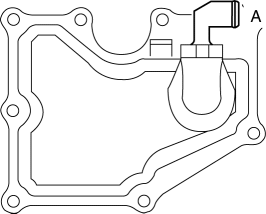
8. Verify that there is no airflow when pressure is applied to port A.
-
If there is airflow, replace the PCV valve..
9. Verify that there is airflow when vacuum is applied to port A.
-
If there is no airflow, replace the PCV valve..
 EGR Valve Removal/Installation [Mzr 2.0, Mzr 2.5]
1. Remove the battery cover..
2. Disconnect the negative battery cable..
3. Drain the engine coolant from the radiator..
4. Remove the air cleaner and the air hose as a single unit..
5. Remove ...
 Positive Crankcase Ventilation (PCV) Valve Removal/Installation [Mzr 2.0, Mzr
2.5]
Positive Crankcase Ventilation (PCV) Valve Removal/Installation [Mzr 2.0, Mzr
2.5]
1. Remove the battery cover..
2. Disconnect the negative battery cable..
3. Remove the intake manifold and the fuel distributor component as a single
unit..
4. Remove in the order indicated in ...
Other materials:
Rear Door Child Safety Locks
These locks are intended to help prevent
children from accidentally opening the
rear doors. Use them on both rear doors
whenever a child rides in the rear seat of
the vehicle.
If you slide the child safety lock to the
lock position before closing that door, the
door cannot be opened from th ...
Steering Gear And Linkage Disassembly
CAUTION:
To prevent damage to the steering gear, secure it to the vise using a copper
plate or clean cloth.
1. Disassemble in the order indicated in the table.
1
Floor seal
2
Oil pipe
3
Tie-rod end ...
Buckle Switch Inspection
Driver Side
1. Switch the ignition to off.
2. Disconnect the negative battery cable..
3. Remove the front seat..
4. Remove the front buckle..
5. Inspect for continuity between the buckle switch terminals using a tester.
If not as indicated in the table, replace the driver sid ...
