
Subaru Solterra 2023-2026 Owner's Manual: Power (ignition) switch
In the Subaru Solterra, operating the power (ignition) switch while carrying the electronic key allows you to start the EV system or switch between different power modes quickly and efficiently.
The Subaru Solterra power system is designed for convenience and safety, ensuring that the vehicle only becomes operational under the correct conditions.
Starting the EV system
1. Before starting the Subaru Solterra, confirm that the charging cable has been fully disconnected from the vehicle.
2. Pull the parking brake switch to verify that the parking brake is engaged. The parking brake indicator should illuminate on the display.
3. Firmly press and hold the brake pedal.
 and a confirmation message will appear on the Subaru Solterra multi-information
display.
and a confirmation message will appear on the Subaru Solterra multi-information
display.
If this message does not appear, the Subaru Solterra EV system cannot be started.
If the shift position is set to N, the Subaru Solterra will not start. Always shift to P before attempting to start the EV system.
4. Press the Subaru Solterra power switch once firmly and briefly.
A single short press is sufficient; there is no need to hold the button down.
When the "READY" indicator appears, the Subaru Solterra EV system is active and ready for operation.
Keep the brake pedal depressed until the "READY" indicator is fully illuminated.
The Subaru Solterra EV system can be started regardless of the current power switch mode.
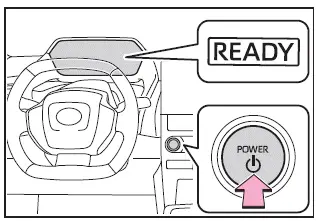
5. Verify that the "READY" indicator is on.
The Subaru Solterra cannot be driven unless the "READY" indicator is illuminated.
■ Power switch illumination
The Subaru Solterra power switch lighting responds dynamically depending on vehicle status:
- When the driver’s or front passenger’s door is opened, the Subaru Solterra power switch illumination activates.
- When the power switch is OFF and the brake pedal is pressed while carrying the electronic key, the illumination will blink.
- When the Subaru Solterra is in ACC or ON mode, the power switch illumination remains steadily lit.
- After switching from ACC or ON to OFF, the Subaru Solterra power switch remains illuminated briefly before turning off.
■ If the EV system does not start
- The Subaru Solterra immobilizer system may still be active. In this case, contact an authorized SUBARU dealer.
- The charging cable may still be connected to the Subaru Solterra.
- If a start-related message appears on the display, carefully read and follow the instructions provided.
- If the Subaru Solterra door was unlocked using the mechanical key, the EV system may not start via the smart key system. However, if the electronic key is inside the vehicle and the doors are locked, starting may still be possible.
■ When the ambient temperature is low, such as during winter driving conditions
- In cold conditions, the Subaru Solterra "READY" indicator may take longer to stabilize. Wait until it remains steadily illuminated before driving.
- If the Subaru Solterra traction battery temperature drops extremely low (below approximately -22ºF [-30ºC]), the EV system may not start. In such cases, allow the battery temperature to rise before attempting to start again.
■ If the 12-volt battery is discharged
In the Subaru Solterra, if the 12-volt battery becomes discharged, the EV system cannot be started using the smart key system. In such cases, alternative procedures or battery recovery will be required before normal operation can resume.
■ If "Smart Key System Malfunction
See Owner's Manual" is displayed on the multi-information display, the Subaru Solterra system may not be functioning correctly.
Have the Subaru Solterra inspected by an authorized SUBARU dealer as soon as possible to prevent further issues.
■ If the "READY" indicator does not come on
If the "READY" indicator fails to illuminate in the Subaru Solterra after following the correct starting procedure, this may indicate a system fault. Contact your SUBARU dealer immediately for diagnosis and repair.
■ Operation of the power switch
- When using the Subaru Solterra power switch, ensure it is pressed briefly and firmly. If the press is too light or too long, the power mode may not change and the EV system may not start.
- If attempting to restart the Subaru Solterra EV system immediately after
turning it OFF, the system may not respond.
Wait a few seconds after switching OFF before attempting to restart the Subaru Solterra EV system.
■ Customization
If the Subaru Solterra smart key system has been disabled through customization settings, some starting functions may not operate as expected.
WARNING
■ When starting the EV system
Always start the Subaru Solterra EV system while seated in the driver’s seat and maintain full control of the vehicle.
Never press the accelerator pedal during startup, as this may lead to unintended vehicle movement and potentially cause serious injury or an accident.
NOTICE
■ When starting the EV system
If the Subaru Solterra EV system becomes difficult to start or behaves abnormally, have the vehicle inspected by a SUBARU dealer without delay.
■ Symptoms indicating a malfunction with the power switch
If the Subaru Solterra power switch does not operate smoothly, feels unusual, or appears to stick during operation, it may indicate a malfunction. Immediate inspection by a SUBARU dealer is recommended.
Stopping the EV system
1. Bring the Subaru Solterra to a complete stop.
2. Engage the parking brake securely.
3. Press the P position switch.
Confirm that the Subaru Solterra shift position indicator displays P and that the parking brake indicator is illuminated.
4. Press the power switch.
The Subaru Solterra EV system will shut down, and the meter display will turn off (the shift position indicator may remain briefly before switching off).
5. Release the brake pedal and verify that neither "ACCESSORY" nor "POWER ON" is displayed on the Subaru Solterra meter.
■ Automatic EV system shut off feature
- The Subaru Solterra includes an automatic shut-off function that turns off the EV system if the vehicle remains in P for an extended period.
- Typically, the Subaru Solterra EV system will shut down automatically after approximately 1 hour if left running in P.
- This timer will reset if the brake pedal is pressed or if the Subaru Solterra shift position is changed from P.
- If the Subaru Solterra is parked and locked using the door lock switch from inside or the mechanical key from outside, the automatic shut-off feature will be deactivated.
In the Subaru Solterra, the timer responsible for the automatic EV system shut-off feature is intelligently reactivated whenever the driver’s door is opened. This ensures that the Subaru Solterra maintains optimal energy management and safety readiness, especially during repeated entry and exit scenarios, enhancing both convenience and system efficiency.
■ When the shift control system malfunctions
If you attempt to switch off the power while a malfunction is present in the shift control system of your Subaru Solterra, the system may automatically transition into ACC mode instead of shutting down completely. In such a case, you can fully deactivate ACC by firmly applying the parking brake and pressing the power switch once more. This behavior is designed to maintain partial system availability while preventing unsafe shutdown conditions.
Whenever a system irregularity is detected in your Subaru Solterra, it is strongly recommended to have the vehicle inspected without delay by an authorized SUBARU dealer to ensure proper operation and long-term reliability.
WARNING
■ Stopping the EV system in an emergency
- If an emergency requires you to immediately stop the EV system while
driving the Subaru Solterra, press and hold the power switch for more than 2
seconds, or quickly press it three or more times in succession.
It is critical to avoid interacting with the power switch during normal driving conditions unless absolutely necessary. Even if the EV system is turned off in motion, steering and braking capabilities will remain functional, preserving control of the Subaru Solterra.
However, depending on the charge level of the 12-volt battery and current operating conditions, power assistance for steering may be reduced. This can result in heavier steering feel before the vehicle comes to a complete stop. In such situations, safely pull over and stop the Subaru Solterra as soon as conditions allow.
- If the power switch is pressed while the Subaru Solterra is in motion, a warning notification will appear on the multi-information display accompanied by an audible alert to inform the driver of the action.
- To restart the EV system after performing an emergency shutdown in the Subaru Solterra, press the power switch briefly but decisively to restore normal operation.
Changing power switch modes
In the Subaru Solterra, different power modes can be selected by pressing the power switch without depressing the brake pedal. Each press cycles through the available modes, allowing flexible control over the vehicle’s electrical systems.
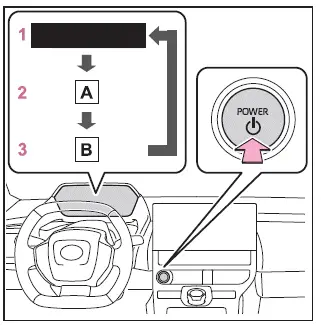
- "ACCESSORY"
- "POWER ON"
- OFF
The Subaru Solterra remains powered down, but essential safety features such as the emergency flashers remain operational. - ACC*
In this mode, selected electrical systems like the audio unit can be used without activating the full EV system."ACCESSORY" will be displayed on the multi-information display of the Subaru Solterra, clearly indicating the current state.
- ON
All electrical components of the Subaru Solterra become fully operational in this mode."POWER ON" will appear on the multi-information display, confirming full system readiness.
*: Setting can be customized.
■ Auto power off function
The Subaru Solterra is equipped with an automatic power-off function designed to protect the 12-volt battery. If the vehicle remains in ACC mode for more than 20 minutes, or in ON mode (without the EV system running) for over 20 minutes while the shift position is in P, the system will automatically turn off the power switch. Despite this safeguard, it is important to note that this function cannot completely eliminate the risk of battery discharge. Therefore, avoid leaving the Subaru Solterra in ACC or ON modes for extended periods when the EV system is inactive.
NOTICE
■ To prevent 12-volt battery discharge
- Do not keep the Subaru Solterra in ACC or ON mode for prolonged durations without activating the EV system, as this may lead to unnecessary battery drain.
- If "ACCESSORY" or "POWER ON" is visible on the multi-information display, the Subaru Solterra is not fully turned off. Always confirm that the power switch is set to OFF before exiting the vehicle to avoid unintended battery usage.

 Shift position
Choose the appropriate shift position in your Subaru Solterra according
to your driving needs, road conditions, and intended operation.
Shift position purpose and functions
In the Subaru Sol ...
Other materials:
Schedule 2
Chart symbols:
I: Inspect: Inspect and clean, repair, adjust, fill up, or replace if
necessary.
R: Replace
L : Lubricate
C: Clean
T: Tighten
Remarks:
*1 Use of FL-22 is recommended when replacing engine coolant. Using engine
coolant other than FL-22 may
cause serious damage to the en ...
Replacing Exterior Light Bulbs
Headlights (With xenon fusion
headlights)
Low/High beam bulbs
You cannot replace the low/high beam
bulbs by yourself. The bulbs must be
replaced at an Authorized Mazda Dealer.
Headlights (With halogen headlights)
Low-beam bulbs
If you are changing the right bulb, start
the engine, turn ...
Driver monitor
Basic functions
In the Subaru Solterra, the driver monitoring system continuously observes the
driver during operation using an advanced in-cabin camera. It analyzes the driver’s
head position, gaze direction, and whether the eyes are open or closed.
Based on this data, the Subaru Solterra e ...
