
Mazda 3 Service Manual: Power Steering Fluid Line Component Removal/Installation
NOTE:
-
The following procedure is for replacement of the parts shown in the figure. Regarding replacement of the suction hose and return hose, refer to the electric power steering oil pump component removal/installation..
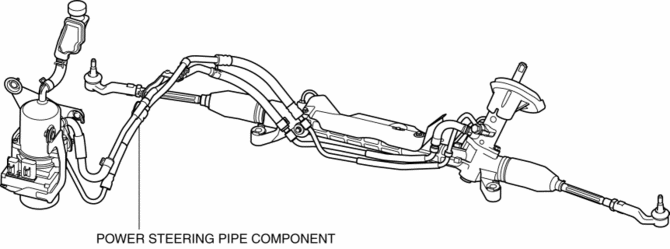
Power Steering Pipe Component Removal/Installation
NOTE:
-
The pressure pipe and return pipe are integrated with the power steering pipe component. Therefore, if any one of the pipes has a malfunction, replace the power steering pipe component.
1. Remove the front mudguard (RH)..
2. Remove the splash shield and aerodynamic under cover NO.2 as a single unit..
3. Remove the connecting bolt (pump side) from the electric power steering oil pump and disconnect the return hose from the power steering pipe component (return pipe).
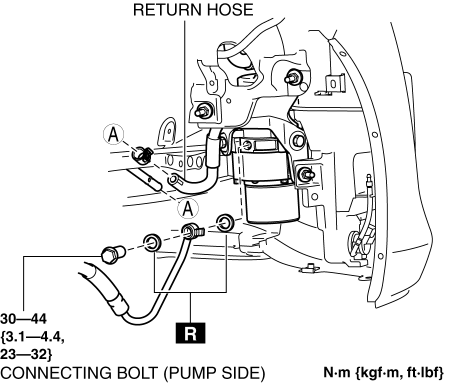
NOTE:
-
Drain the power steering fluid.
4. Remove the nut shown in the figure.
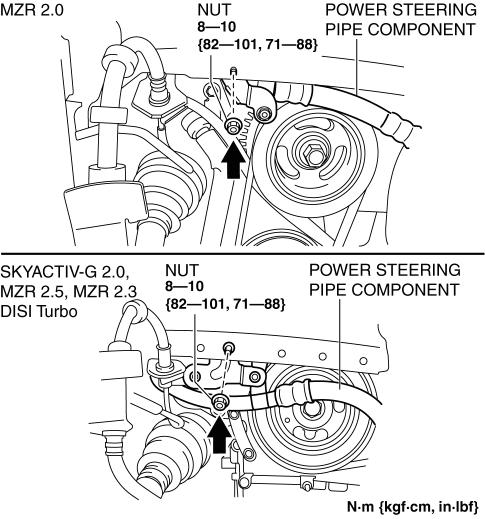
5. Remove in the order indicated in the table.
6. Install in the reverse order of removal.
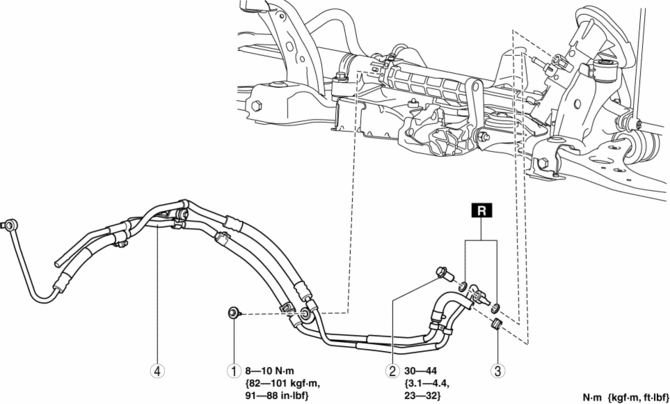
|
1 |
Bolt |
|
2 |
Connecting bolt (steering gear side) |
|
3 |
Hose clips |
|
4 |
Power steering pipe component |
 Power Steering Fluid Inspection
Fluid Level Inspection
1. Verify that the fluid level is between MAX and MIN of the sub tank when the
engine is cold.
If the fluid is not at the specified level, adjust the fluid level (MIN ...
 Steering Shaft Inspection
1. Inspect the column bearing for excessive play and damage.
2. Verify that the measurement of the steering shaft indicated in the figure
is as specified.
If not within the specificati ...
Other materials:
Oil Control Valve (OCV) Inspection [Mzr 2.0, Mzr 2.5]
Coil Resistance Inspection
1. Remove the battery cover..
2. Disconnect the negative battery cable..
3. Remove the plug hole plate..
4. Disconnect the OCV connector.
5. Measure the resistance between terminals A and B using an ohmmeter.
OCV coil resistance
6.9—7.9 ohms [20°C ...
Side Step Molding Removal
1. Remove the fasteners A.
2. Using the removal tool, disengage clips B in the direction of the arrow (1),
(2) shown in the figure.
NOTE:
Leave the disengaged clip B in place in consideration of the servicing.
3. Slide the side step molding in the direction of the arrow ( ...
Rear Cross Traffic Alert (RCTA)
The Rear Cross Traffic Alert (RCTA) system is designed to assist the driver
in checking the
area to the rear of the vehicle on both sides while the vehicle is reversing by
alerting the
driver to the presence of vehicles approaching the rear of the vehicle.
The Rear Cross Traffic Alert (RCTA ...
