
Mazda 3 Service Manual: Rear Seat Back Trim Removal/Installation
1. Remove the rear seat back frame..
2. Remove rings C, then remove the seat back trim from the seat back pad.
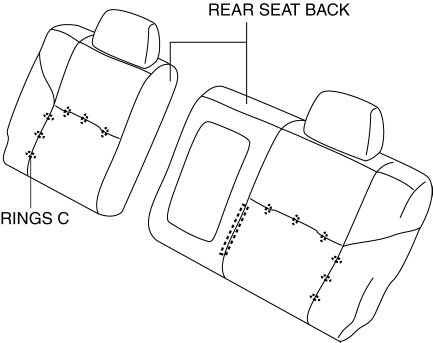
3. Install in the reverse order of removal.
 Rear Seat Back Removal/Installation
1. Remove the rear seat cushion..
2. Remove the rear buckle installation bolt..
3. Fold the rear seat back.
4. Remove the bolts.
5. Remove the rear seat back from the rear seat back br ...
 Rear Seat Cushion Removal/Installation
1. Detach the hooks from the grommets by pulling the rear seat cushion in the
order of (1), (2) in the direction of the arrow shown in the figure, while remove
the wire.
2. Install in the re ...
Other materials:
Immobilizer system
The Subaru Solterra is equipped with advanced key technology featuring
integrated transponder chips that communicate with the vehicle’s onboard system,
ensuring that the EV system can only be started with a properly registered key.
This significantly enhances protection against unauthorized ...
Rear Center Seat Belt Removal/Installation
CAUTION:
The ELR (emergency locking retractor) has a spring that will unwind if the
retractor cover is removed. The spring cannot be rewound by hand. If this occurs,
the ELR will not work properly. Therefore, do not disassemble the retractor.
4SD
1. Remove the following parts:
...
Inboard Light Removal/Installation
4SD
1. Disconnect the negative battery cable..
2. Remove the trunk lid trim..
3. Disconnect the connector.
4. Remove the nut.
5. Remove the bracket.
6. Remove the inboard light as shown in the figure.
7. Install in the reverse order of removal..
5HB
1. Disconnect the negative ...
