
Mazda 3 Service Manual: Seat Warmer Unit Inspection
WARNING:
-
Handling a front seat (with built-in side air bag) improperly can accidentally operate (deploy) the air bag, which may seriously injure you. Read the service warnings before handling a front seat (with built-in side air bag)..
CAUTION:
-
After removing a front seat, do not operate the slider lever. If the slider lever is operated, the left and right slide positions will deviate, and the slide adjuster may be damaged after the front seat is installed.
-
Verify that there are no malfunctions in the sliding mechanism after installing a front seat.
-
When performing the procedure with a front seat removed from the vehicle, perform the procedure on a clean rag so as not to damage or soil the seat.
-
When the passenger's seat is removed, perform the seat weight sensor inspection using the M-MDS after installing the passenger's seat..
-
When the passenger's seat is replaced with a new one, perform the seat weight sensor calibration using the M-MDS..
Seat Cushion
1. Remove the battery cover..
2. Disconnect the negative battery cable and wait 1 min or more
..
3. Remove the front seat..
4. Remove the front seat side cover.
5. Remove the front seat cushion trim..
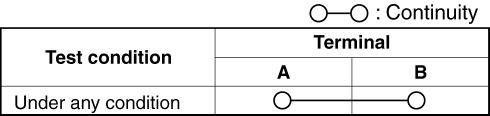
6. Verify that the continuity between terminals A and B is as indicated in the table.
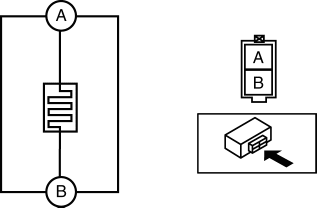
-
If not as indicated in the table, replace the seat warmer unit..
Seat Back
1. Remove the battery cover..
2. Disconnect the negative battery cable and wait 1 min or more
..
3. Remove the front seat..
4. Remove the front seat back trim..
5. Verify that the continuity between terminals A and B is as indicated in the table.
-
If not as indicated in the table, replace the seat warmer unit..
 Seat Warmer Switch Removal/Installation
1. Remove the battery cover..
2. Disconnect the negative battery cable..
3. Remove the shift panel..
4. Squeeze the tabs of seat warmer switch and pull it outward to remove it.
5. Remove ...
 Seat Warmer Unit Removal/Installation
Removal
WARNING:
Handling a front seat (with built-in side air bag) improperly can accidentally
operate (deploy) the air bag, which may seriously injure you. Read the service
warnings b ...
Other materials:
Rear Window Defogger
The rear window defogger clears fog from
the rear window.
The ignition must be switched ON to use
the defogger.
Press the switch to turn on the rear
window defogger. The rear window
defogger operates for about 15 minutes
and then turns off automatically.
The indicator light illuminates ...
Variable Intake Air Solenoid Valve Inspection [Mzr 2.0, Mzr 2.5]
Airflow Inspection
1. Remove the battery cover..
2. Disconnect the negative battery cable..
3. Remove the variable intake air solenoid valve..
4. Inspect airflow between the ports under the following conditions.
If not as specified, replace the variable intake air solenoid val ...
Electronic key battery
If the electronic key battery of your Subaru Solterra becomes depleted,
it should be replaced promptly to ensure uninterrupted operation of all key functions.
■ If the key battery is depleted
When the battery inside the Subaru Solterra electronic key weakens or fully discharges,
you may noti ...
