
Mazda 3 Service Manual: Transaxle Range (TR) Switch Removal/Installation [FS5 A EL]
CAUTION:
-
Water or foreign objects entering the connector can cause a poor connection or corrosion. Be sure not to drop water or foreign objects on the connector when disconnecting it.
1. Engage the parking brake and use wheel chocks at the front and rear of the wheels.
2. Shift the selector lever to the N position.
3. Perform the following procedures.
a. Remove the battery cover..
b. Disconnect the negative battery cable.
c. Remove the air cleaner component..
4. Remove in the order indicated in the table.
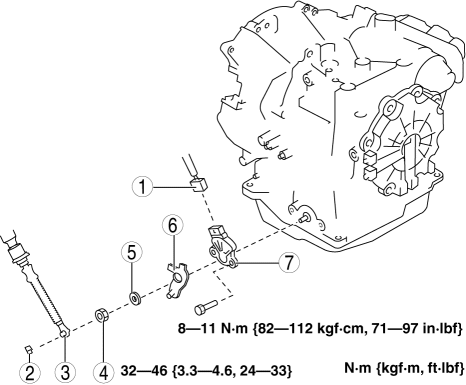
|
1 |
Connector |
|
2 |
Clip |
|
3 |
Selector cable |
|
4 |
Manual shaft nut (See Manual Shaft Nut Removal Note.) (See Manual Shaft Nut Installation Note.) |
|
5 |
Washer |
|
6 |
Manual shaft lever |
|
7 |
TR switch (See TR switch Installation Note.) |
5. Install in the reverse order of removal.
6. Inspect the TR switch..
Manual Shaft Nut Removal Note
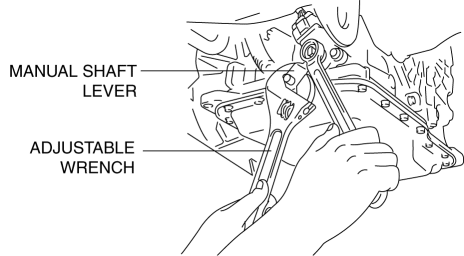
1. Set the adjustable wrench as shown to hold the manual shaft lever and loosen the manual shaft nut.
CAUTION:
-
Do not use an impact wrench. Hold the manual shaft lever when removing the manual shaft nut, or the transaxle may be damaged.
TR switch Installation Note
1. Verify that the manual shaft is aligned with the N position.
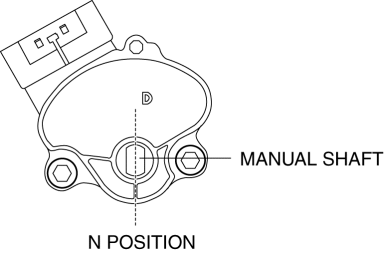
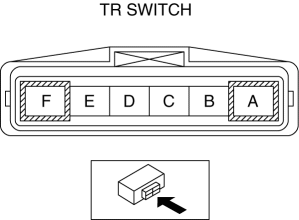
2. Adjust the TR switch between terminals B and C until the resistance becomes specification.
-
TR switch specification
-
713—787 ohms
3. Tighten the TR switch installation bolts.
-
Tightening torque
-
8—11 N·m {82—112 kgf·cm, 71—97 in·lbf}
Manual Shaft Nut Installation Note
1. Set the adjustable wrench as shown to hold the manual shaft lever and tighten the manual shaft nut.
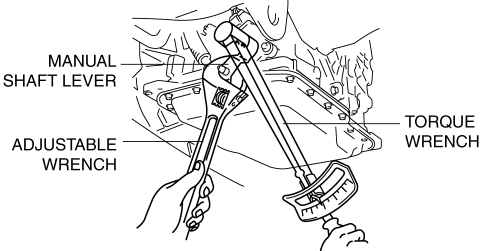
CAUTION:
-
Do not use an impact wrench. Hold the manual shaft lever when installing the manual shaft nut, or the transaxle may be damaged
-
Tightening torque
-
32—46 N·m {3.3—4.6 kgf·m, 24—33 ft·lbf}
 Transaxle Range (TR) Switch Inspection [FS5 A EL]
CAUTION:
Water or foreign objects entering the connector can cause a poor connection
or corrosion. Be sure not to drop water or foreign objects on the connector
when disconnecting it.
...
 Automatic
...
Other materials:
Sunlight/Temperature Sensor
The climate control system measures
inside and outside temperatures, and
sunlight. It then sets temperatures inside
the passenger compartment accordingly.
CAUTION
Do not obstruct either sensor,
otherwise the climate control system
will not operate properly.
...
Oil Control Valve (OCV) Removal/Installation [Mzr 2.3 Disi Turbo]
1. Remove the battery cover..
2. Disconnect the negative battery cable..
3. Remove the charge air cooler..
4. Remove the ignition coils..
5. Disconnect the ventilation hose from the cylinder head cover..
6. Remove the cylinder head cover..
7. Remove in the order indicated in the table.
...
Cup Holder
WARNING
Never use a cup holder to hold hot
liquids while the vehicle is moving:
Using a cup holder to hold hot
liquids while the vehicle is moving is
dangerous. If the contents spill, you
could be scalded.
Do not put anything other than cups or
drink cans in cup hold ...
