
Mazda 3 Service Manual: Trunk Lid Release Actuator Inspection
1. Disconnect the negative battery cable..
2. Remove the trunk lid trim..
3. Remove the trunk lid latch and release actuator..
4. Press the latch in using a flathead screwdriver to inspect the latch lever condition.
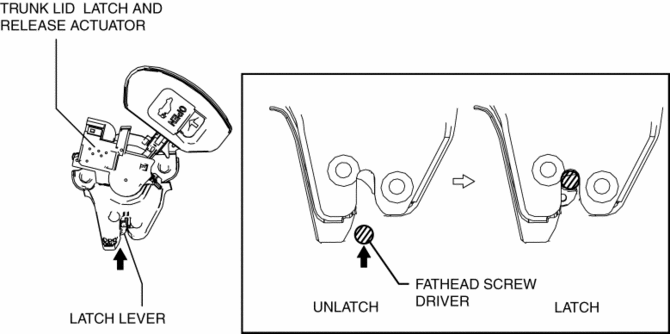
5. Connect terminal A to the positive battery voltage, connect terminal B to the ground, and verify that the latch lever is released and the condition changes to the unlatch condition.
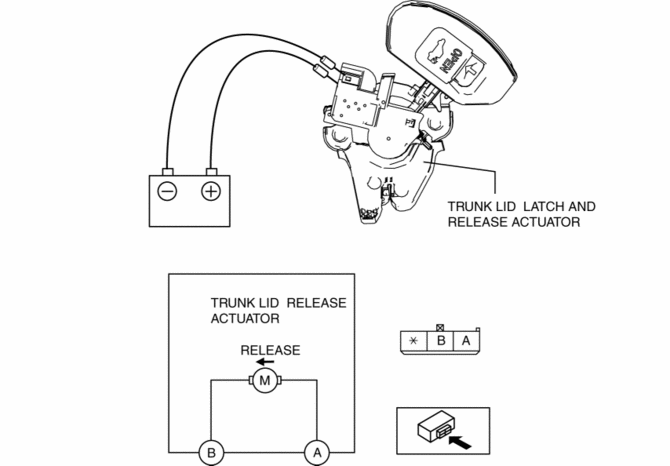
-
If the operation cannot be verified, replace the trunk lid latch and release actuator.
 Trunk Lid Opener Lever Removal/Installation
1. Remove the front scuff plate (LH)..
2. Remove the front side trim (LH)..
3. Remove the fuel-filler lid opener bezel..
4. Partially peel back the floor covering.
5. Remove the bolts.
...
 Trunk Lid Removal/Installation
WARNING:
Removing the trunk lid stay damper without supporting the trunk lid can be
dangerous. The trunk lid may fall and injure you. Be sure to open the trunk
lid completely and support ...
Other materials:
Electric Variable Valve Timing Actuator Inspection [Skyactiv G 2.0]
WARNING:
A hot engine can cause severe burns. Turn off the engine and wait until it
is cool before servicing.
CAUTION:
Do not disassemble the electric variable valve timing actuator because it
is a precision unit.
1. Remove the battery cover..
2. Disconnect the ne ...
Ignition Coil Removal/Installation [Mzr 2.3 Disi Turbo]
1. Remove the battery cover..
2. Disconnect the negative battery cable..
3. Remove the charge air cooler..
4. Remove in the order indicated in the table.
5. Install in the reverse order of removal.
1
Connector
2
Ignition coil
...
Turn signal lever
Operating instructions
The turn signal lever in the Subaru Solterra is designed for precise, intuitive
operation, allowing the driver to clearly communicate intended maneuvers to other
road users. Proper use of this control enhances safety and ensures predictable driving
behavior in all ...
