
Mazda 3 Service Manual: Vacuum Hose Removal/Installation [Mzr 2.0, Mzr 2.5]
1. Remove the battery and battery tray..
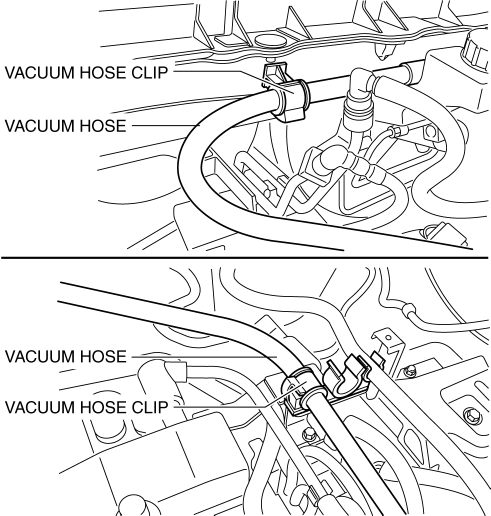
2. Remove the vacuum hose from the vacuum hose clip.
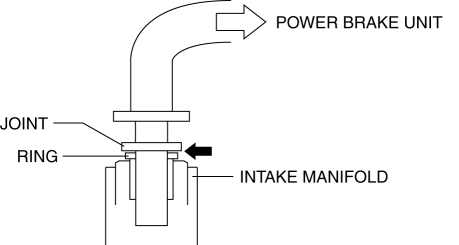
3. Insert a thin flathead screwdriver at the point indicated by the arrow in the figure, push the ring down and disconnect the vacuum hose from the intake manifold.
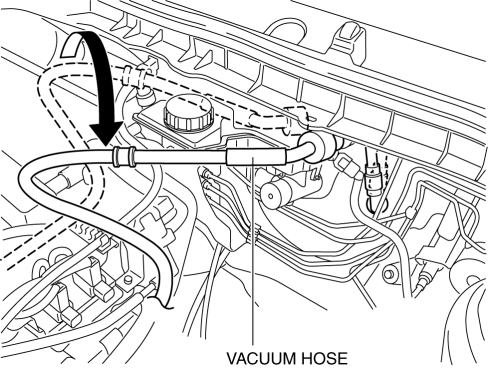
4. Move the vacuum hose as shown in the figure.
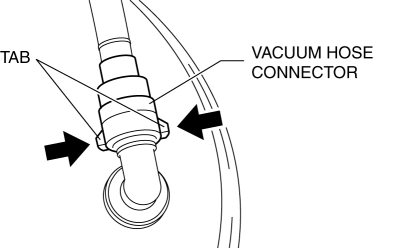
5. Disconnect the vacuum hose connector from the power brake unit while pressing the tabs of the vacuum hose connector.
6. Remove the vacuum hose.
7. Install in the reverse order of removal.
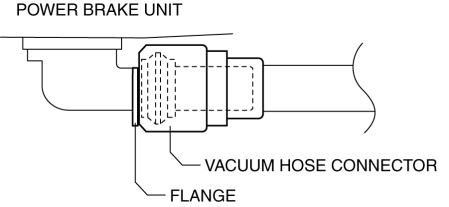
8. Insert the vacuum hose connector to the power brake unit.
9. Verify that the vacuum hose is inserted so that the connector contacts the power brake unit flange.
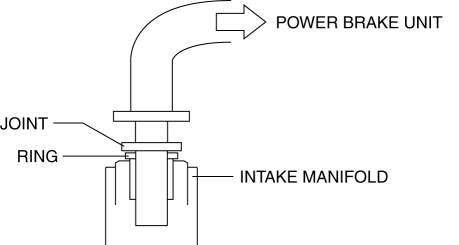
10. Verify that the vacuum hose is inserted so that the joint contacts the intake manifold ring.
 Power Brake Unit Removal/Installation [Mzr 2.3 Disi Turbo]
CAUTION:
Once the brake switch clearance has automatically been adjusted, it cannot
be adjusted again. Therefore, replace the switch with a new one when replacing
the power brake unit or ...
 Vacuum Hose Removal/Installation [Mzr 2.3 Disi Turbo]
1. Remove the charge air cooler cover..
2. Remove the charge air cooler..
3. Insert a thin flathead screwdriver at the point indicated by the arrow in
the figure, push the ring down and disconne ...
Other materials:
Front Seat Back Component [Vehicles Without Power Seat System] Removal/Installation
WARNING:
Handling a front seat (with built-in side air bag) improperly can accidentally
operate (deploy) the air bag, which may seriously injure you. Read the service
warnings before handling a front seat (with built-in side air bag)..
CAUTION:
After removing a front seat ...
Traffic Jam Assist
Function Outline
In the Subaru Solterra, Traffic Jam Assist is an advanced driver support feature
designed to reduce fatigue during congested driving conditions. After confirming
operating conditions, the system can assist with lane centering, controlled acceleration
and deceleration, as well ...
Brake Fluid Air Bleeding
CAUTION:
Brake fluid will damage painted surfaces. Be careful not to spill any on
painted surfaces. If it is spilled, wipe it off immediately.
NOTE:
Keep the fluid level in the reserve tank at 3/4 full or more during the air
bleeding.
Begin air bleeding with the b ...
