
Mazda 3 Service Manual: Windshield Wiper And Washer Switch Inspection
1. Disconnect the negative battery cable..
2. Remove the following parts:
a. Front scuff plate (Driver‘s side).
b. Front side trim (Driver‘s side).
c. Hood release lever.
d. Upper panel.
e. Shift knob (MTX).
f. Selector lever knob (ATX).
g. Shift panel.
h. Side wall.
i. Console.
j. Lower panel.
k. Column cover.
l. Wiper and washer switch.
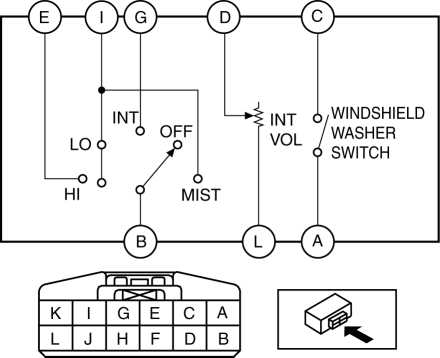
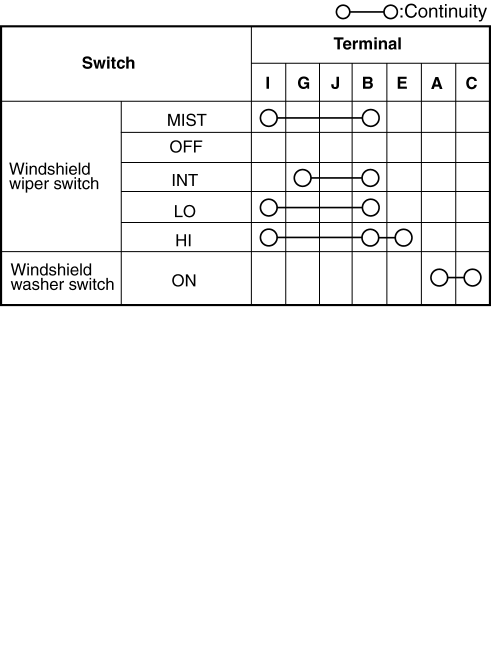
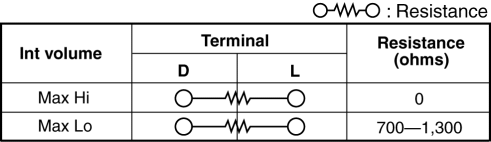
3. Verify that the resistance and continuity between the windshield wiper and washer switch terminals as indicated in the table.
-
If the continuity is not as indicated in the table, or if the resistance is not within the specification, replace the windshield wiper and washer switch.
Vehicles With Auto Wiper System
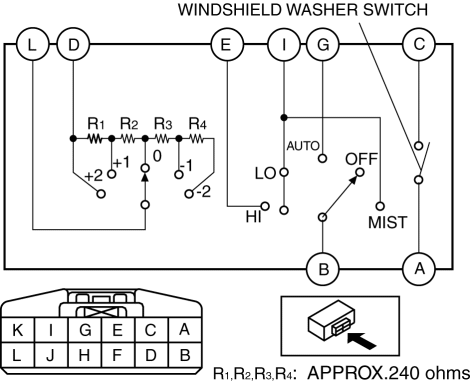
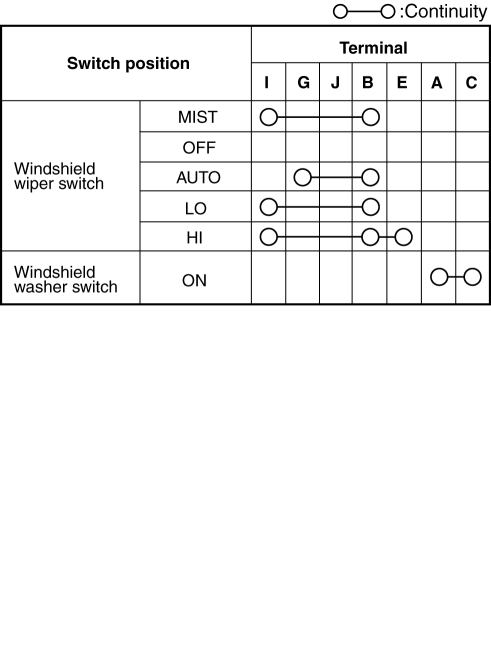
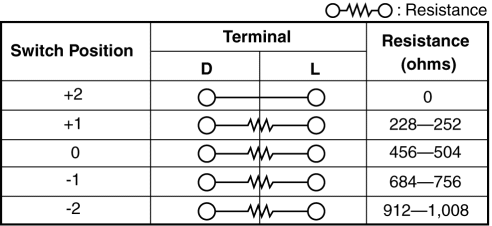
Vehicles Without Auto Wiper System
 Rear Wiper And Washer Switch Inspection
1. Disconnect the negative battery cable..
2. Remove the following parts:
a. Front scuff plate (Driver‘s side).
b. Front side trim (Driver‘s side).
c. Hood release lever.
d. Lower panel. ...

Other materials:
Joint Shaft Assembly [Mzr 2.3 Disi Turbo]
1. Assemble in the order indicated in the table.
1
Bracket
2
Dust seal (RH)
.
3
Bearing
.
4
Dust seal (LH)
.
5
Joint shaft
.
Dust Seal ...
Trunk Lid Latch Switch Inspection
1. Disconnect the negative battery cable..
2. Remove the trunk lid trim..
3. Remove the trunk lid latch and lock actuator..
4. Press the latch in using a flathead screwdriver to inspect the latch lever
condition.
5. Verify that the continuity is as indicated in the table.
I ...
Overloading
WARNING
Be careful not to overload your vehicle:
The gross axle weight rating (GAWR)
and the gross vehicle weight rating
(GVWR) of the vehicle are on the
Motor Vehicle Safety Standard Label
on the driver's door frame. Exceeding
these ratings can cause an accident
or ve ...
