
Mazda 3 Service Manual: Windshield Wiper Arm And Blade Removal/Installation
1. Remove in the order indicated in the table.
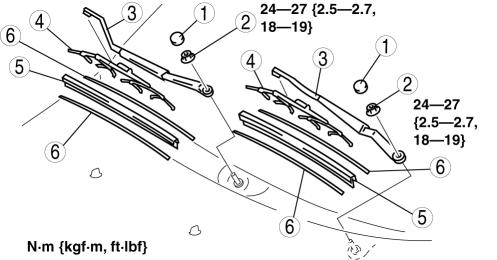
|
1 |
Cap |
|
2 |
Nut |
|
3 |
Windshield wiper arm (See Windshield Wiper Arm Installation Note.) |
|
4 |
Windshield wiper blade |
|
5 |
Rubber brush |
|
6 |
Backing plate |
2. Install in the reverse order of removal.
3. Adjust the windshield wiper arm and blade..
Windshield Wiper Arm Installation Note
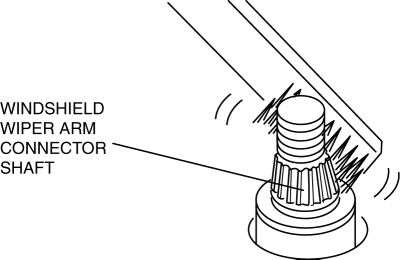
1. Clean the windshield wiper arm connector shafts using a wire brush before installing the windshield wiper arms.
 Windshield Wiper Arm And Blade Adjustment
1. Operate the windshield wipers, and then turn off the windshield wiper motor
to set the wipers in the auto stop position.
2. Slide the serrated connecting part and adjust the windshield wiper ar ...
 Windshield Wiper Motor Disassembly/Assembly
1. Disassemble in the order indicated in the table.
1
Wiper link No.1
(See Ball Joint Assembly Note.)
2
Wiper link No.2
(See Ball Joint ...
Other materials:
Rear Outer Handle Removal/Installation
1. Fully close the rear door glass.
2. Disconnect the negative battery cable..
3. Remove the rear door trim..
4. Remove the service hole cover.
5. Remove the screw from the service hole.
NOTE:
The screw cannot be removed because of the stopper.
6. Press the tab on the ...
Vacuum Hose Removal/Installation [Mzr 2.0, Mzr 2.5]
1. Remove the battery and battery tray..
2. Remove the vacuum hose from the vacuum hose clip.
3. Insert a thin flathead screwdriver at the point indicated by the arrow in
the figure, push the ring down and disconnect the vacuum hose from the intake manifold.
4. Move the vacuum hose ...
Theft Deterrent System Clearing Freeze Frame Data
1. Connect the M-MDS (IDS) to the DLC–2.
2. After the vehicle is identified, select the following items from the initialization
screen of the IDS.
Select “Body”.
Select "Burglar Service Functions".
3. Then, select the following item from the screen menu. ...
