
Mazda 3 Service Manual: Automatic Transaxle Fluid (ATF) Replacement [Fw6 A EL]
WARNING:
-
Do not perform the servicing while the ATF is hot. Otherwise, it could cause severe burns or serious injury.
1. Remove aerodynamic undercover No.2..
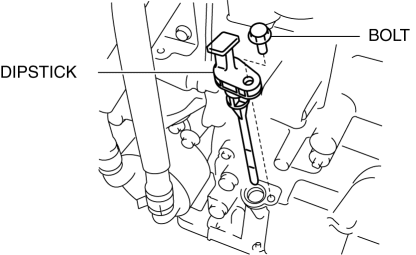
2. Remove the dipstick securing bolt.
3. Remove the dipstick.
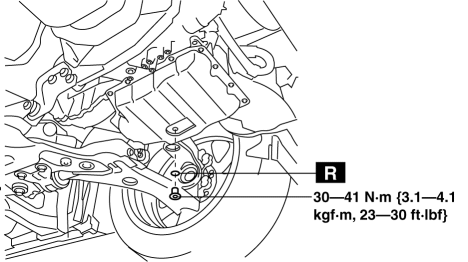
4. Remove the drain plug and washer, and drain the ATF.
5. Install a new washer and drain plug.
-
Tightening torque
-
30—41 N·m {3.1—4.1 kgf·m, 23—30 ft·lbf}
6. Add ATF from the dipstick installation hole.
NOTE:
-
The ATF color is blue.
-
Only use genuine ATF FZ for the FW6A-EL.
-
ATF type
-
Genuine ATF FZ
-
Resupply amount (Reference)
-
ATF is drained from drain plug: 3.5—4.9 L {3.7—5.1 US qt, 3.1—4.3 Imp qt}
7. Adjust the ATF level..
8. Insert the dipstick and install the securing bolt.
-
Tightening torque
-
8—11 N·m {82—112 kgf·cm, 71—97 in·lbf}
9. Install aerodynamic undercover No.2..
 Automatic Transaxle Fluid (ATF) Replacement [FS5 A EL]
WARNING:
A hot transaxle and ATF can cause severe burns. Turn off the engine and wait
until they are cool before changing the ATF.
1. Drain the ATF.
a. Remove the oil dipstick.
b. ...
 Automatic Transaxle Removal/Installation [FS5 A EL]
CAUTION:
Secure the steering wheel using tape or a cable to prevent the steering shaft
from rotating after disconnecting the steering shaft. If the steering wheel
rotates after the steer ...
Other materials:
Information on Temporary Tires
Please refer to the sample below
Temporary tires
Nominal width of tire in millimeters
Ratio of height to width (aspect ratio)
Diagonal
Rim diameter code
Load index & speed symbol
T115/70D16 90M is an example of a tire size and load index rating. Here is an
explanation
of ...
Refrigerant Charging
CAUTION:
Do not exceed the specification when charging the system with refrigerant.
Doing so will decrease the efficiency of the air conditioner or damage the refrigeration
cycle parts.
Charging Recycled HFC-134a Refrigerant
1. Connect an HFC-134a recovery/recycling/recharging d ...
Forward Sensing Camera
(FSC)
Your vehicle is equipped with a Forward Sensing Camera (FSC). The Forward
Sensing
Camera (FSC) is positioned near the rearview mirror and used by the following
systems.
High Beam Control System (HBC)
Lane Departure Warning System (LDWS)
The Forward Sensing Camera (FSC) determines t ...
