
Mazda 3 Owners Manual: Headlight Leveling
The number of passengers and weight of cargo in the luggage compartment change the angle of the headlights.
Auto type
The angle of the headlights will be automatically adjusted when turning on the headlights.
The warning/indicator light turns on when the system has a malfunction.
Refer to Warning/Indicator Lights on .
Manual type
The headlight leveling switch is used to adjust the angle of the headlights manually.
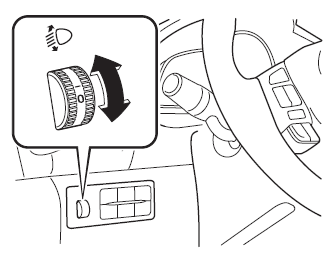
Select the proper headlight angle from the following chart.
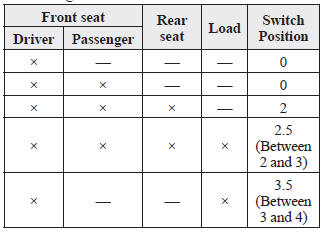
×: Yes —: No
 Flashing the Headlights
To flash the headlights, pull the lever fully
towards you (the headlight switch does not
need to be on).
The headlight high-beam indicator light
in the instrument cluster illuminates
simultan ...
 Daytime Running Lights
Some countries require moving vehicles
to have their lights on (daytime running
lights) during the daytime.
Daytime running lights turn on
automatically when the ignition is
switched ON.
The ...
Other materials:
Available Language (Type A)
The available languages are English,
Spanish, and Canadian French. If the
language setting is changed, all of the
voice guidance and voice input commands
are done in the selected language.
NOTE
If the language setting is changed,
device registration is maintained.
Phonebook records are ...
Front Scuff Plate Removal/Installation
1. Detach tab A while pulling the front scuff plate in the direction of the arrow
(1) shown in the figure, then detach hook B, clips C, and pins D while pulling in
the direction of the arrow (2).
2. Detach tab E while pulling the front scuff plate in the direction of the arrow
(3) shown in t ...
Active Adaptive Shift (AAS)
Active Adaptive Shift (AAS)
automatically controls the transaxle shift
points to best suit the road conditions
and driver input. This improves driving
feel. The transaxle may switch to AAS
mode when driving up and down slopes,
cornering, driving at high elevations,
or depressing the accelerat ...
