
Mazda 3 Service Manual: Pilot Bearing Inspection [G35 M R]
1. Perform the following procedures.
a. Remove the battery cover..
b. Disconnect the negative battery cable.
c. Remove the battery component. (ex: battery, battery tray and PCM component).
d. Remove the air cleaner component..
e. Remove the exhaust manifold insulator installation bolts and set the exhaust manifold insulator aside.
f. Remove the exhaust manifold bracket..
g. Remove the front splash shield..
h. Remove the aerodynamic under cover No.2..
i. Remove the starter..
j. Drain the transaxle oil into a suitable container..
k. Remove the manual transaxle..
2. Without removing the pilot bearing, turn the bearing while applying force in the axial direction.
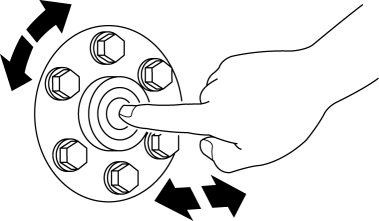
-
If there is any malfunction, replace the pilot bearing..
 Pilot Bearing Inspection [C66 M R]
1. Without removing the pilot bearing, turn the bearing while applying force
in the axial direction.
If there is any malfunction, replace the pilot bearing..
...
 Pilot Bearing Inspection [G66 M R]
1. Perform the following procedures.
a. Remove the battery cover..
b. Disconnect the negative battery cable.
c. Remove the battery component. (ex: battery, battery tray and PCM component).
d. ...
Other materials:
If the electronic key does not operate properly
If communication between the electronic key and the Subaru Solterra
is disrupted, or if the key cannot be used due to a depleted battery, the smart
key system and wireless remote functions will be unavailable. In such situations,
the Subaru Solterra can still be accessed and started by followi ...
Advanced Park cancelation/ suspension
■ Assistance will be canceled when
Under the following conditions, the Subaru Solterra Advanced Park system will
automatically terminate its operation. When this occurs, immediately take control
by firmly holding the steering wheel and pressing the brake pedal to safely stop
the Subaru Solt ...
How to use DC charging
This section provides a comprehensive overview of the DC fast charging
procedure for the Subaru Solterra traction battery, allowing drivers to quickly
and efficiently recharge when needed.
When using a DC charger with the Subaru Solterra, always review and
follow the specific instructions pro ...
