
Mazda 3 Service Manual: Purge Solenoid Valve Removal/Installation [Mzr 2.0, Mzr 2.5]
1. Remove the battery cover..
2. Disconnect the negative battery cable..
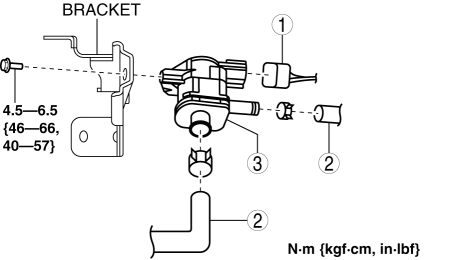
3. Remove in the order indicated in the table.
|
1 |
Purge solenoid valve connector |
|
2 |
Evaporative hose (See Evaporative Hose Installation Note.) |
|
3 |
Purge solenoid valve |
4. Install in the reverse order of removal.
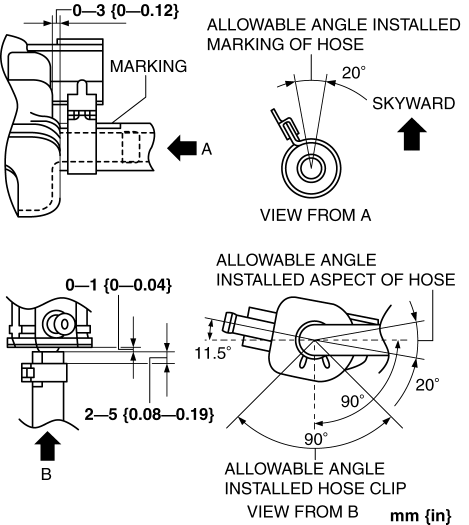
Evaporative Hose Installation Note
1. Install the evaporative hose and clip as shown in the figure.
 Purge Solenoid Valve Inspection [Mzr 2.0, Mzr 2.5]
Airflow Inspection
1. Remove the battery cover..
2. Disconnect the negative battery cable..
3. Remove the purge solenoid valve..
4. Inspect airflow between the ports under the following conditi ...
 Quick Release Connector (Emission System) Removal/Installation [Mzr 2.0, Mzr
2.5]
Quick Release Connector (Emission System) Removal/Installation [Mzr 2.0, Mzr
2.5]
Quick Release Connector Type
CAUTION:
Verify the type and location, and install/remove properly.
Except for Mexico
Mexico
Type A Removal
CAUTION:
Be careful not to da ...
Other materials:
Air Bag/Front Seat Belt
Pretensioner System Warning
Beep
If there is a problem with the air bag/seat
belt pretensioner systems and the warning
light illumination, a warning beep sound
will be heard for about 5 seconds every
minute.
The air bag and seat belt pretensioner
system warning beep sound will continue
to be heard for approximately 35
min ...
Antenna Feeder No.5 Inspection
1. Disconnect the negative battery cable..
2. Remove the following parts:
a. Front scuff plate (RH).
b. Front side trim (RH).
c. Rear seat cushion.
d. Rear scuff plate (RH).
e. Tire house trim (RH).
3. Disconnect the antenna feeder No.4.
4. Disconnect the antenna feeder No.3.
...
Closing the Hood
Check under the hood area to make
certain all filler caps are in place and all
loose items (e.g. tools, oil containers,
etc.) have been removed.
Lift the hood, grasp the padded area on
the support rod, and secure the support
rod in the clip. Verify that the support
rod is secured in ...
