
Mazda 3 Service Manual: TCM Removal/Installation [FS5 A EL]
CAUTION:
-
Do not apply a shock to or touch the projection on the TCM, otherwise it may not operate normally.
1. Perform the following procedures.
a. Remove the battery cover..
b. Disconnect the negative battery cable.
c. Remove the battery component (ex: battery, battery tray and PCM component)..
2. Remove in the order indicated in the table.
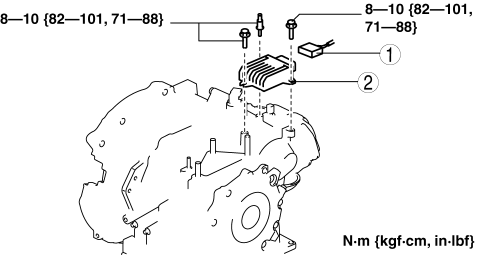
|
1 |
Connector |
|
2 |
TCM |
3. Install in the reverse order of removal.
 TCM Inspection [FS5 A EL]
NOTE:
The TCM terminal voltage can vary with conditions when measuring and changes
due to age deterioration on the vehicle, causing false diagnosis. Therefore
a comprehensive inspection ...
 Torque Converter Clutch (TCC) Non Operation [Fw6 A EL]
TROUBLESHOOTING ITEM
Torque converter clutch (TCC) non-operation
DESCRIPTION
TCC does not operate when vehicle reaches TCC oper ...
Other materials:
Valve Clearance Adjustment [Mzr 2.0, Mzr 2.5]
1. Remove the battery cover..
2. Disconnect the negative battery cable.
3. Remove the plug hole plate..
4. Disconnect the wiring harness.
5. Remove the ignition coils..
6. Remove the spark plugs..
7. Remove the ventilation hose.
8. Remove the oil level gauge.
9. Remove the cylinder h ...
Blower Motor Installation [Full Auto Air Conditioner]
1. Install the SST (49 B061 015A) to the blower motor.
2. Install the blower motor with the SST (49 B061 015A) installed, to
the A/C unit.
CAUTION:
To prevent damage to the sirocco fan, install the blower motor being careful
that the blower motor does not interfere with the ...
Steering Gear And Linkage Removal/Installation
CAUTION:
Performing the following procedures without first removing the ABS wheel-speed
sensor may possibly cause an open circuit in the wiring harness if it is pulled
by mistake. Before performing the following procedures, disconnect the ABS wheel-speed
sensor connector (axle side) ...
