
Mazda 3 Service Manual: Transaxle Oil Inspection [G35 M R]
1. Park the vehicle on level ground.
2. Remove the aerodynamic under cover No.2..
3. Remove the oil level plug and washer.
4. Verify that the oil is near the brim of the plug port.
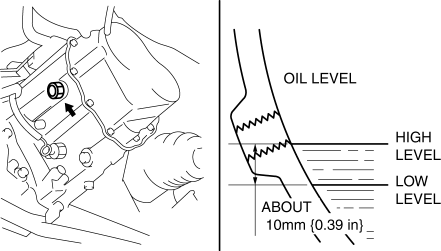
-
If the oil level is lower than the low level, add the specified amount and type of oil through the oil level plug hole.
|
Item |
Specification |
|
Grade |
API service GL-4 |
|
Viscosity |
SAE 75W-80 |
5. Install a new washer and the oil level plug.
-
Tightening torque
-
39—59 N·m {4.0—6.0 kgf·m, 29—43 ft·lbf}
6. Install the aerodynamic under cover No.2..
 Transaxle Oil Inspection [A26 M R]
1. Park the vehicle on level ground.
2. Remove the aerodynamic under cover No.2..
3. Remove the oil level plug and gasket.
4. Verify that the oil is near the brim of the plug port.
I ...
 Transaxle Oil Inspection [G66 M R]
1. Park the vehicle on level ground.
2. Remove the aerodynamic under cover No.2..
3. Remove the oil level plug and washer.
4. Verify that the oil is near the brim of the plug port.
I ...
Other materials:
Fuel-Filler Lid and Cap
WARNING
When removing the fuel-fi ller cap,
loosen the cap slightly and wait for any
hissing to stop, then remove it:
Fuel spray is dangerous. Fuel can
burn skin and eyes and cause illness
if ingested. Fuel spray is released
when there is pressure in the fuel tank
and ...
Oil Control Valve (OCV) Inspection [Mzr 2.3 Disi Turbo]
Coil Resistance Inspection
1. Remove the battery cover..
2. Disconnect the negative battery cable..
3. Disconnect the OCV connector.
4. Measure the coil resistance between terminals A and B using a tester.
If not as specified, replace the OCV..
OCV coil resistance
6. ...
Initial Learning [Fw6 A EL]
Introduction
If the control valve body and oil pressure switch are replaced, always perform
the initial learning. If the initial learning is not completed, engine rev-up
may occur or shift shock may increase. DTC P06B8:00 is displayed while the initial
learning has not been implement ...
