
Mazda 3 Service Manual: Wheel Balance Adjustment
CAUTION:
-
Adjust the outer wheel balance first, then the inner wheel balance.
-
Be careful not to scratch the wheels.
Adhesive-type Balance Weight (Outer)
1. Remove the old balance weight from the wheel.
2. Remove the double-sided adhesive tape remaining on the wheel, then clean and degrease the bonding area.
3. Set the wheel on a wheel balancer, measure the amount of unbalance and the position with the mode set for knock-type balance weight.
4. Multiply the amount of unbalance by 1.6
to obtain the balance weight value.
5. Select a balance weight closest to the weight value and attach the balance weight on the position (outer) indicated by the wheel balancer.
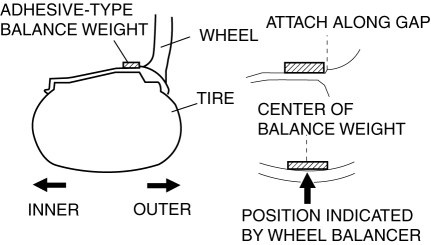
-
Example calculation of balance weight value
-
Indicated amount of unbalance: 23 g {0.81 oz}
23 g {0.81 oz}×1.6 = 36.8 g {1.30 oz}
-
Selected balance weight value: 35 g {1.24 oz}
NOTE:
-
When selecting a balance weight, select one closest to the calculated value.
Example: 32.4 g {1.14 oz} = 30 g {1.06 oz}
CAUTION:
-
Use a genuine balance weight or equivalent (steel).
-
When attaching the weight, press the weight with a force of 25 N {2.5 kgf, 5.5 lbf} per 5 g for 2 s or more.
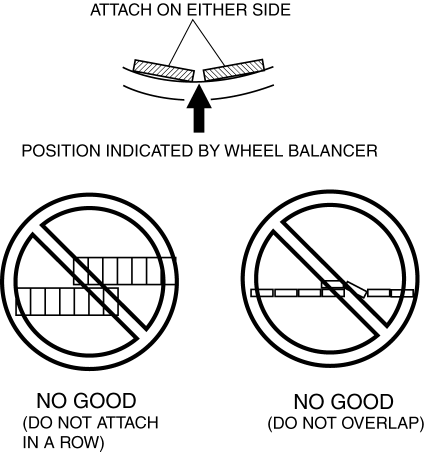
6. If attaching two balance weights, position them so that each is on either side of the position indicated by the wheel balancer.
CAUTION:
-
Do not attach weight balances in a row.
-
Do not overlap the balance weights.
-
Total weight must not exceed 160g {5.65 oz}.
Knock-type Balance Weight (Inner)
1. Measure the amount of unbalance with a wheel balancer.
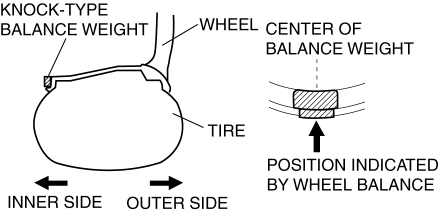
2. Attach a weight corresponding to the measured weight value on the position (inner) indicated by the wheel balancer.
CAUTION:
-
Do not attach three or more balance weights.
-
One balance weight must not exceed 60g {2.12 oz}, and a total of tow balance weights must not exceed 100g {3.53 oz}.
Remaining Amount of Unbalance Confirmation
1. After installing the outer and inner balance weights, operate the wheel balancer again.
2. Confirm that the remaining unbalance does not exceed the following on either side.
-
If the remaining unbalance exceeds the specifications, adjust the wheel balance again.
|
Outer (Adhesive-type) |
Inner (Knock-type) |
|
|
16 inch wheel |
14 g {0.49 oz} |
9 g {0.3 oz} |
|
17 inch wheel |
13 g {0.46 oz} |
8 g {0.28 oz} |
|
18 inch wheel |
12 g {0.42 oz} |
8 g {0.28 oz} |
 Wheel Alignment Pre Inspection
1. Park the vehicle on a level ground, in an unloaded condition*, and with the
wheels straight forward.
*: Unloaded condition.....Fuel tank is full. Engine coolant and engine oil are
at specifie ...
 Wheel Unit ID Registration
NOTE:
After the wheel unit replacement, registration of the wheel unit identification
codes must be performed.
ID registration can be done using the M-MDS, or not using the M-MDS.
...
Other materials:
Rearview Mirror
WARNING
Do not stack cargo or objects higher
than the seatbacks:
Cargo stacked higher than the
seatbacks is dangerous. It can block
your view in the rearview mirror, which
might cause you to hit another car
when changing lanes.
Rearview mirror adjustment
Before dri ...
Sunvisor Removal/Installation
1. Disconnect the negative battery cable..
2. Remove the screw.
3. Rotate the sunvisor in the direction of the arrow.
4. Unhook and remove the sunvisor.
5. Disconnect the vanity mirror illumination connector. (Vehicles with vanity
mirror illumination)
6. Press the center adaptor tabs ...
Liftgate Lower Trim Removal/Installation
1. Remove the liftgate upper trim..
2. Remove the liftgate side trim..
3. Remove the screw and fasteners.
4. Pull the liftgate lower trim in the direction of arrow (1), (2), (3), then
detach clips A, B, pin C and D from the liftgate.
5. Remove the liftgate lower trim.
6. Install ...
