
Subaru Solterra 2023-2026 Owner's Manual: Advanced Park guidance screens
The Subaru Solterra Advanced Park system provides clear and intuitive guidance screens on the multimedia display, helping the driver easily understand vehicle positioning and parking operations in real time.
Guidance screen (When assistance starts)
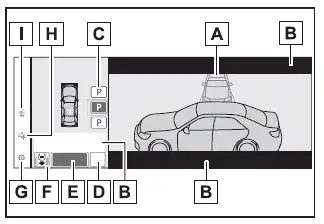
- Target parking space box (blue)
- Advice display
- Parking type change button
When multiple control icons appear on the Subaru Solterra display, their functions vary depending on the current driving situation and system status, allowing flexible and precise parking adjustments.
 or
or
 :
Switch the target to a different available parking space.
:
Switch the target to a different available parking space.
 or
or
 :
Confirm and select the currently highlighted parking space.
:
Confirm and select the currently highlighted parking space.
 : Switch to the parallel parking mode.
 :
Toggle the perpendicular parking mode (forward/reverse).
:
Toggle the perpendicular parking mode (forward/reverse).
- "MODE" button
Use this control to switch between memory parking mode, perpendicular parking (forward/reverse), and parallel parking functions within the Subaru Solterra system.
- "Start" button
Select this button to initiate the Subaru Solterra parking assistance sequence.
- Perpendicular parking direction change button
This control allows switching between forward parking and reverse parking modes for perpendicular spaces.
 :
Select perpendicular forward parking.
:
Select perpendicular forward parking.
 :
Select perpendicular reverse parking.
:
Select perpendicular reverse parking.
- Customize setting button
Opens the Subaru Solterra Advanced Park settings menu for system configuration and personalization.
- Registration button
Use this function to store a specific parking space for future automated parking operations.
- Remote control function start button (if equipped)
Allows activation of the Subaru Solterra Remote Park function via a connected smartphone, enabling parking from outside the vehicle.
Guidance screen (When reversing)
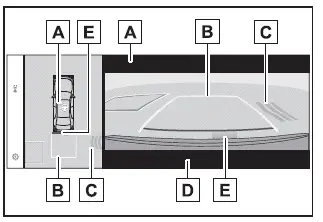
- Operation icon
This icon is displayed when the Subaru Solterra Advanced Park system is actively controlling vehicle movement.
- Guide lines (yellow and red)
These visual guides indicate the projected path from the front or rear bumper to the stopping position. Yellow lines show the trajectory, while red lines indicate approximately 1 ft. (0.3 m) from the vehicle for enhanced safety.
- Moving object warning icon
- Emergency support brake control operation display "BRAKE!" is displayed.
- SUBARU Parking Assist display
*: The yellow horizontal guideline will not appear if the target stopping position is approximately 8.2 ft. (2.5 m) or more away from the Subaru Solterra.
■ SUBARU Parking Assist pop-up display
Regardless of whether the SUBARU Parking Assist system is enabled or disabled, if an obstacle is detected during Advanced Park operation in the Subaru Solterra, a pop-up alert will automatically appear over the guidance screen to warn the driver.
■ Brake control operation when Advanced Park is operating
While the Subaru Solterra Advanced Park system is active, if the system determines that there is a high risk of collision with either moving or stationary objects, it will automatically engage EV system output limitation and braking control to help prevent impact.
The Subaru Solterra Advanced Park interface is designed to provide clear, responsive, and intelligent visual feedback, ensuring that drivers maintain full awareness while benefiting from advanced automated parking support.
If brake control is activated, the Subaru Solterra Advanced Park operation will be temporarily paused, and a notification message will appear on the multi-information display to inform the driver.
■ Buzzer
Depending on ambient noise levels or sounds generated by other vehicle systems, the audible alert of the Subaru Solterra Advanced Park system may be difficult to hear. Always remain visually attentive to the surroundings.
■ If a black screen is displayed on the multimedia display when the Advanced Park is operating
If the Subaru Solterra display suddenly turns black during operation, the system may be experiencing radio interference or a temporary malfunction.
If an external radio antenna is installed near any camera, reposition it as far away from the Subaru Solterra camera units as possible to avoid interference.
If no antenna is present and the display does not recover after turning the power switch off and restarting the EV system, have the Subaru Solterra inspected by an authorized SUBARU dealer.
Perpendicular parking (forward/reverse) function
The Subaru Solterra perpendicular parking function (forward/reverse) can be used when a valid parking space is detected while the vehicle is positioned close to and aligned perpendicularly with the center of the parking space. Depending on the layout of the parking area, the system may automatically assist in changing the vehicle’s direction by controlling the shift position.
Parking using the perpendicular parking (forward/ reverse) function
1. Position the Subaru Solterra so that it is stopped near and perpendicular to the center of the desired parking space.
If there are parking space lines
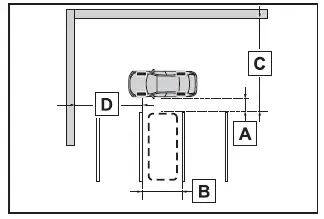
- Approximately 3.3 ft. (1 m)*
- Approximately 8.2 ft. (2.5 m)*
- Approximately 19.7 ft. (6 m) or more*
- Approximately 18.0 ft. (5.5 m) or more*
The Subaru Solterra system is capable of operating even if only one side of the parking space is marked with a visible line.
*: These values represent approximate reference distances used by the Subaru Solterra system to detect suitable parking spaces.
Detection capability may vary depending on environmental conditions and surface visibility.
If there is an adjacent parked vehicle
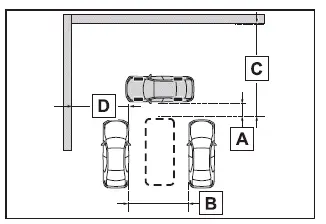
- Approximately 3.3 ft. (1 m)*
- Approximately 9.8 ft. (3 m) or more*
- Approximately 19.7 ft. (6 m) or more*
- Approximately 18.0 ft. (5.5 m) or more*
The Subaru Solterra Advanced Park system can still function effectively even if a vehicle is present on only one side of the intended parking space.
*: These are guideline distances for optimal detection and may vary in real-world conditions.
Environmental factors such as lighting, weather, and obstacles may affect detection accuracy.
2. Press the Advanced Park main switch and verify that an available parking space is displayed on the Subaru Solterra multimedia screen.
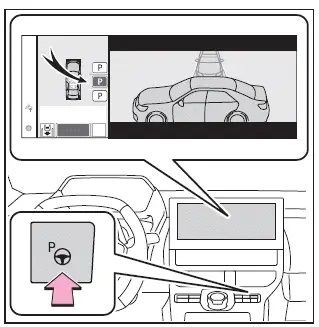
- If the Subaru Solterra system identifies a suitable parking space, a blue target parking box will appear on the display.
- If the detected space supports parallel parking, select the space and then
press
 to switch to parallel parking mode.
 - If the parking direction can be adjusted, select the space and then choose
 or
or
 to modify the entry direction.
 - Depending on the surrounding environment, lighting conditions, and available space, the Subaru Solterra Advanced Park function may not be available.
The Subaru Solterra Advanced Park system enhances parking precision and ease of use, but its effectiveness depends on proper positioning, clear surroundings, and favorable environmental conditions.
Based on the information shown on the multimedia display, the Subaru Solterra Advanced Park system may recommend selecting a different parking space if the current one is not suitable for safe automated maneuvering.
3. Select the "Start" button.
Once activated, the Subaru Solterra will emit an audible buzzer, display operational guidance on the multi-information display, and begin automated parking assistance.
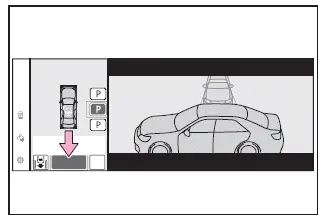
- When the brake pedal is released, messages such as "Moving Forward..." or "Backing Up..." will appear, and the Subaru Solterra will begin moving accordingly.
- To interrupt or cancel the assistance at any time, press the Advanced Park main switch.
If the function is canceled, the message "Advanced Park Cancelled" will be displayed on the Subaru Solterra screen.
If at any moment you feel that the Subaru Solterra is getting too close to nearby vehicles, objects, or obstacles, take immediate action.
4. Follow the instructions displayed on the screen carefully and continue performing the indicated operations until the Subaru Solterra comes to a complete stop within the designated parking space.
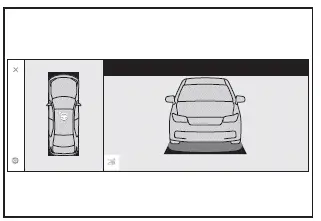
Once the vehicle has successfully stopped, the message "Advanced Park Finished" will appear, indicating that the Subaru Solterra parking procedure has been completed.
If you select
 on the multimedia display, the vehicle icon shown on the completion screen will
rotate, allowing you to better visualize the final parking position of the Subaru
Solterra.
on the multimedia display, the vehicle icon shown on the completion screen will
rotate, allowing you to better visualize the final parking position of the Subaru
Solterra.
■ If you feel that the vehicle is approaching close to a surrounding vehicle, object, person, or gutter
Immediately press the brake pedal to stop the Subaru Solterra. After stopping, you can manually change the shift position to adjust the vehicle’s direction. During this process, the Advanced Park assistance will be paused. However, if you press the "Start" button again, the Subaru Solterra system will resume operation and continue moving in the selected direction.
■ When the brakes have been operated
While the Subaru Solterra Advanced Park system is functioning, you may hear mechanical braking sounds. These sounds are part of normal system operation and do not indicate any malfunction.
NOTICE
■ When using the perpendicular parking (forward/reverse) function
- Always confirm that no obstacles are present within the yellow guide
lines or in the path between the Subaru Solterra and the intended parking space.
If any obstruction is detected within this area, immediately cancel the Advanced Park function to avoid potential collision.
- If the parking surface is uneven, sloped, or contains height differences, the Subaru Solterra may not align properly within the parking space. In such cases, avoid using the Advanced Park feature.
- When attempting to park in tight or narrow spaces, the Subaru Solterra may approach nearby vehicles very closely. If there is any risk of contact, press the brake pedal immediately to stop the vehicle.
- If a detected parked vehicle is unusually narrow or positioned extremely close to a curb, the Subaru Solterra may also park very close to that boundary. If you suspect a risk of collision or improper positioning, stop the vehicle using the brake pedal and disable the system by pressing the Advanced Park main switch.
The Subaru Solterra Advanced Park system provides a high level of automated convenience, but safe operation always depends on driver awareness, timely intervention, and proper environmental conditions.
 Types of cameras and sensors used for the Advanced Park
The Subaru Solterra Advanced Park system relies on a network of high-precision
cameras and sensors designed to detect surrounding vehicles and environmental features,
helping the driver accurately ...
 Advanced Park perpendicular exiting (forward/ reverse) function
When preparing to leave a perpendicular parking space, the Subaru Solterra Advanced
Park system evaluates surrounding conditions and, if it determines that a safe exit
path is available, the perpe ...
Other materials:
Parking Brake Lever Inspection
Stroke Inspection
1. Pump the brake pedal a few times.
2. Pull the parking brake lever two to three times.
3. Inspect the parking brake stroke by slowly pulling at point A 50 mm {1.97
in} from the end of the parking brake lever with a force of 98 N {10 kgf,
22 lbf} and counting the number o ...
Cruise Control
With cruise control, you can set and automatically maintain any speed of more
than about
25 km/h (16 mph).
WARNING
Do not use the cruise control under the following conditions:
Using the cruise control under the following conditions is dangerous and
could result in
loss of ve ...
Rear Trailing Link Removal/Installation
CAUTION:
Performing the following procedures without first removing the ABS wheel-speed
sensor may possibly cause an open circuit in the wiring harness if it is pulled
by mistake. Before performing the following procedures, disconnect the ABS wheel-speed
sensor wiring harness connec ...
