
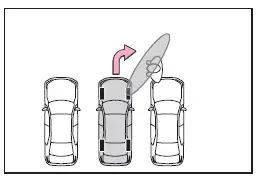
Subaru Solterra 2023-2026 Owner's Manual: Advanced Park perpendicular exiting (forward/ reverse) function
When preparing to leave a perpendicular parking space, the Subaru Solterra Advanced Park system evaluates surrounding conditions and, if it determines that a safe exit path is available, the perpendicular exiting (forward/reverse) function can be activated. In more complex environments, the Subaru Solterra may automatically adjust the shift position during assistance to optimize the exit trajectory and ensure a smoother maneuver.
Leaving a parking space using the perpendicular exiting (forward/reverse) function
1. While firmly pressing the brake pedal and with the shift position set to P, press the Advanced Park main switch. Confirm that the Subaru Solterra displays the exit direction selection screen on the multimedia display.
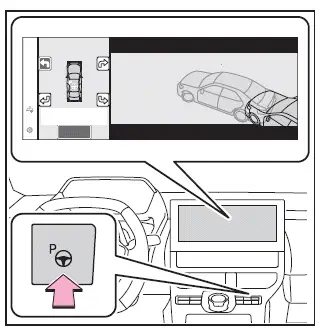
2. On the multimedia display, select the desired arrow indicating the direction in which you want the Subaru Solterra to exit.
If the turn signal lever is activated, the system will limit the selection to either left or right exit directions, aligning with the signal input.
3. Keep the brake pedal depressed and select the "Start" button.
The Subaru Solterra will emit an audible signal, display operational guidance on the multi-information display, and begin executing the automated exit maneuver.
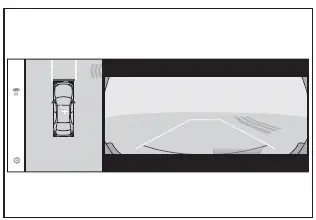
To cancel the assistance at any time, press the Advanced Park main switch. If canceled, the Subaru Solterra will display the message "Advanced Park Cancelled".
If you notice that the Subaru Solterra is approaching too close to nearby vehicles, obstacles, or pedestrians, immediately intervene.
4. Continue to follow the instructions shown on the display until the Subaru Solterra reaches a position from which it can safely exit the parking space.
Once the optimal exit position is reached, a message such as "You can exit by moving the steering wheel" will appear. When you take control of the steering wheel, the message "Advanced Park Finished" will be displayed, signaling the end of the assistance. Since the Subaru Solterra may still be moving, maintain a firm grip on the steering wheel and proceed carefully.
If the steering wheel is not touched, the Subaru Solterra will come to a stop at the exit position. You can manually завершити assistance by pressing either the accelerator or brake pedal.
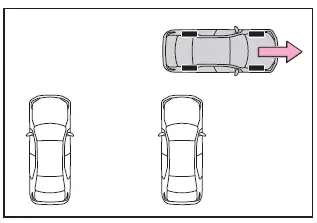
■ Perpendicular exiting (forward/ reverse) function
Use the Subaru Solterra exiting (forward/reverse) function strictly for leaving a perpendicular parking space. If the system is activated unintentionally, immediately press the brake pedal to stop the vehicle and disable the function using the Advanced Park main switch.
■ Situations in which the perpendicular exiting (forward/reverse) function will not operate
The Subaru Solterra Advanced Park system may not initiate the exiting function in the following conditions:
- When another vehicle is positioned in the intended exit path, such as one waiting to park
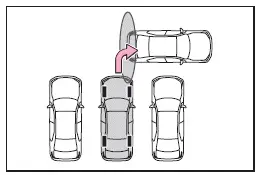
- When obstacles such as walls, columns, or pedestrians are detected near front or rear sensors, including corner areas
Advanced Park Parallel parking function
The Subaru Solterra parallel parking function becomes available when the system successfully identifies a suitable parking space while the vehicle is stopped and properly aligned near the center of that space. In certain scenarios, the system may automatically adjust the shift position to refine the maneuver and improve parking accuracy.
Parking using the parallel parking function
1. Position the Subaru Solterra so that it is aligned close to the center of the intended parking space.
If there are parking space lines
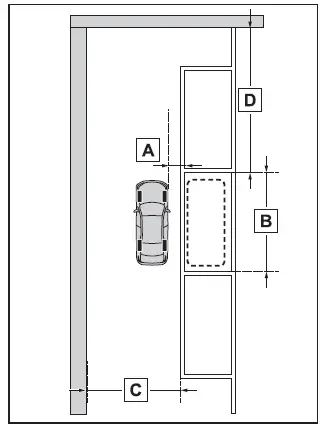
- Approximately 3.3 ft. (1 m)*
- Approximately 19.7 ft. (6 m)*
- Approximately 14.8 ft. (4.5 m) or more*
- Approximately 26.2 ft. (8 m) or more*
*: These values serve as general reference distances for detecting a valid parking space and may vary depending on real-world conditions.
Environmental factors such as lighting, road surface, or obstacles may affect the Subaru Solterra system’s ability to detect parking spaces accurately.
If there is an adjacent parked vehicle
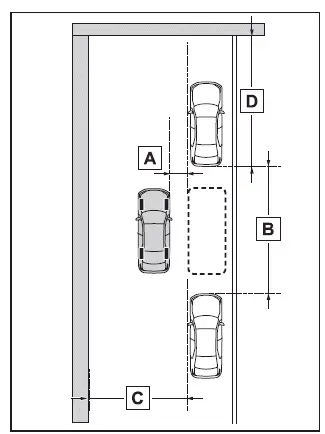
- Approximately 3.3 ft. (1 m)*
- Approximately 23.0 ft. (7 m) or more*
- Approximately 14.8 ft. (4.5 m) or more*
- Approximately 26.2 ft. (8 m) or more*
The Subaru Solterra Advanced Park system combines precision sensors and intelligent control to simplify parking maneuvers, but consistent driver attention remains essential for safe and effective operation.
*: This value is provided as a general reference for detecting an appropriate parking space with the Subaru Solterra Advanced Park system.
Keep in mind that depending on lighting conditions, surrounding objects, and road surface characteristics, the Subaru Solterra may not always be able to accurately recognize a parking space.
2. Press the Advanced Park main switch and confirm that a suitable parking space is displayed on the Subaru Solterra multimedia screen.
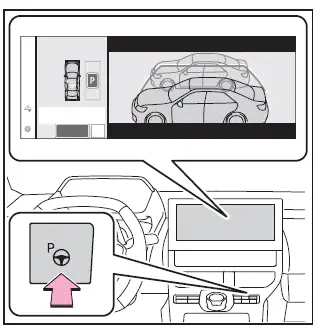
- When the Subaru Solterra identifies a valid parking space, a clearly marked target parking box will appear on the display.
- If perpendicular parking (forward/reverse) is available for the selected
space, choose the parking space and then select
 to switch to the perpendicular parking (forward/reverse) mode.
 - In certain environments, such as tight spaces or unclear surroundings, the
Subaru Solterra Advanced Park function may not be available.
In such cases, follow the guidance displayed on the screen and attempt to use the system in another parking location more suitable for detection.
3. Select the "Start" button.
Once activated, the Subaru Solterra will emit a confirmation buzzer, display operational instructions on the multi-information display, and begin automated parking assistance.
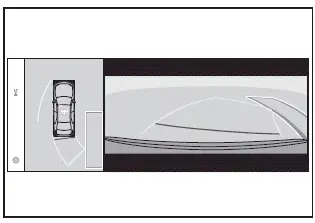
- After releasing the brake pedal, the message "Moving Forward..." will appear, and the Subaru Solterra will begin moving forward automatically.
- To cancel the operation at any time, press the Advanced Park main switch.
If the operation is interrupted, the Subaru Solterra will display "Advanced Park Cancelled" on the screen.
If you notice that the Subaru Solterra is getting too close to nearby vehicles, objects, or pedestrians, immediately intervene to ensure safety.
4. Continue following the on-screen guidance until the Subaru Solterra comes to a complete stop within the selected parking space.
When the vehicle has fully stopped, the message "Advanced Park Finished" will appear, indicating that the Subaru Solterra parking process has been successfully completed.
If you select
 on the multimedia display, the vehicle icon on the completion screen will rotate,
allowing for a clearer visualization of the Subaru Solterra’s final parking position.
on the multimedia display, the vehicle icon on the completion screen will rotate,
allowing for a clearer visualization of the Subaru Solterra’s final parking position.
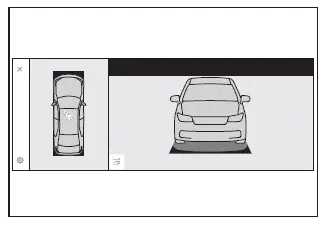
■ If "No available parking space" is displayed
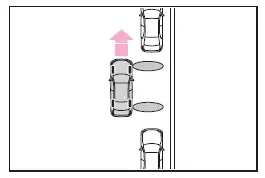
Even when the Subaru Solterra is positioned parallel to a parking area, the system may fail to detect nearby parked vehicles, preventing activation of the parking assist function.
In this situation, slightly reposition the Subaru Solterra so that adjacent vehicles become clearly detectable by the sensors. Once detected, the Advanced Park system can be reactivated.
NOTICE
■ When using the parallel parking function
- Always ensure that no obstacles are present within the yellow guide
lines or between the Subaru Solterra and the target parking space.
If any obstruction is detected in these areas, the parallel parking function of the Subaru Solterra may be paused or canceled automatically for safety.
- If the parking surface is uneven, sloped, or contains height differences, the Subaru Solterra may not align correctly, potentially resulting in improper positioning. Avoid using the system under such conditions.
- If a nearby parked vehicle is unusually narrow or positioned very close to a curb, the Subaru Solterra may also park closer than expected. If a collision risk is detected, immediately press the brake pedal and deactivate the system.
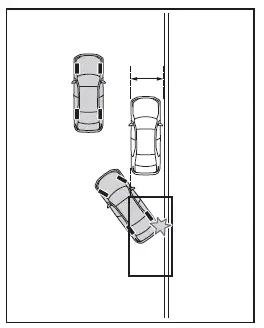
- If a wall or obstacle is located on the inner side of the parking space, the Subaru Solterra may stop slightly outside the intended parking boundary.
Advanced Park Parallel exiting function
When exiting from a parallel parking space, the Subaru Solterra Advanced Park system can assist if it determines that a safe exit route is available. In more complex situations, the system may automatically adjust the shift position to optimize the vehicle’s path and ensure a controlled and smooth exit maneuver.
The Subaru Solterra Advanced Park system is designed to enhance convenience and precision, but optimal performance depends on proper positioning, environmental conditions, and active driver supervision.
Leaving a parking space using the parallel exiting function
1. With the brake pedal firmly pressed and the Subaru Solterra set to the P shift position, activate the Advanced Park system by pressing the main switch. Confirm that the exit direction selection interface appears on the multimedia display of your Subaru Solterra.
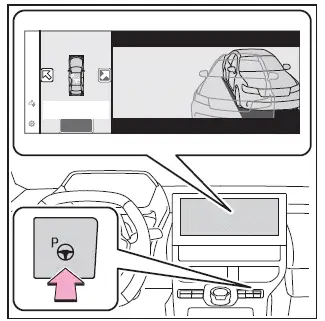
2. Use the on-screen arrows to choose the desired exit direction for the Subaru Solterra.
If the turn signal lever is engaged, the system will restrict the available options to either left or right exit directions, corresponding to the signal input.
3. Keep the brake pedal depressed and select the "Start" button.
The Subaru Solterra will emit a confirmation tone, display operational guidance, and begin executing the parallel exiting maneuver automatically.
To cancel the operation at any time, press the Advanced Park main switch.
If canceled, the Subaru Solterra will display "Advanced Park Cancelled" on the screen.
If at any moment you feel the Subaru Solterra is approaching too close to nearby vehicles, obstacles, or pedestrians, intervene immediately.
4. Continue following the instructions displayed on the screen until the Subaru Solterra reaches a safe position from which it can exit the parking space.
Once this position is achieved, a message such as "You can exit by moving the steering wheel" will appear. When you take control of the steering wheel, the message "Advanced Park Finished" will be shown, indicating completion. As the Subaru Solterra may still be in motion, maintain control and proceed carefully.
If the steering wheel is not touched, the Subaru Solterra will come to a stop automatically at the exit position.
Assistance can also be завершено manually by pressing either the accelerator or brake pedal.
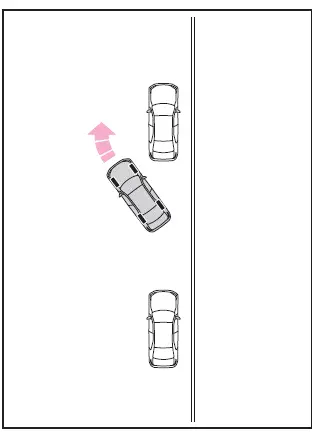
■ Parallel exiting function
The Subaru Solterra parallel exiting function is intended strictly for leaving a parallel parking space. If it is activated unintentionally, immediately press the brake pedal to stop the vehicle and cancel the operation using the Advanced Park main switch.
■ Situations in which the parallel exiting function will not operate
The Subaru Solterra Advanced Park system may not activate the parallel exiting function under the following conditions:
- When vehicles are stopped ahead, such as at a traffic signal, blocking the exit path
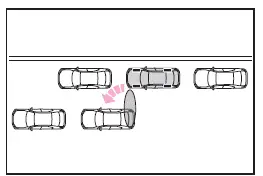
- When another vehicle is positioned directly behind the Subaru Solterra, obstructing the exit route
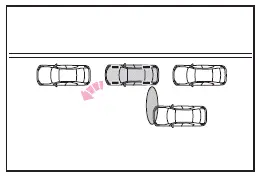
- When obstacles such as walls, columns, or pedestrians are detected near the front or rear side sensors
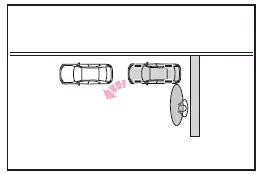
- When the Subaru Solterra is parked on a curb and the side sensors detect the road surface incorrectly
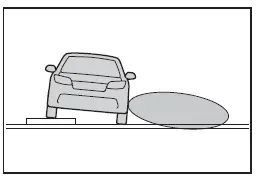
- When there is no vehicle parked in front of the Subaru Solterra
- When the gap between the Subaru Solterra and the vehicle ahead is excessively large
Advanced Park Memory function
The Subaru Solterra Advanced Park memory function allows the vehicle to park in previously saved parking locations, even in the absence of visible parking lines or adjacent vehicles. This feature is particularly useful for frequently used parking spaces.
Up to three parking locations can be stored in the Subaru Solterra system memory.
Registering a parking space
1. Position the Subaru Solterra so that it is aligned close to the center of the desired parking space.
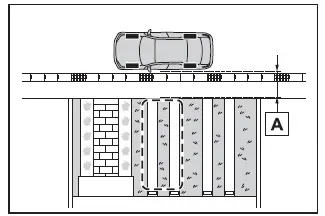
- Approximately 3.3 ft. (1 m)
2. Press the Advanced Park main switch, then select

If the Subaru Solterra is positioned in a location without clear parking lines or nearby vehicles, the message "No available parking space" may appear.
In this case, press and hold
 to manually register the parking position.
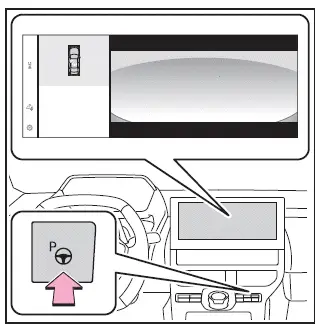
3. Choose between perpendicular parking (forward/reverse) or parallel parking mode based on your preference and the parking conditions.
The Subaru Solterra Advanced Park system enhances everyday usability by allowing automated parking and memory-based positioning, but safe operation still requires full driver attention and awareness of the surroundings.
Only those parking spaces where the Subaru Solterra Advanced Park system can safely provide assistance will be shown on the display.
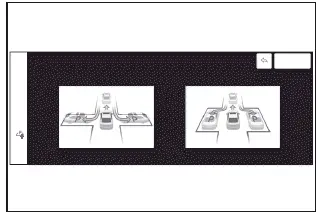
4. Choose the preferred parking direction.
When perpendicular parking (forward/reverse) has been selected in step 3:
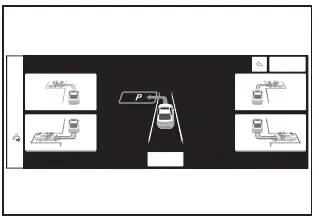
When parallel parking has been selected in step 3:
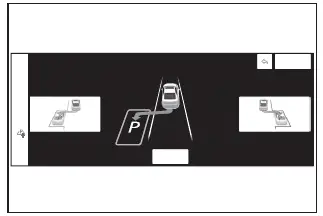
5. Using the directional arrow controls, fine-tune the position of the parking space to be stored in the Subaru Solterra system, then confirm by selecting the "OK" button.
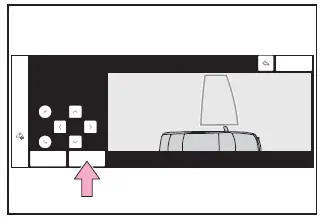
6. Press the "Start" button to initiate assistance.
A confirmation tone will sound, and the Subaru Solterra will display guidance messages while beginning the automated parking sequence.
Once the brake pedal is released, a message such as "Moving Forward..." will appear, and the Subaru Solterra will start moving accordingly.
If at any moment you feel the Subaru Solterra is getting too close to surrounding vehicles, obstacles, or pedestrians, immediately intervene for safety.
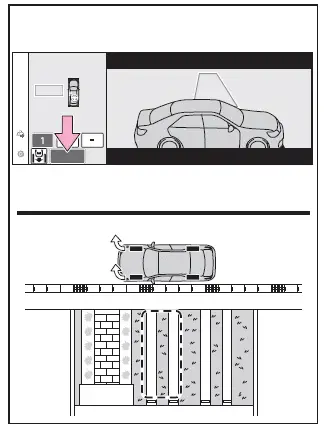
7. Follow the on-screen guidance instructions carefully until the Subaru Solterra comes to a complete stop within the selected parking space.
8. Verify the final stopping position of the Subaru Solterra. If adjustments are needed, use the arrow controls to refine the parking position, then confirm by selecting the "Reg." button.
After successful registration, the message "Registration Completed" will appear on the Subaru Solterra multimedia display.
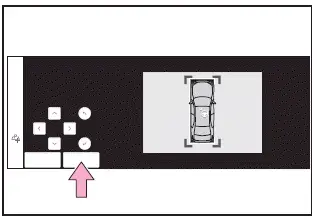
- Register a parking space only when the area within the highlighted boundary lines is completely free of obstacles.
- The Subaru Solterra system allows only limited adjustment of the registered parking position.
When parking in a parking space registered to the memory function
1. Position the Subaru Solterra near the center of the selected registered parking space and bring the vehicle to a stop.
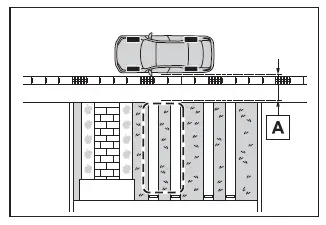
- Approximately 3.3 ft. (1 m)
2. Press the Advanced Park main switch and confirm that the Subaru Solterra display shows available parking options.
If the "MODE" button appears, it can be used to switch between memory parking, perpendicular parking (forward/reverse), and parallel parking modes.
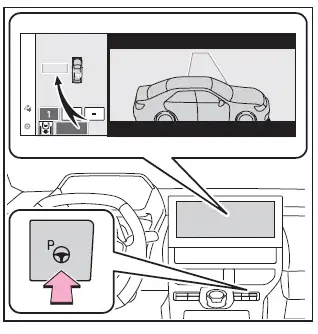
3. Select the desired stored parking space and press the "Start" button to begin the automated process.
Continue by following the same procedure as described for perpendicular parking (forward/reverse) starting from step 3.
■ When overwriting a registered parking space
If the Subaru Solterra memory has reached its maximum capacity and
 is selected, you can choose an existing stored parking space and replace it with
a new one.
is selected, you can choose an existing stored parking space and replace it with
a new one.
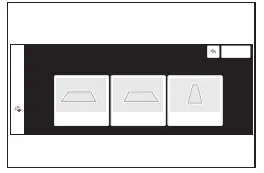
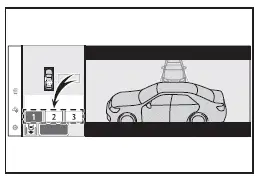
■ When multiple parking spaces are registered
Select the preferred parking location from the list and press the "Start" button to initiate parking assistance.
NOTICE
■ When using the memory function
- The Subaru Solterra memory parking function assists in positioning the
vehicle within previously saved parking locations.
If environmental conditions, vehicle configuration, or road surface differ from the conditions at the time of registration, the system may not accurately detect the space or may not fully complete the parking maneuver.
- Avoid registering parking spaces in the following conditions, as the
Subaru Solterra system may not function reliably later:
- When the camera lens is dirty, fogged, or covered with water droplets
- During rain or snowfall
- In low-light conditions such as nighttime
- In some situations, registering a parking space in the Subaru Solterra
may not be possible:
- When there is insufficient space between the roadway and the parking area
- When the road surface lacks distinguishable features that the system can recognize
- If a parking space is registered under certain conditions, the Subaru
Solterra may later fail to start assistance or reach the stored position accurately:
- When shadows cover the parking space (e.g., under a carport or structure)
The Subaru Solterra Advanced Park memory system is designed to improve convenience and efficiency, but optimal results depend on consistent environmental conditions and proper system setup.
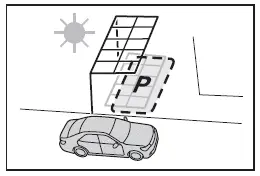
- When loose elements such as leaves, debris, or lightweight objects are present in the parking space and may shift position
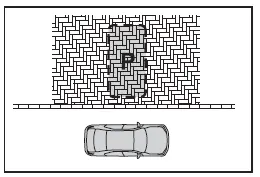
- When the road surface around the parking space features repeating textures or patterns (such as brick or tile), which may confuse Subaru Solterra sensors
- Under the following conditions, the Subaru Solterra Advanced Park system
may not be able to provide assistance to a previously registered parking space:
- When shadows from trees, buildings, or the Subaru Solterra itself significantly alter the appearance of the parking space
- When objects are present within the registered parking area
- When pedestrians or moving vehicles are detected during the assistance process
- When the starting position of the Subaru Solterra differs from the position used during registration
- When physical barriers such as parking blocks prevent access to the stored parking location
- When the road surface has changed due to wear, repair, or resurfacing
- When lighting conditions differ from those during registration (weather changes or time of day variations)
- When strong sunlight directly affects the camera, such as during sunrise or sunset
- When brightness or color inconsistencies are present on the road surface
- When temporary lighting (vehicle headlights, security lights, etc.) interferes with camera visibility
- When repetitive patterns on the road surface affect sensor recognition
- When small protrusions or irregularities exist near the parking space
- When the parking area is located on an incline or uneven terrain
- When camera lenses are fogged due to temperature changes from hot or cold water exposure
- When the Subaru Solterra camera lenses are dirty, obstructed, or covered with water droplets
- When accessories or external components partially block the camera field of view
If the Subaru Solterra cancels assistance during the registration process, repeat the entire registration procedure under improved conditions.
- When attempting to register a parking space and the road surface cannot be properly detected, the message "No available parking space to register" will appear on the Subaru Solterra display.
- For accurate operation of the Subaru Solterra memory function, always stop the vehicle precisely at the intended stopping point. Failure to do so may result in inaccurate detection or incomplete parking assistance.
- Avoid using the memory function if the Subaru Solterra camera has experienced a strong impact or if the panoramic view appears misaligned.
- If a camera has been replaced, the Subaru Solterra system requires re-registration of all stored parking spaces due to changes in camera alignment.
Remote control function (if equipped)
The Subaru Solterra allows parking and exit maneuvers to be controlled remotely using a compatible smartphone, enhancing convenience in tight or difficult spaces.
In addition, the Subaru Solterra can be guided remotely to move forward or backward into locations such as garages, where direct driver control may be limited.
Parking using Remote control function
The Subaru Solterra Remote control function enables automated parking via smartphone when the vehicle is properly positioned close to and aligned with the center of the target parking space. Depending on the situation, the system can automatically adjust the driving direction and shift position during the process.
1. Bring the Subaru Solterra to a stop near the center of the intended parking space.
2. Activate the Advanced Park main switch and confirm that available parking spaces are displayed on the Subaru Solterra multimedia screen.
3. Select
 and choose [Perpendicular/parallel] according to the desired parking type.
4. Confirm the selection by pressing the [OK] button to proceed with Subaru Solterra automated parking assistance.
The Subaru Solterra Advanced Park and Remote control functions significantly enhance parking precision and convenience, but achieving optimal performance requires stable environmental conditions, clean sensors, and careful preparation before initiating the process.
5. Carefully exit the Subaru Solterra while carrying both the electronic key and your smartphone, then launch the Remote Park application on your device.
The electronic key detection range for the Subaru Solterra extends to approximately 9.8 ft. (3 m) around the vehicle.
Before initiating remote parking, ensure that any obstacles along the intended path are removed. Minor objects, such as cones, may also be repositioned after exiting the Subaru Solterra if necessary.
6. While standing outside the Subaru Solterra, verify the selected parking space on your smartphone screen and press the start button to begin the process.
Operate the Remote control function from a safe position—at least approximately 1.6 ft. (50 cm) away from the Subaru Solterra and never within its projected movement path.
7. Continuously monitor the surroundings and trace the designated control area on the smartphone display.
As long as the input is maintained, the Subaru Solterra will proceed with automated movement and perform the parking maneuver accordingly.
If interaction with the smartphone stops, the Subaru Solterra will pause and halt safely. When input resumes, the system will automatically lock the vehicle before continuing movement.
8. Once the Subaru Solterra reaches the intended parking position, the system will engage the parking brake, shift into P, switch off the power, and automatically lock the doors.
A completion confirmation screen will then appear on your smartphone.
■ Parking function usability even with temporary obstructions
- When using the Subaru Solterra parking assist in marked parking spaces, the system can still designate a target space even if a temporary obstruction is present. This allows the driver to begin the setup from inside the Subaru Solterra, exit the vehicle, remove the obstacle, and then continue assistance remotely.
- During perpendicular parking with the Subaru Solterra Advanced Park system, up to three parking spaces on each side (six total) may be detected. However, when using the Remote control function, detection is limited to one parking space per side.
Moving the vehicle forward and backward using Remote control function
The Subaru Solterra Remote control function also enables controlled forward and backward movement, which is particularly useful when positioning the vehicle in confined spaces such as garages.
1. Bring the Subaru Solterra to a complete stop at the desired starting position.
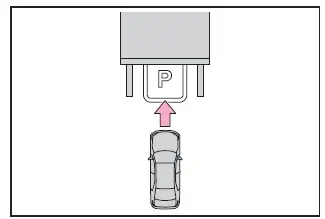
2. Press the Advanced Park main switch in the Subaru Solterra.
3. Select
 and choose [Forward/reverse] on the display.
4. Confirm your selection by pressing the [OK] button.
5. Exit the Subaru Solterra with the electronic key and smartphone, then open the Remote Park application.
The Subaru Solterra will recognize the electronic key within approximately 9.8 ft. (3 m) of the vehicle.
6. From outside the vehicle, confirm the intended movement direction on the smartphone interface and press the start button.
Maintain a safe distance of at least approximately 1.6 ft. (50 cm) from the Subaru Solterra and ensure you remain outside its path of movement during operation.
7. While observing the environment, trace the operation area on the smartphone display continuously.
The Subaru Solterra will move accordingly, executing forward or reverse motion based on your input.
If interaction stops, the vehicle will pause immediately. During operation, you may also stop the Subaru Solterra at any time or switch movement direction as needed.
8. Once positioning is complete, press the power button on the smartphone interface.
The Subaru Solterra will automatically switch off the power and lock all doors.
■ Changing the direction of travel
While the Subaru Solterra is under remote control, you can adjust the driving direction using the forward/reverse control interface.
For example, if a wall is located close behind the Subaru Solterra, you can move the vehicle slightly forward to create space for loading or unloading, and then guide it back into position afterward using the same function.
The Subaru Solterra Remote control system provides a high level of precision and flexibility, but safe and effective operation always depends on maintaining clear surroundings, proper positioning, and continuous user attention.
Exiting using Remote control function
The Subaru Solterra Remote control feature enables smooth and controlled exiting from both perpendicular and parallel parking spaces even when the power switch is OFF. When using forward and reverse movement assistance, the Subaru Solterra can travel up to approximately 23.0 ft. (7 m) from its starting position, with the ability to adjust direction as needed for safe maneuvering.
1. Stand near the parked Subaru Solterra, unlock the doors using the electronic key, and launch the Remote Park application on your smartphone.
If the smartphone fails to connect to the Subaru Solterra, repeat the unlocking process with the electronic key to re-establish communication.
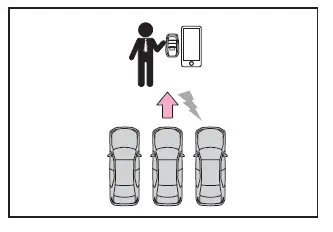
2. Press the start button displayed on the smartphone screen.
The Subaru Solterra power system will automatically switch to ON mode.
3. Confirm that available exit directions are shown, then select the desired direction for departure.
4. Carefully monitor the surroundings and trace the control area on the smartphone screen.
As long as the input is maintained, the Subaru Solterra will move and execute the exit maneuver automatically.
If interaction is interrupted, the Subaru Solterra will pause and stop safely. During operation, assistance can be halted at any moment or the travel direction can be modified as required.
5. Once the Subaru Solterra reaches a suitable position, enter the vehicle while carrying the electronic key.
To stop the process midway, simply release the smartphone controls or enter the Subaru Solterra.
Parking using the Remote control function and memory function
The Subaru Solterra also allows remote operation of previously stored parking spaces using the memory function. This is particularly useful for frequently used parking locations where precision and consistency are important.
1. Position the Subaru Solterra near the center of the desired registered parking space and bring it to a complete stop.
2. Activate the Advanced Park main switch and confirm that the Subaru Solterra detects available parking spaces on the multimedia display.
3. Select
 and choose [Perpendicular/parallel] depending on your parking preference.
4. Confirm the selection by pressing the [OK] button.
If the [MODE] button appears, it can be used to switch between Subaru Solterra memory parking, perpendicular parking, and parallel parking modes.
5. Exit the Subaru Solterra with both the electronic key and smartphone, then launch the Remote Park application.
The Subaru Solterra key detection zone extends approximately 9.8 ft. (3 m) around the vehicle. Remove any obstacles such as cones after exiting the vehicle if necessary.
6. From outside the vehicle, verify the parking space on the smartphone display and press the start button.
Operate the Subaru Solterra Remote control function from a safe distance of at least approximately 1.6 ft. (50 cm), ensuring you remain outside the vehicle’s movement path.
7. Continuously observe the environment and trace the control area on the smartphone screen.
The Subaru Solterra will move automatically and carry out the parking maneuver as long as the control input is maintained.
If input stops, the Subaru Solterra will pause safely. When input resumes, the system will automatically lock the vehicle before continuing movement.
8. After reaching the parking position, the Subaru Solterra will engage the parking brake, shift into P, turn off the power, and lock the doors automatically.
A completion confirmation screen will be displayed on the smartphone.
Preparation before using Remote control function
■ Preparation before using
Before activating the Subaru Solterra Remote control system, ensure that all required conditions are met, including proper smartphone connectivity, sufficient battery levels, and a clear environment around the vehicle. This preparation ensures reliable and safe operation of the Subaru Solterra Advanced Park features.
The Subaru Solterra Remote control and memory parking functions significantly improve convenience and usability, but achieving optimal results always depends on careful setup, stable conditions, and continuous attention from the user.
1. Download and install the Remote Park application from the official app store on your smartphone.
2. Switch the Subaru Solterra power to ON and pair your smartphone with the multimedia system via Bluetooth.
For detailed instructions on Bluetooth pairing, refer to the "MULTIMEDIA OWNER'S MANUAL" of your Subaru Solterra.
3. Complete the setup process within the Remote Park app and register your Subaru Solterra vehicle.
4. Once registration is complete, the Subaru Solterra will appear on your smartphone screen.
Select the registered Subaru Solterra to proceed.
The vehicle name and displayed image can be customized during the registration process to make identification easier.
Additional Subaru Solterra vehicles can also be added through the application menu if required.
■ Remote control function on/off
1. Select
 and then choose "Advanced Park" from the Subaru Solterra multimedia display.
2. Select "Remote Park" to enable or disable the function. (By default, the Subaru Solterra Remote Park function is set to ON.)
3. Press the Advanced Park main switch to activate the system.
If the switch is pressed during an active Subaru Solterra assistance operation, the process will be immediately canceled.
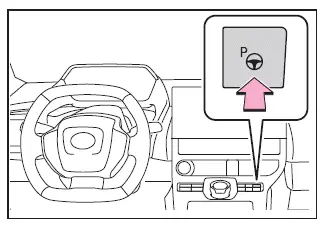
4. Select
 as shown on the Subaru Solterra multimedia display to proceed with remote operation.
NOTICE
■ Remote control function
- When operating the Subaru Solterra Remote control system, always carry the electronic key with you, preferably in a pocket or close to your body for reliable detection.
- If the electronic key is placed too close to the smartphone or other electronic devices, signal interference may occur, preventing the Subaru Solterra from recognizing the key properly.
- For Subaru Solterra models equipped with a digital key, the Remote control function cannot be used with only the digital key. The physical electronic key must always be present.
- After using the Subaru Solterra Remote control function and re-entering the vehicle, ensure that the electronic key is inside and all doors are fully closed before driving.
For Subaru Solterra vehicles equipped with a power easy access system, the seat automatically returns to its normal driving position when the driver's seat belt is fastened or the brake pedal is pressed after Remote control operation ends.
- When the Subaru Solterra Remote control function finishes or is canceled and the power is switched off, the doors will automatically lock. However, if any door remains open, locking may not occur. Always verify vehicle status after operation.
- If the Subaru Solterra locks after Remote control use and movement is detected inside the vehicle, an alarm may be triggered for security purposes.
■ Situations in which the function may not operate correctly
- When the Subaru Solterra Smart key system experiences irregular operation
- When the vehicle is positioned near strong fluorescent lighting sources
- When radio wave interference affects communication between the Subaru Solterra and the smartphone
■ Electronic key battery consumption
- During Subaru Solterra Remote control operation, the electronic key continuously transmits and receives signals, which may lead to increased battery consumption.
- If the electronic key battery becomes depleted, the Subaru Solterra Remote control function may not operate correctly or may stop entirely.
■ Situations in which the sensors may not operate properly
- When using the Subaru Solterra Remote control function, visibility around
the vehicle may be limited, especially in confined or poorly lit environments.
To ensure safe operation, always confirm the following before activating the Subaru Solterra Remote Park system:
- The Subaru Solterra and surrounding area are clearly visible at all times
- No pedestrians, animals, or obstacles are present in the intended path
- A safe distance from the Subaru Solterra is maintained during operation
- Full awareness of the surrounding environment is maintained to prevent potential hazards
- The Remote control function can be stopped immediately if required
The Subaru Solterra Remote Park system offers advanced convenience and control, but safe usage depends on proper setup, clear surroundings, and continuous driver attention during every stage of operation.
 Advanced Park guidance screens
The Subaru Solterra Advanced Park system provides clear and intuitive guidance
screens on the multimedia display, helping the driver easily understand vehicle
positioning and parking operations in ...
 Advanced Park cancelation/ suspension
■ Assistance will be canceled when
Under the following conditions, the Subaru Solterra Advanced Park system will
automatically terminate its operation. When this occurs, immediately take control ...
Other materials:
Seat Warmer
The front seats are electrically heated. The
ignition must be switched ON.
Press the seat warmer switch to illuminate
the indicator light while the ignition
is switched ON. The mode changes as
follows each time the seat warmer switch
is pressed.
WARNING
Be careful when using t ...
Air Filter Removal/Installation [Mzr 2.0, Mzr 2.5]
Except for Mexico
1. Remove the fuel-filler pipe protector..
2. Remove in the order indicated in the table.
1
Evaporative hose
2
Air filter
3. Install in the reverse order of removal. ...
Automatic Transaxle Controls
Various Lockouts:
Indicates that you must depress
the brake pedal and hold in the lock-release
button to shift (The ignition must be switched ON).
Indicates the shift lever can be
shifted freely into any position.
Indicates that you must hold in
the lock-release button to shift.
NO ...
