
Mazda 3 Service Manual: Air Intake Actuator Removal/Installation [Manual Air Conditioner]
1. Set the air intake mode to FRESH.
2. Disconnect the negative battery cable..
3. Remove the following parts:
a. Front scuff plate (Passenger-side).
b. Front side trim (Passenger-side).
c. Dashboard under cover.
d. Glove compartment.
e. Lower panel (Passenger-side).
f. Shower duct (Passenger-side).
4. Disconnect the harness clip from the blower case.
5. Disconnect the air intake actuator connector.
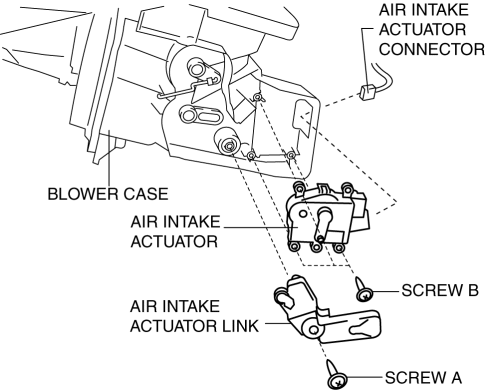
6. Remove the blower case..
7. Remove the screw A.
8. Remove the air intake actuator link.
9. Remove the screw B.
10. Remove the air intake actuator.
11. Install in the reverse order of removal.
 Air Intake Actuator Removal/Installation [Full Auto Air Conditioner]
1. Set the air intake mode to FRESH.
2. Disconnect the negative battery cable..
3. Remove the following parts:
a. Front scuff plate (Passenger-side).
b. Front side trim (Passenger-side).
c. ...
 Intake Air System Removal/Installation [Mzr 2.0, Mzr 2.5]
WARNING:
A hot engine and intake air system can cause severe burns. Turn off the engine
and wait until they are cool before removing the intake air system.
Fuel is very flammable li ...
Other materials:
Operating Tips for WMA
WMA is short for Windows Media Audio
and is the audio compression format used
by Microsoft.
Audio data can be created and stored at a
higher compression ratio than MP3.
This unit plays files with the extension
(.wma) as WMA files.
Microsoft and Windows Media are
registered trademarks of ...
Oil Seal Replacement [FS5 A EL]
1. Remove the aerodynamic under cover No. 2..
2. Remove the oil seal.
a. Drain the ATF..
b. Remove the drive shaft and/or joint shaft..
CAUTION:
The oil seal is easily damaged by the sharp edges of the drive shaft splines.
Do not let the splines contact the oil seal.
c. Remo ...
Engine SST [Mzr 2.0, Mzr 2.5]
1: Mazda SST number
2: Global SST number
Example
1:49 UN01 052
2:310–D005
Spring lock coupler tool (green)
1: 49 C017 5A0
2: –
Engine support set
1:49 B011 105
2:–
Adapter
...
