
Mazda 3 Service Manual: Ambient Temperature Sensor Removal/Installation [Full Auto Air Conditioner]
1. Disconnect the negative battery cable..
2. Remove the aerodynamic under cover No.2..
3. Remove the aerodynamic under cover No.1..
4. Disconnect the connector.
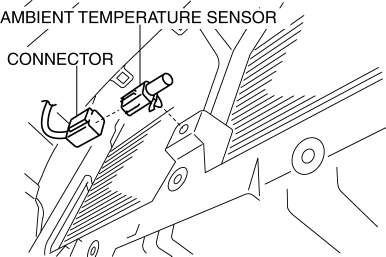
5. Remove the ambient temperature sensor.
6. Install in the reverse order of removal.
 Ambient Temperature Sensor Inspection [Manual Air Conditioner]
1. Measure the temperature around the ambient temperature sensor and measure
the resistance between the ambient temperature sensor terminal.
If the characteristics of the ambient tempera ...
 Ambient Temperature Sensor Removal/Installation [Manual Air Conditioner]
1. Disconnect the negative battery cable..
2. Remove the aerodynamic under cover No.2..
3. Remove the aerodynamic under cover No.1..
4. Disconnect the connector.
5. Remove the ambient temp ...
Other materials:
Intermediate Sensor Inspection [FS5 A EL]
On-Vehicle Inspection
1. Inspect the power supply circuit for the intermediate sensor.
a. Set the battery component (ex: battery, battery tray and PCM component) out
of the way.
b. Disconnect the intermediate sensor connector.
c. Switch the ignition to ON (engine off).
d. Measure the ...
Engine Removal/Installation [Mzr 2.0, Mzr 2.5]
WARNING:
Fuel vapor is hazardous. It can very easily ignite, causing serious injury
and damage. Always keep sparks and flames away from fuel.
Fuel line spills and leakage are dangerous. Fuel can ignite and cause serious
injuries or death and damage. Fuel can also irritate skin ...
Driving position memory
In the Subaru Solterra, the driving position memory system intelligently
adjusts the driver’s seat and outside rear view mirrors to match personal preferences,
while also simplifying entry and exit from the vehicle.
The Subaru Solterra allows you to store your preferred driving position, in ...
