
Mazda 3 Service Manual: Clutch Pedal Position (CPP) Switch Inspection [Mzr 2.0, Mzr 2.5]
Continuity Inspection
1. Verify that the CPP switch is installed properly..
2. Remove the battery cover..
3. Disconnect the negative battery cable..
4. Disconnect the CPP switch connector..
5. Verify that the continuity between CPP switch terminals A and B when the clutch pedal is depressed and when it is released is according to the following table:
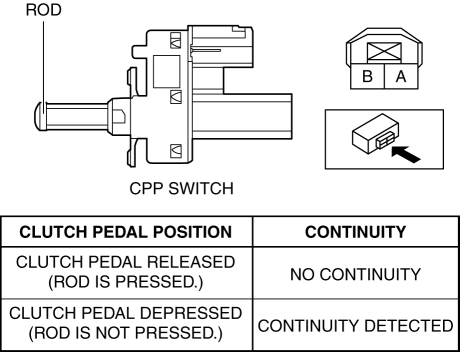
-
If not as verified, replace the CPP switch..
 Clutch Pedal Inspection [C66 M R]
NOTE:
For the clutch pedal inspection, note the followings and measure each inspection
location.
Measure the center of the upper surface of the pedal pad for each inspection.
...
 Clutch Pedal Position Switch Removal/Installation [C66 M R]
1. Remove the battery cover..
2. Disconnect the negative battery cable..
3. Disconnect the clutch pedal position switch connector.
4. Remove the clutch pedal position switch from the pedal brack ...
Other materials:
Front Center Speaker Inspection
1. Disconnect the negative battery cable..
2. Remove the following parts:
a. Upper column cover.
b. Instrument cluster.
c. Center panel.
d. Center cover.
e. Dashboard upper panel.
f. Front center speaker.
3. Verify the resistance between the front center speaker terminals.
...
Jack
To remove the jack
(4–Door)
Push the tabs and remove the cover.
(5–Door)
Turn the knob and remove the cover.
Turn the wing bolt and jack screw
counterclockwise.
To secure the jack
Insert the wing bolt into the jack with
the jack screw pointing to the down
a ...
Door Sash Film Removal
1. Disconnect the negative battery cable.
2. Partially peel back the glass run channel.
3. Partially peel back the door weatherstrip.
4. Remove the following parts:
a. Inner garnish.
b. Front door trim.
c. Power outer mirror.
d. Rear door trim.
e. Rear door speaker.
f. Rear door qu ...
