
Mazda 3 Service Manual: Cruise Control Switch Inspection [Mzr 2.3 Disi Turbo]
1. Remove the battery cover..
2. Disconnect the negative battery cable and wait for 1 min or more
..
3. Remove the driver–side air bag module..
4. Disconnect the clock spring connector (part wiring harness-side).
5. Measure the resistance between clock spring terminals K and M (part wiring harness-side) using a tester.
-
If not as specified, replace the steering switch..
|
Switch condition |
Resistance (ohm) |
|
Cruise OFF switch held at on |
Continuity |
|
CANCEL switch held at on |
Approx. 120 |
|
SET (-) switch held at on |
Approx. 300 |
|
SET (+) switch held at on |
Approx. 600 |
|
RESUME switch held at on |
Approx. 1,110 |
|
Cruise ON switch held at on |
Approx. 2,110 |
|
Neutral |
Approx. 4,310 |
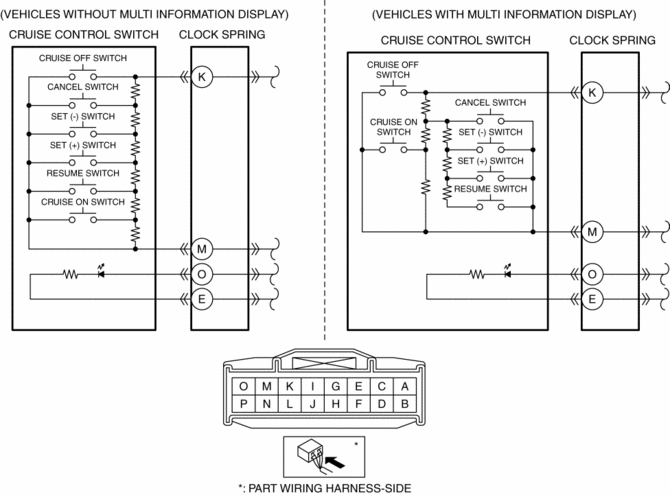
6. Apply battery positive voltage to clock spring connector terminal O (part wiring harness-side), and terminal E (part wiring harness-side) to ground.
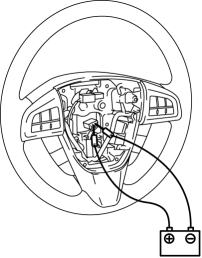
7. Verify that the LED illuminates.
-
If the LED does not illuminate, replace the steering switch..
 Cruise Control Switch Inspection [Mzr 2.0, Mzr 2.5]
1. Remove the battery cover..
2. Disconnect the negative battery cable and wait for 1 min or more..
3. Remove the driver–side air bag module..
4. Disconnect the clock spring connector (part w ...
 Electronics
...
Other materials:
Parking Brake Lever Inspection
Stroke Inspection
1. Pump the brake pedal a few times.
2. Pull the parking brake lever two to three times.
3. Inspect the parking brake stroke by slowly pulling at point A 50 mm {1.97
in} from the end of the parking brake lever with a force of 98 N {10 kgf,
22 lbf} and counting the number o ...
Accelerator Pedal Removal/Installation [Mzr 2.0, Mzr 2.5]
1. Remove the battery cover..
2. Disconnect the negative battery cable..
3. Remove the driver-side lower panel..
4. Remove in the order indicated in the table.
1
APP sensor connector
2
Accelerator pedal
5. Install in the rev ...
Drive Belt Auto Tensioner Inspection [Skyactiv G 2.0]
WARNING:
A hot engine can cause severe burns. Turn off the engine and wait until it
is cool before servicing.
CAUTION:
If the rubber part of the drive belt auto tensioner is damaged by a screwdriver
or other tool, oil in the hydraulic pressure unit could leak and the tens ...
