
Subaru Solterra 2023-2026 Owner's Manual: Drive mode select switch
The drive modes of the Subaru Solterra can be adjusted to match different driving conditions, ensuring optimal performance, efficiency, and comfort.
Selecting a drive mode
By pressing the drive mode select switch, the Subaru Solterra cycles through three distinct driving modes: Power mode, Normal mode, and Eco drive mode. Each mode modifies the behavior of the electric powertrain to suit specific driving needs, allowing the Subaru Solterra to adapt seamlessly to various road and traffic conditions.
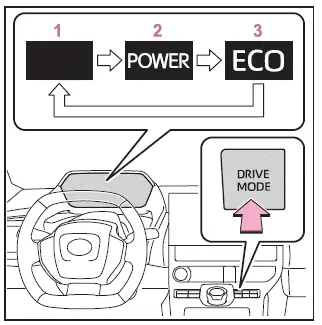
- Normal mode
This mode provides a well-balanced combination of energy efficiency, smooth operation, and responsive driving performance. It is the ideal default setting for everyday driving in the Subaru Solterra, offering a refined and quiet ride with consistent acceleration. - Power mode
In Power mode, the Subaru Solterra enhances throttle responsiveness and delivers stronger acceleration. The EV system is tuned to provide immediate power output, making this mode particularly suitable for overtaking, merging onto highways, or situations requiring more dynamic driving performance. - Eco drive mode
Eco mode optimizes the Subaru Solterra for maximum energy efficiency by softening accelerator response and reducing power output. This helps extend driving range and encourages smoother driving habits.When Eco drive mode is active, the Eco indicator illuminates, confirming that the vehicle is operating in an energy-saving configuration.
■ Drive mode cancellation
- Power mode in the Subaru Solterra is automatically canceled when the power switch is turned off or when "X-MODE" is activated. In such cases, the system reverts to Normal mode to ensure stable and predictable operation.
- Normal mode and Eco drive mode remain active even after the Subaru Solterra is turned off. These modes will only change if the driver manually selects another drive mode or engages "X-MODE".
- When drive mode select is not available
When "X-MODE" is engaged in the Subaru Solterra, switching to Power mode or Eco drive mode is not possible. This ensures that the vehicle maintains optimal traction and stability settings required for challenging road conditions.
The Subaru Solterra drive mode system provides flexibility for drivers to prioritize performance, efficiency, or balanced operation, making it a versatile choice for both urban commuting and longer journeys.
 Advanced Park cancelation/ suspension
■ Assistance will be canceled when
Under the following conditions, the Subaru Solterra Advanced Park system will
automatically terminate its operation. When this occurs, immediately take control ...
 X-MODE
The Subaru Solterra X-MODE system is engineered to significantly
enhance off-road stability, traction, and control, allowing the vehicle to confidently
handle challenging terrains beyond standard ...
Other materials:
Vacuum Pump Inspection [Skyactiv G 2.0]
1. Pinch open the clamp using pliers and disconnect the vacuum hose from the
vacuum pump.
2. Install the vacuum gauge as shown in the figure, then check the vacuum.
3. Warn up the engine.
If the pressure is less than the specification, inspect for the following.
M ...
Making a Call
Phonebook Usage
Telephone calls can be made by saying
the contact name in the downloaded
phonebook or the name of a person whose
phone number has been registered in the
Bluetooth ® Hands-Free. Refer to Import
contact (Download Phonebook).
Press the talk button.
Wait for the beep sound.
...
Interior Light Bulb Removal/Installation
1. Disconnect the negative battery cable..
2. Insert a tape-wrapped fastener remover into the service hole and pry with
the screwdriver in the direction shown by the arrow to remove the lens.
3. Remove the interior light bulb.
4. Install in the reverse order of removal. ...
