
Mazda 3 Service Manual: Drive Shaft Inspection
1. Inspect the connections for any looseness.
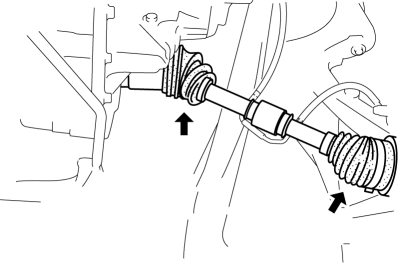
-
If there is any malfunction, tighten or replace the applicable part.
2. Inspect the dust boot for damage and cracks.
-
If there is any malfunction, replace the applicable part.
3. Move the spline and joint up and down, left and right by hand and verify that there is no excessive play.
-
If there is any malfunction, replace the applicable part.
 Drive Shaft (Tripod Joint) Disassembly/Assembly
1. Disassemble in the order indicated in the table.
2. Assemble in the reverse order of disassembly.
1
Boot band (transaxle side)
(See Boot Band (Transaxle Side) Dis ...
 Drive Shaft Removal/Installation
CAUTION:
Performing the following procedures without first removing the ABS wheel-speed
sensor may possibly cause an open circuit in the wiring harness if it is pulled
by mistake. Before ...
Other materials:
For safe driving
For optimal safety in your Subaru Solterra, always adjust your seating
position, mirrors, and driving posture correctly before starting your journey.
Correct driving posture
Adjust the seatback angle so that you sit upright comfortably without needing
to lean forward while steering y ...
Traffic Jam Assist
Function Outline
In the Subaru Solterra, Traffic Jam Assist is an advanced driver support feature
designed to reduce fatigue during congested driving conditions. After confirming
operating conditions, the system can assist with lane centering, controlled acceleration
and deceleration, as well ...
Checking Tire Pressure
When you check the air pressure, make sure the tires are cold —meaning
they are not hot
from driving even a mile.
Remove the cap from the valve on one tire.
Firmly press a tire gauge onto the valve.
Add air to achieve recommended air pressure.
If you overfill the tire, release air ...
