
Subaru Solterra 2023-2026 Owner's Manual: Dynamic radar cruise control
In the Subaru Solterra, the Dynamic Radar Cruise Control system continuously monitors traffic ahead using radar and camera technology. It detects vehicles in front, evaluates the current following distance, and automatically adjusts speed to maintain a safe and comfortable gap. The Subaru Solterra allows the driver to customize the following distance by using the dedicated vehicle-to-vehicle distance control switch.
The Subaru Solterra Dynamic Radar Cruise Control is specifically intended for use on highways and expressways, where traffic flow is stable and predictable.
WARNING
■ For safe use
- The driver of the Subaru Solterra is always responsible for safe vehicle operation. Never rely solely on the Dynamic Radar Cruise Control system and remain fully aware of surrounding conditions at all times.
- The Subaru Solterra Dynamic Radar Cruise Control is designed to reduce
driver workload during long-distance driving.
However, its capabilities are limited. Carefully review all system characteristics and continue to drive attentively.
- Always set an appropriate cruising speed in the Subaru Solterra based on speed limits, traffic flow, weather, and road conditions. The driver is responsible for verifying the selected speed.
- Even when the Subaru Solterra system is functioning normally, differences may exist between actual road conditions and what the system detects. The driver must remain vigilant, assess potential hazards, and take necessary actions to ensure safety.
■ Precautions for the driving assist systems
The Subaru Solterra Dynamic Radar Cruise Control provides limited assistance. Over-reliance on this system may result in hazardous situations or accidents.
- Support for driver awareness: The Subaru Solterra system assists in maintaining a safe distance from the vehicle ahead, but it does not replace the need for constant observation. It is not intended for inattentive driving and does not function reliably in poor visibility conditions. The driver must remain attentive at all times, even when the vehicle comes to a stop.
- Support for driver judgment: The Subaru Solterra Dynamic Radar Cruise
Control evaluates only the distance between vehicles and cannot assess all potential
risks on the road.
The driver must independently determine whether a situation is safe and react accordingly.
- Support for driver operation: The Subaru Solterra system does not prevent or avoid collisions on its own. If a dangerous situation arises, the driver must immediately take control by braking or steering as needed.
■ Situations in which the dynamic radar cruise control should not be used
Do not operate the Subaru Solterra Dynamic Radar Cruise Control in the following situations, as proper system performance cannot be guaranteed:
Using the system under unsuitable conditions may increase the risk of accidents.
- On roads where pedestrians, cyclists, or mixed traffic are present
- When entering or exiting highways or expressways
- When the approach warning is frequently activated, indicating unstable traffic conditions
- In situations where Subaru Solterra sensors may not function correctly
- When lane markings are unclear or cannot be detected
The Subaru Solterra Dynamic Radar Cruise Control enhances long-distance driving comfort and helps maintain consistent spacing in traffic, but it must always be used responsibly and in combination with attentive, proactive driving.
Basic functions
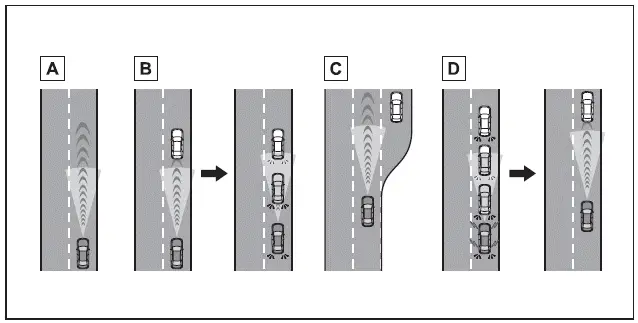
- Constant speed cruising:
When there are no vehicles ahead
In this mode, the Subaru Solterra maintains a steady speed set by the driver, ensuring smooth and efficient highway travel. The system continuously monitors speed to keep it consistent.
If the Subaru Solterra exceeds the preset speed while descending a slope, the system will notify the driver by flashing the set speed indicator and activating an audible alert, prompting corrective action.
- Deceleration and follow-up cruising
When a preceding vehicle driving slower than the set vehicle speed is detected
When the Subaru Solterra detects a slower vehicle ahead, it automatically reduces speed to maintain a safe following distance. If necessary, braking force is applied, and the stop lights will illuminate accordingly.
The Subaru Solterra dynamically adjusts its speed based on the movement of the preceding vehicle, ensuring a consistent and safe gap. If the closing distance becomes too short and deceleration is insufficient, an approach warning will be triggered to alert the driver.
- Acceleration
When there are no longer any preceding vehicles driving slower than the set vehicle speed
Once the path ahead is clear, the Subaru Solterra will smoothly accelerate back to the preset cruising speed and resume constant speed driving.
- Starting off:
If a preceding vehicle stops, the Subaru Solterra will also come to a complete stop (controlled stop). When the preceding vehicle begins moving again, pressing the "RES" switch or lightly applying the accelerator will resume follow-up cruising.
If no action is taken, the Subaru Solterra will remain stationary.
Vehicles equipped with Traffic Jam Assist: On highways and expressways, if the preceding vehicle moves within approximately 3 minutes after stopping, the Subaru Solterra may automatically resume movement. A buzzer and message will notify the driver before the vehicle begins to follow traffic again, enhancing convenience in congested conditions.
System components
■ Meter display
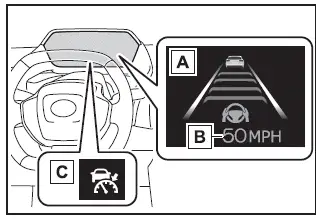
- Multi-information display
- Set vehicle speed
- Indicators
■ Switches
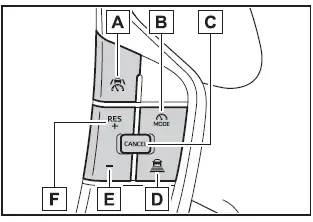
- Driving assist switch
- Driving assist mode select switch
- Cancel switch
- Vehicle-to-vehicle distance switch
- "-" switch
- "+" switch/"RES" switch
Using the dynamic radar cruise control
■ Setting the vehicle speed
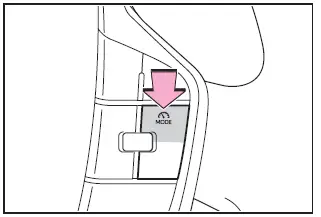
1. In the Subaru Solterra, press the driving assist mode select switch to activate the Dynamic Radar Cruise Control system.
The corresponding indicator will illuminate, confirming that the Subaru Solterra system is ready for operation.
2. Use the accelerator pedal to reach your desired cruising speed (approximately 20 mph [30 km/h] or higher), then press the driving assist switch to set the speed.
The selected speed will be clearly displayed on the Subaru Solterra multi-information display, allowing the driver to monitor and adjust settings as needed.
The Subaru Solterra Dynamic Radar Cruise Control system is designed to enhance driving comfort, especially on long journeys, by intelligently adapting to traffic conditions while maintaining driver control and awareness.
In the Subaru Solterra, the vehicle speed at the exact moment the control switch is released becomes the active set cruising speed, ensuring precise and intuitive speed selection.
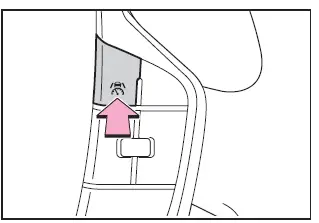
■ Adjusting the set vehicle speed
- Adjusting the set vehicle speed using the switches
To modify the preset cruising speed in the Subaru Solterra, press the "+" or "-" switch repeatedly until the desired speed value appears on the display.
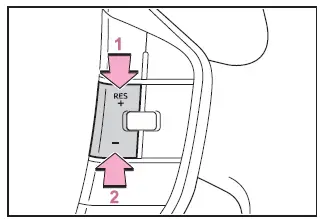
- Increase set vehicle speed
- Decrease set vehicle speed
Short press adjustment: Press the switch briefly
Long press adjustment: Hold the switch down until the Subaru Solterra reaches the preferred speed setting
The set vehicle speed will change according to the following patterns:
For U.S.A.
Short press adjustment: Speed increases or decreases by 1 mph (1.6 km/h) with each press
Long press adjustment: Speed changes continuously in 1 mph (1.6 km/h) increments while the switch is held
Except for U.S.A.
Short press adjustment: Speed changes by 1 km/h (0.6 mph) or 1 mph (1.6 km/h) per press
Long press adjustment: Speed adjusts continuously in larger steps of 5 km/h (3.1 mph) or 5 mph (8 km/h) while holding the switch
- Increasing the set vehicle speed using the accelerator pedal
1. Press the accelerator pedal in the Subaru Solterra to reach the desired higher speed.
2. Press the "+" switch to store this new speed as the updated cruise control setting.
■ Canceling/resuming control
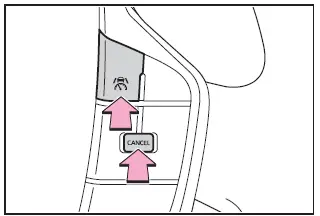
1. Press the cancel switch or driving assist switch to deactivate cruise control in the Subaru Solterra.
The system will also cancel if the brake pedal is pressed. (If the Subaru Solterra has been brought to a complete stop by the system, pressing the brake pedal will not cancel control.)
2. Press the "RES" switch to resume the previously set speed and continue cruise control operation.
■ Changing the vehicle-to-vehicle distance
Each time the distance control switch is pressed in the Subaru Solterra, the following distance setting cycles through available levels. When a preceding vehicle is detected, the indicator A will appear on the display.
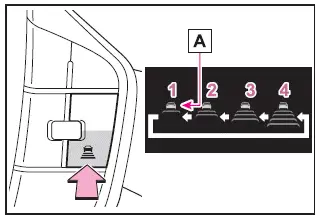
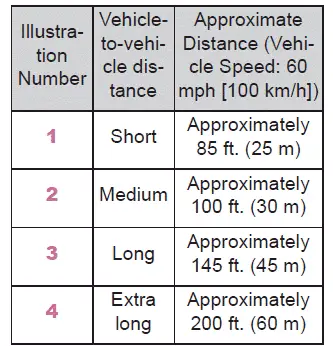
The actual distance maintained by the Subaru Solterra varies based on driving speed and conditions. When the vehicle is brought to a stop automatically, a safe distance is maintained from the vehicle ahead regardless of the selected setting.
■ Operating conditions
- The Subaru Solterra must be in the D (Drive) shift position.
- The system can be activated when vehicle speed is approximately 20 mph (30
km/h) or higher.
- If the Subaru Solterra speed is set below approximately 20 mph (30 km/h), the system will automatically adjust the set speed to about 20 mph (30 km/h).
- If the selected speed exceeds the system’s maximum allowable limit, the Subaru Solterra will cap the set speed at its upper threshold.
■ Accelerating after setting the vehicle speed
The Subaru Solterra allows manual acceleration by pressing the accelerator pedal even while cruise control is active. After acceleration, the vehicle will return to the previously set cruising speed.
However, when operating in adaptive distance control mode, the Subaru Solterra may reduce speed below the set value to maintain a safe following distance from the vehicle ahead, ensuring safer and smoother driving.
The Subaru Solterra Dynamic Radar Cruise Control system offers flexible speed control and intelligent distance management, enhancing both comfort and safety during long-distance travel.
■ When the vehicle is stopped by system control during follow-up cruising
- In the Subaru Solterra, if the vehicle is brought to a complete stop by the Dynamic Radar Cruise Control system and the "RES" switch is pressed, follow-up cruising will resume automatically provided the preceding vehicle begins moving within approximately 3 seconds.
- If the preceding vehicle starts moving within about 3 seconds after the Subaru Solterra has been stopped by system control, the system can automatically resume tracking without additional driver input.
■ Automatic cancelation of vehicle-to-vehicle distance control mode
In the Subaru Solterra, the adaptive distance control mode may automatically deactivate under the following conditions:
- When another driving assistance system applies braking or output limitation (for example: Pre-Collision System or drive-start control)
- When the parking brake is engaged
- When the Subaru Solterra is stopped by system control on a steep incline
- When any of the following occur while the vehicle is stationary under system
control:
- The driver's seat belt is unfastened
- The driver's door is opened
- Approximately 3 minutes have passed since the vehicle stopped
In certain situations, the Subaru Solterra may automatically activate the parking brake for safety.
- When conditions prevent some or all functions of the system from operating correctly
■ Preceding vehicles that the sensor may not detect correctly
Depending on road and traffic conditions, the Subaru Solterra sensors may have difficulty recognizing certain vehicles. In such cases, the driver must manually control acceleration or braking as needed.
Because detection accuracy may be limited, approach warnings might not always activate in time.
- When a vehicle suddenly cuts in front of the Subaru Solterra or exits the lane very quickly or very slowly
- When the Subaru Solterra is in the process of changing lanes
- When a preceding vehicle is traveling at an unusually low speed
- When a vehicle is stationary in the same lane
- When a motorcycle is traveling in the same lane as the Subaru Solterra
■ Conditions under which the system may not operate correctly
Under certain circumstances, the Subaru Solterra Dynamic Radar Cruise Control system may not respond as expected. The driver should be prepared to intervene immediately by braking or accelerating.
- When a preceding vehicle brakes suddenly
- When changing lanes at low speeds, such as during heavy traffic or congestion
■ Conditions for extended resume time
The extended resume function in the Subaru Solterra is activated only when all of the following conditions are satisfied:
- For vehicles with connected navigation: an active Subaru connected services subscription is required (contact your SUBARU dealer for details)
- The Subaru Solterra is traveling on a restricted-access road such as a highway or expressway
- A preceding vehicle is detected and tracked by the system
- No interruptions or changes in the detected vehicle occur
- The preceding vehicle remains the same and is not replaced by another vehicle
- Clearance sonar and FCTA systems do not detect obstacles ahead
- The driver monitor system confirms that the driver is looking forward
- No steering input is applied
- The brake pedal is not pressed
Approach warning
When the Subaru Solterra approaches a vehicle ahead and the system determines that automatic deceleration is insufficient, such as when another vehicle suddenly merges into the lane, a warning will be issued.
The warning includes a flashing display and an audible buzzer, prompting the driver to take immediate action.
In such situations, the driver must press the brake pedal to maintain a safe following distance and ensure safe operation of the Subaru Solterra.
The Subaru Solterra Dynamic Radar Cruise Control system enhances convenience and safety, but always requires active driver supervision and timely intervention.
■ Warnings may not occur when
In certain situations within the Subaru Solterra Dynamic Radar Cruise Control system, warnings may not be triggered even if the following distance becomes short.
- When the vehicle ahead is traveling at the same speed or faster than the Subaru Solterra
- When the preceding vehicle is moving at a very low speed and does not create a rapid closing distance
- Immediately after setting the cruising speed in the Subaru Solterra system
- When the accelerator pedal is actively pressed by the driver
Curve speed reduction function
In the Subaru Solterra, when the system detects that the vehicle is entering a curve, it may automatically begin to reduce speed to improve stability and safety. Once the curve has been completed, the speed reduction will gradually cease.
Depending on driving conditions, the Subaru Solterra may smoothly return to the preset cruising speed after exiting the curve.
If adaptive distance control becomes necessary, such as when another vehicle cuts into the lane, the curve speed reduction function may be temporarily canceled to prioritize distance control.
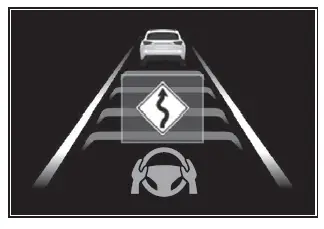
■ Situations in which the curve speed reduction function may not operate
The Subaru Solterra curve speed reduction feature may not activate under the following conditions:
- When driving through wide or gentle curves that do not require speed adjustment
- When the accelerator pedal is being pressed by the driver
- When navigating extremely short or sharp curves where detection is limited
Driver Monitor support function
When the Subaru Solterra driver monitoring system detects inattentiveness and displays a warning, the vehicle’s acceleration may be temporarily limited to enhance safety.
Once the driver re-engages and the warning is cleared, normal acceleration performance will be restored automatically.
Support for lane change
At speeds of approximately 50 mph (80 km/h) or higher, the Subaru Solterra can assist during lane changes. When the turn signal is activated and a lane change is initiated toward the passing lane, the system may gently increase speed to support overtaking.
The Subaru Solterra determines the passing lane based on vehicle configuration (left-hand or right-hand drive). If the vehicle is operated in a region with opposite traffic orientation, acceleration assistance may occur in an unexpected direction.
For example, a Subaru Solterra configured for right-hand traffic may accelerate when signaling right, even if driving in a left-hand traffic environment.
When changing into a lane with a slower-moving vehicle, the Subaru Solterra will instead gradually reduce speed to facilitate a safer transition.
Changing Dynamic radar cruise control settings
The Subaru Solterra allows drivers to adjust Dynamic Radar Cruise Control behavior through the customization settings menu, enabling tailored operation according to driving preferences.
Display and system operation state
The Subaru Solterra provides real-time visual feedback of Dynamic Radar Cruise Control operation through the instrument display, ensuring the driver is always informed about system status and behavior.
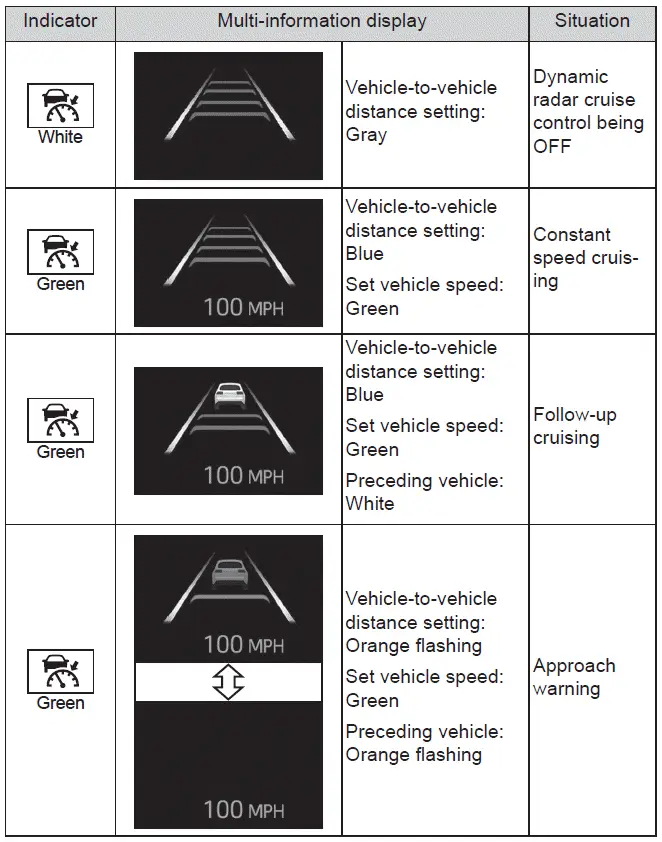
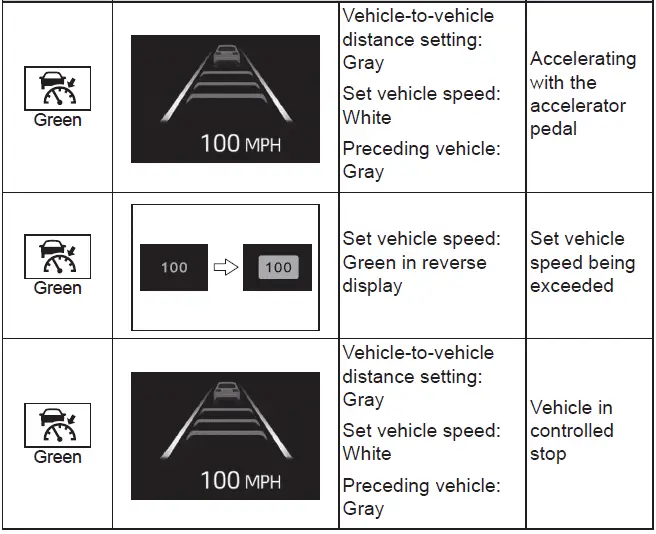
The Subaru Solterra Dynamic Radar Cruise Control system combines intelligent speed management with advanced driver support, helping deliver a smoother and safer driving experience while maintaining full driver control.
 RSA (Road Sign Assist)
In the Subaru Solterra, the Road Sign Assist (RSA) system uses the
front camera and, when available, navigation data to identify traffic signs such
as speed limits and restrictions. Once recognize ...
 Cruise control
In the Subaru Solterra, cruise control allows the vehicle to maintain
a constant speed without continuous pressure on the accelerator pedal, providing
a more relaxed and efficient driving experien ...
Other materials:
Automatic Transaxle Removal/Installation [FS5 A EL]
CAUTION:
Secure the steering wheel using tape or a cable to prevent the steering shaft
from rotating after disconnecting the steering shaft. If the steering wheel
rotates after the steering shaft and the steering gear and linkage are disconnected,
the internal parts of the clock spr ...
Antenna Feeder No.5 Removal/Installation
1. Disconnect the negative battery cable..
2. Remove the following parts:
a. Front scuff plate (RH).
b. Front side trim (RH).
c. Rear scuff plate (RH).
d. B-pillar lower trim (RH).
e. Rear seat cushion.
f. Tire house trim (RH).
3. Partially peel back the floor covering.
4. Disconne ...
Body Control Module (Bcm) Inspection
1. Remove the following parts:
a. Front scuff plate (LH).
b. Front side trim (LH).
c. Upper panel.
d. Shift knob (MTX).
e. Selector lever knob (ATX).
f. Shift panel.
g. Side wall.
h. Console.
2. Set the hood release lever out of the way..
3. Remove the lower panel. (driver-side). ...
