
Subaru Solterra 2023-2026 Owner's Manual: RSA (Road Sign Assist)
In the Subaru Solterra, the Road Sign Assist (RSA) system uses the front camera and, when available, navigation data to identify traffic signs such as speed limits and restrictions. Once recognized, the system provides clear visual alerts and, when necessary, audible warnings to help keep the driver informed and aware of current road regulations.
WARNING
■ For safe use
- Safe driving in the Subaru Solterra is always the sole responsibility of the driver. Remain attentive to road conditions and surrounding traffic at all times.
- Do not depend entirely on the Subaru Solterra RSA system. While it provides helpful sign recognition, it cannot replace direct observation and driver judgment. Always confirm road signs visually to ensure safe and correct driving behavior.
■ Situations in which the RSA should not be used
Disable the Subaru Solterra RSA system when environmental or operational conditions make its use unreliable or unnecessary.
■ Situations in which the system may not operate properly
Performance may be affected in conditions where sensors or visibility are compromised.
Display Function
- When the Subaru Solterra front camera detects a road sign, or when sign information is available through the navigation system (if equipped), the recognized sign will be displayed on the instrument panel or display screen.
- The Subaru Solterra system is capable of showing multiple signs simultaneously, depending on the driving environment.
Depending on vehicle configuration, the number of signs that can be displayed at one time may be limited.
■ Operating conditions of sign display
In the Subaru Solterra, road signs will be displayed when the following conditions are met:
- The system successfully detects a sign. A displayed sign may disappear in the following situations:
- When no new signs are detected over a certain driving distance
- When the system determines that the vehicle has entered a different road, such as after making a turn
■ Situations in which the display function may not operate properly
Under certain conditions, the Subaru Solterra RSA system may fail to detect signs or may display incorrect information. This does not necessarily indicate a malfunction.
- When road signs are dirty, faded, tilted, or damaged
- When electronic signboards have low contrast or poor visibility
- When signs are partially or fully obscured by trees, poles, or other objects
- When a sign is only visible to the Subaru Solterra camera for a brief moment
- When the vehicle’s movement (turning or lane changing) is misinterpreted
- When signs are located immediately after junctions or in adjacent lanes before merging
- When stickers or markings on other vehicles resemble traffic signs
- When objects similar in shape to supported signs are mistakenly recognized
- When speed limit signs for adjacent roads fall within the detection range
- When driving through roundabouts
- When signs intended for specific vehicles (such as trucks) are detected
- When supplementary signs (time restrictions, days, zones) are present
- When driving through construction or roadwork zones
- Vehicles with navigation system: when map data is outdated
- Vehicles with navigation system: when navigation is unavailable
In such cases, the Subaru Solterra display and navigation system may show different speed limits or sign information.
Notification function
The Subaru Solterra RSA system can actively alert the driver in specific situations:
- If the vehicle exceeds the detected speed limit, the displayed sign will be emphasized and an audible warning will sound.
- If the Subaru Solterra detects a "Do Not Enter" sign and determines that the vehicle has entered a restricted area, the warning symbol will flash and a buzzer will alert the driver.
■ Operating conditions of the notification functions
- Excess speed notification function:
- This function operates when the Subaru Solterra system recognizes a valid speed limit sign.
- No entry notification function:
- This activates when multiple "Do Not Enter" signs are detected simultaneously
- And when the Subaru Solterra passes between those detected signs
Types of road signs supported
- The Subaru Solterra can display a range of standard traffic signs relevant to the driving region.
However, newly introduced or non-standard signs may not always be recognized or displayed correctly.
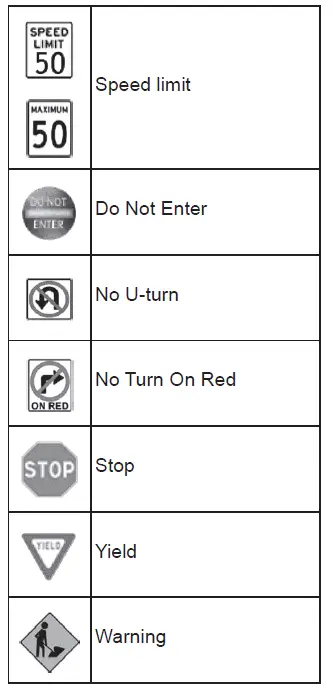
Changing RSA settings
The Subaru Solterra allows customization of Road Sign Assist features through the vehicle settings menu, enabling drivers to adjust notifications and display preferences according to their needs.
Using the Subaru Solterra RSA system responsibly enhances awareness of road regulations and contributes to safer, more informed driving.
 PDA (Proactive driving assist)
In the Subaru Solterra, the Proactive Driving Assist (PDA) system
continuously monitors the surroundings and, when a detectable object is identified,
it can automatically apply gentle braking and ...
 Dynamic radar cruise control
In the Subaru Solterra, the Dynamic Radar Cruise Control system continuously
monitors traffic ahead using radar and camera technology. It detects vehicles in
front, evaluates the current following ...
Other materials:
Back door
In the Subaru Solterra, the back door can be conveniently locked,
unlocked, opened, and closed using several intuitive methods, ensuring both ease
of use and a high level of safety during everyday operation.
WARNING
Carefully follow all safety precautions when operating the Subaru Solterra
b ...
Front ABS Wheel Speed Sensor Inspection
Sensor Output Value Inspection
CAUTION:
Resistance inspection using other testers may cause damage to the ABS wheel-speed
sensor internal circuit. Be sure to use the M-MDS to inspect the ABS wheel-speed
sensor.
1. Switch the ignition to off.
2. Connect the M-MDS to the DLC-2. ...
Audio Operation Using Voice Recognition (Type B)
Main audio operation
The below commands are examples of the available commands.
When the talk button is pressed and the following command is spoken out, the
audio can be
operated. The commands in the () can be omitted. The specified name and number
are put
into the {}.
NOTE
Some c ...
