
Subaru Solterra 2023-2026 Owner's Manual: PDA (Proactive driving assist)
In the Subaru Solterra, the Proactive Driving Assist (PDA) system continuously monitors the surroundings and, when a detectable object is identified, it can automatically apply gentle braking and subtle steering input to help maintain a safe distance and reduce the likelihood of getting too close to obstacles.
WARNING
■ For safe use
Safe driving of the Subaru Solterra always remains the full responsibility of the driver.
- The Subaru Solterra proactive driving assist is designed to support normal
braking and steering actions and to help reduce the risk of approaching objects
too closely. However, its capabilities are limited and should only be considered
as an assistance feature.
The driver must always apply braking and steering inputs as required based on real driving conditions.
Carefully review all operating conditions and limitations. Never rely entirely on the Subaru Solterra PDA system.
- The proactive driving assist system does not reduce the level of attention
required for safe driving. Even when functioning correctly, there may be differences
between what the driver sees and what the Subaru Solterra system detects.
The driver must continuously assess surroundings, evaluate potential hazards, and maintain control. Over-reliance on the Subaru Solterra system may result in serious accidents.
- The Subaru Solterra PDA is not designed for inattentive driving or for use in poor visibility conditions. Always remain alert and maintain full awareness of the environment.
■ When turning proactive driving assist off
- When environmental or sensor-related conditions prevent proper operation
- When it is necessary to manually disable the Subaru Solterra assistance systems for safety reasons
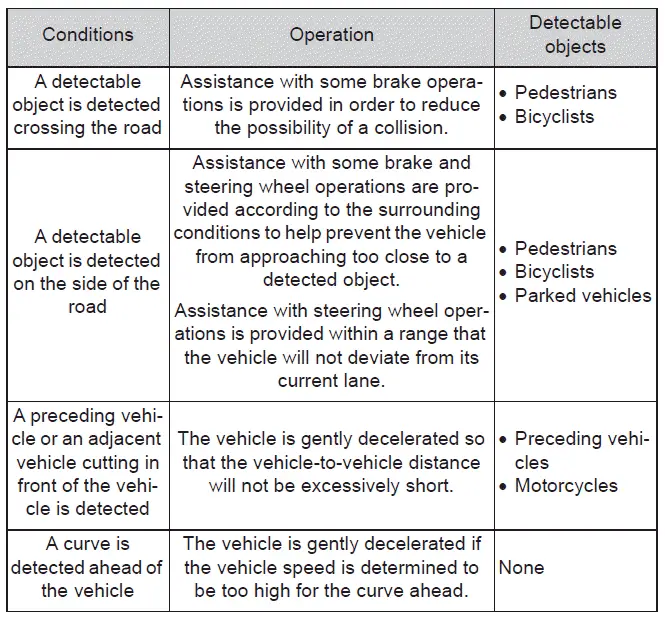
System operating conditions and detectable objects
Depending on the driving environment, the Subaru Solterra proactive driving assist adapts its behavior, including detection capability and level of intervention.
■ Vehicle speeds at which the system can operate
- Detectable object crossing the road assistance
Approximately 20 to 35 mph (30 to 60 km/h)
- Detectable object on the side of the road assistance
Approximately 20 to 35 mph (30 to 60 km/h)
- Preceding vehicle deceleration assistance
Approximately 15 mph (20 km/h) or higher
- Curve deceleration assistance
Approximately 15 mph (20 km/h) or higher
- Steering assist within a lane
Approximately 5 to 80 mph (10 to 140 km/h)
■ System operation will be canceled when
- In the following situations, the Subaru Solterra PDA system will automatically
stop operating:
- When dynamic radar cruise control or standard cruise control is active
- When the Pre-Collision System (PCS) is switched off
- When system limitations prevent partial or full functionality
- When the shift position is set to P, R, or N
- Brake assist support in the Subaru Solterra will be canceled under the following
conditions:
- At speeds of approximately 9 mph (15 km/h) or lower
- When a specific speed threshold is reached based on surrounding conditions
- In the following situations, system operation may be interrupted or canceled:
- When other driving support systems intervene, such as PCS or drive-start control
- When the system determines that the detected object is no longer relevant or has moved away
- When lane markings are no longer visible or detectable
- When the brake pedal is pressed by the driver
- When the accelerator pedal is pressed
- When the steering wheel is turned with significant force
- When the turn signal lever is engaged for a lane change or turn
The Subaru Solterra Proactive Driving Assist system enhances everyday driving comfort by providing intelligent support in various situations, but it must always be used in combination with attentive and responsible driving behavior.
WARNING
Situations in which the system may not operate properly
- In the Subaru Solterra, certain road or environmental conditions may prevent accurate lane detection, reducing the effectiveness of assistance functions.
- When a detectable object suddenly stops just before entering the driving path, the Subaru Solterra system may not react in time.
- When passing extremely close to objects positioned behind guardrails, fences, or barriers, detection accuracy may be reduced.
- During lane changes while overtaking another object, the Subaru Solterra sensors may temporarily lose precise tracking.
- When passing objects that are actively changing lanes or turning, the system may not predict their movement correctly.
- When numerous roadside objects such as guardrails, poles, trees, walls, fences, traffic cones, or mailboxes are present, the Subaru Solterra may misinterpret the environment.
- When road markings, patterns, or painted surfaces resemble detectable objects, incorrect detection may occur.
- When driving under low overhead structures such as tunnels, signs, or gantries, the Subaru Solterra system may interpret them as obstacles.
- When traveling on snow-covered, icy, or heavily rutted roads, detection capability and system response may be limited.
- When a detectable object is moving toward the Subaru Solterra, system recognition may be affected.
- When either the Subaru Solterra or surrounding objects are swaying or unstable, detection consistency may decrease.
- When a detectable object changes behavior suddenly, such as rapid acceleration, braking, or directional changes, the system may not respond as expected.
- When rapidly approaching an object, the Subaru Solterra system may have insufficient time to react.
- When the vehicle ahead or a motorcycle is not directly aligned with the Subaru Solterra, detection may be less reliable.
- When structures are positioned above a detectable object, recognition may be partially obstructed.
- When part of an object is hidden by other elements such as luggage, umbrellas, or barriers, the Subaru Solterra may not fully identify it.
- When multiple detectable objects overlap within the sensor range, system interpretation may become inaccurate.
- When strong light sources such as sunlight or headlights reflect off an object, detection performance may be affected.
- When objects are very bright (such as white surfaces) or blend into their surroundings due to similar color or brightness, recognition may be reduced.
- When an object suddenly emerges from the side or cuts into the path of the Subaru Solterra, detection may be delayed.
- When approaching vehicles positioned at angles, perpendicular orientations, or facing directly toward the Subaru Solterra, recognition may be inconsistent.
- When parked vehicles are angled or positioned unusually, the system may not correctly interpret their presence.
- When detecting bicycles with unusual configurations (child-sized, carrying loads, tandem bicycles, or additional passengers), accuracy may decrease.
- When pedestrians or cyclists fall outside typical height ranges (approximately below 3.2 ft. (1 m) or above 6.5 ft. (2 m)), the Subaru Solterra may not detect them reliably.
- When a pedestrian’s outline is unclear due to clothing such as raincoats or long garments, detection may be impaired.
- When pedestrians or cyclists are bending, crouching, or partially hidden, recognition may fail.
- When pedestrians or cyclists move at high speed, the Subaru Solterra may not track them accurately.
- When pedestrians are pushing objects such as strollers, bicycles, or wheelchairs, the system may misinterpret their shape.
- When lighting conditions are poor (such as dawn, dusk, tunnels, or nighttime), objects may blend into the environment and become difficult to detect.
- When the lane width is unusually wide (approximately 13.1 ft. (4 m) or more), system accuracy may decrease.
- When the lane width is very narrow (approximately 8.2 ft. (2.5 m) or less), proper operation may be limited.
- Immediately after starting the Subaru Solterra EV system, the system may require time or distance before functioning optimally.
- While turning left or right, or shortly after completing a turn, detection performance may be temporarily reduced.
- During lane changes or shortly afterward, the Subaru Solterra system may not operate consistently.
- When entering, navigating, or exiting curves, system accuracy may fluctuate for a short period.
Understanding these limitations helps Subaru Solterra drivers use proactive driving assist and related safety systems more effectively while maintaining full control and awareness in all driving environments.
Changing proactive driving assist settings
- In the Subaru Solterra, the Proactive Driving Assist system can be easily turned ON or OFF through the vehicle’s customization menu, allowing the driver to adapt the system to specific driving preferences.
- Additional configuration options for the Subaru Solterra proactive driving assist can also be adjusted within the customize settings, providing flexibility in how assistance features respond in different driving situations.
System operation display
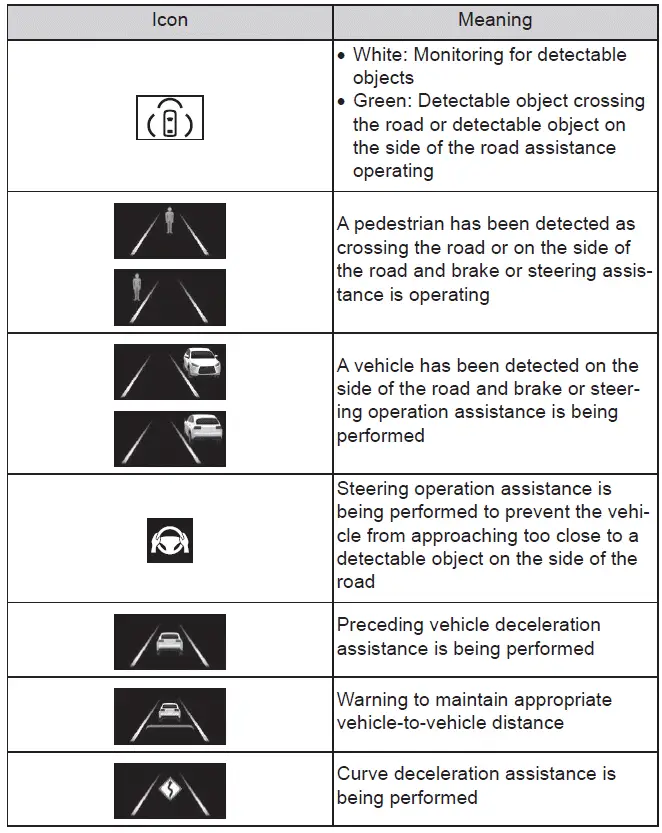
Depending on current driving conditions, the Subaru Solterra will display various indicators and icons to inform the driver about system status and activity.
Some of these visual indicators are available only when the display is switched to the driving safety support information screen, ensuring that the Subaru Solterra driver receives clear and relevant feedback.
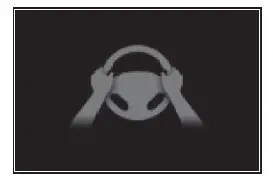
■ Hands off steering wheel warning operation
When the Subaru Solterra detects that the driver is not maintaining proper contact with the steering wheel during system operation, a message and warning icon will appear to prompt the driver to take control.
If the system confirms that the steering wheel is being held again, the warning will be canceled automatically. Regardless of warnings, always keep a firm grip on the steering wheel when using Subaru Solterra driver assistance features.
- When the Subaru Solterra is actively assisting with objects crossing the road or located along the roadside and detects that the driver is not holding the steering wheel, the warning will activate.
If no steering input is detected for a certain period, an audible buzzer will sound along with the visual warning to ensure the driver re-engages.
This Subaru Solterra warning may also be triggered if only minimal or insufficient steering input is applied continuously.
■ Warning operation after preceding vehicle deceleration assistance has ended
After the Subaru Solterra completes deceleration assistance for a preceding vehicle, if the driver does not press the brake or accelerator and the vehicle continues to approach the object ahead, a flashing warning and buzzer will activate to prompt immediate action.
If the Subaru Solterra detects that the driver has resumed control by pressing the brake or accelerator pedal, the warning will be automatically canceled.
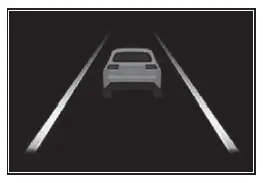
These visual and audible alerts in the Subaru Solterra are designed to maintain driver engagement and enhance overall safety, ensuring that advanced assistance systems work in harmony with attentive driving.
 LDA (Lane Departure Alert)
Basic functions
In the Subaru Solterra, the Lane Departure Alert (LDA) system is designed to
assist the driver by monitoring the vehicle’s position relative to lane markings
or road boundaries* ...
 RSA (Road Sign Assist)
In the Subaru Solterra, the Road Sign Assist (RSA) system uses the
front camera and, when available, navigation data to identify traffic signs such
as speed limits and restrictions. Once recognize ...
Other materials:
Inspecting Engine Oil Level
Be sure the vehicle is on a level
surface.
Warm up the engine to normal
operating temperature.
Turn it off and wait at least 5 minutes
for the oil to return to the oil pan.
Pull out the dipstick, wipe it clean, and
reinsert it fully.
Pull it out again and examine the level ...
Multi-information display
Display and menu icons
■ Display
Driving support system status display area
In the Subaru Solterra, this area dynamically presents visual information whenever
advanced driver assistance systems are active and a menu icon other than
is selected:
LDA (Lane Departure Alert)
...
Operating the Radio
Radio ON
Select the icon on the home
screen to display the Entertainment screen. When selecting
the desired radio, the following icons are indicated in the lower part of the
center display.
AM/FM Radio
Icon
Function
Displays the Entertainment menu. Use to ...
