
Subaru Solterra 2023-2026 Owner's Manual: FCTA (Cross Traffic Alert)
In the Subaru Solterra, the Front Cross Traffic Alert (FCTA) system is designed to enhance driver awareness when approaching intersections or crossing points at low speeds. The system monitors the area ahead and can detect vehicles approaching from the left or right side, helping the driver react in time to avoid potential hazards.
FCTA system control
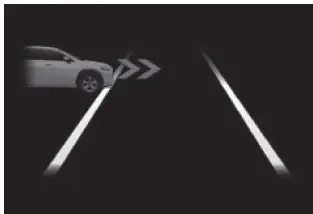
- When the Subaru Solterra detects a vehicle approaching from either side at the front while nearing an intersection, a visual notification is displayed to alert the driver.
- If the system determines that the Subaru Solterra may proceed into an intersection while a vehicle is approaching from the left or right, an audible buzzer and warning message will be activated, prompting the driver to apply the brakes.
- Multi-information display
WARNING
■ For safe use
Safe operation of the Subaru Solterra is always the responsibility of the driver. The FCTA system is intended only as an additional support feature and does not replace careful observation of traffic conditions.
Relying solely on the Subaru Solterra FCTA system may result in dangerous situations or accidents. The warnings provided by the system may not always match real-time traffic conditions.
Even if the warning display disappears after a short time, this does not guarantee that the area around the Subaru Solterra is completely clear of vehicles or pedestrians.
■ FCTA system operating conditions
The Subaru Solterra Front Cross Traffic Alert system will operate when all of the following conditions are satisfied:
- A shift position other than P or R is selected
- The Subaru Solterra is traveling at approximately 10 mph (15 km/h) or less
- A vehicle is approaching from the left or right at a speed between approximately 7 to 37 mph (10 to 60 km/h)
- No vehicle is directly in front of the Subaru Solterra
- The accelerator pedal is not being strongly pressed
- The brake pedal is not being strongly pressed
■ Situations in which the system may operate even though no vehicles are approaching
Under certain conditions, the Subaru Solterra FCTA system may activate even when there is no actual approaching vehicle:
- When approaching roadside objects such as guardrails, traffic signs, utility poles, street lights, trees, tall grass, or walls
- When passing objects along the roadside, including parked vehicles
- When distant vehicles or pedestrians are detected at the edges of the system’s sensing range
- When nearby vehicles or pedestrians are moving within adjacent parking spaces
- When pedestrians or cyclists are traveling along sidewalks near the roadway
- When detected objects move away from the Subaru Solterra rather than toward it
- When an approaching vehicle slows down or comes to a stop
- When a vehicle turns immediately in front of the Subaru Solterra
- When pedestrians move into the detection area
- When an oncoming vehicle performs a turning maneuver
- When the Subaru Solterra enters an intersection before a vehicle approaching from the side
- When stopped at traffic lights and vehicles approach from the left or right
- When making turns in front of approaching vehicles
The Subaru Solterra FCTA system improves awareness at intersections and low-speed crossing scenarios, but must always be used in combination with careful visual checks and responsible driving behavior.
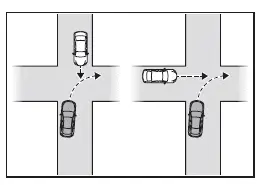
- When an oncoming vehicle approaches and then passes across the detection area of the Subaru Solterra
- When another vehicle overtakes the Subaru Solterra from behind or alongside
- When traveling parallel to another vehicle or a pedestrian within close proximity
- When a vehicle or pedestrian moves toward the side of the Subaru Solterra
■ Situations in which the system may not operate properly
Under certain real-world driving conditions, the Subaru Solterra Front Cross Traffic Alert (FCTA) system may not detect approaching vehicles accurately, which can affect its ability to operate as intended:
- If an approaching vehicle changes direction abruptly or performs sudden maneuvers such as rapid steering, acceleration, or braking
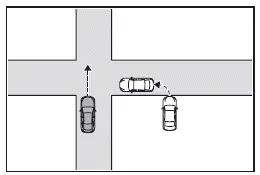
- If a vehicle approaches diagonally from the front-left or front-right rather than from a direct side angle
- When an approaching vehicle is still far away and outside the optimal detection range of the Subaru Solterra sensors
- If objects such as parked cars, walls, or structures are positioned between the Subaru Solterra and the approaching vehicle
- When multiple vehicles approach simultaneously with minimal spacing, making detection more difficult
Changing FCTA settings
- The Subaru Solterra FCTA system can be activated or deactivated through the vehicle’s customization menu.
- Drivers can also adjust various Subaru Solterra FCTA-related settings to better match their driving preferences and typical traffic conditions.
The Subaru Solterra FCTA feature is designed to enhance awareness in complex traffic environments, especially at intersections, but it should always be used as a supportive system alongside attentive driving and proper visual checks.
 Cruise control
In the Subaru Solterra, cruise control allows the vehicle to maintain
a constant speed without continuous pressure on the accelerator pedal, providing
a more relaxed and efficient driving experien ...
 Emergency Driving Stop System
In the Subaru Solterra, the Emergency Driving Stop System is engineered
to automatically slow down and bring the vehicle to a controlled stop within its
lane if the driver becomes unable to contin ...
Other materials:
Direct Mode
Direct mode can be used for temporarily
switching gears by operating the steering
shift switch while the vehicle is being
driven with the selector lever in the D
range.
While in direct mode, the D and M
indication illuminate and the gear position
in use is illuminated.
Direct mode is can ...
Clutch Cover Inspection [C66 M R]
1. Remove the clutch cover..
2. Perform the following procedures to inspect the clutch cover.
If it exceeds the maximum specification, replace the clutch cover..
a. Measure the wear of the diaphragm spring fingers.
Clutch cover diaphragm spring fingers maximum depth
0.6 ...
Oil Seal (Differential) Replacement [A26 M R]
1. On level ground, jack up the vehicle and support it evenly on safety stands.
2. Drain the oil from the transaxle..
3. Remove the front tires..
4. Remove the splash shield..
5. Remove the aerodynamic under cover No.2..
6. Separate the drive shaft and joint shaft from the transaxle..
7 ...
