
Mazda 3 Service Manual: Filament Inspection
1. Turn the ignition switch to the ON position.
2. Turn the rear window defroster switch on.
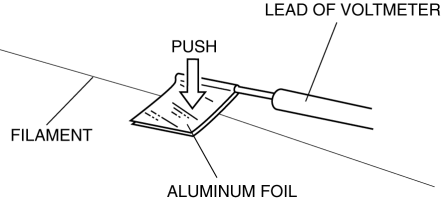
CAUTION:
-
Directly touching the rear window defroster filament with the lead of the tester could damage it. Wrap aluminum foil around the end of the lead and inspect the filament by touching it with the foil.
3. Connect the positive lead of the tester to the positive side of each filament and the negative lead to ground.
4. Gradually slide the positive lead from the positive side to the negative side and verify that the voltage decreases accordingly.
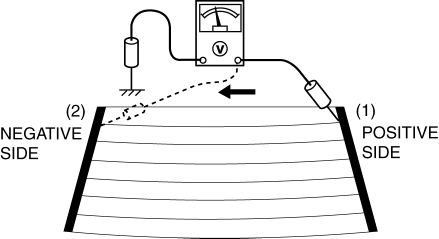
-
If the voltage changes rapidly, the filament has a malfunction. Repair the filament.
|
Measured part
|
Voltage (Reference)
|
|
(1) to (2) |
Approx. 11 V to 0 V |
 Base Removal
1. Remove the rearview mirror..
2. Wind each end of a wire around a bar.
WARNING:
Using the piano wire with bare hands can cause injury. Always wear gloves
when using the piano wire ...
 Filament Repair
1. Clean the filament using isopropyl alcohol.
2. Attach tape to both sides of the filament.
3. Using a small brush or marking pen, apply silver paint.
4. After 2—3 min, carefully remove t ...
Other materials:
Tire Rotation
WARNING
Rotate tires periodically:
Irregular tire wear is dangerous. To
equalize tread wear for maintaining
good performance in handling and
braking, rotate the tires every 12,000
km (7,500 miles). However Mazda
recommends to rotate every 8,000 km
(5,000 miles) to help ...
Accessory Socket Inspection
Front
1. Disconnect the negative battery cable..
2. Remove the upper panel..
3. Remove the shift lever knob. (MTX).
4. Remove the selector lever knob. (ATX).
5. Remove the shift panel.
6. Remove the accessory socket (front).
7. Connect a tester as shown in the figure and verify that the ...
Back Up Light Switch Inspection
1. Disconnect the negative battery cable..
2. Remove the battery component. (ex: battery, battery tray and PCM component)
(G35-MR,G66M-R).
3. Remove the aerodynamic under cover No.2. (G35-MR,G66M-R,C66M-R).
4. Disconnect the back-up light switch connector..
5. Verify that the continuity be ...
